


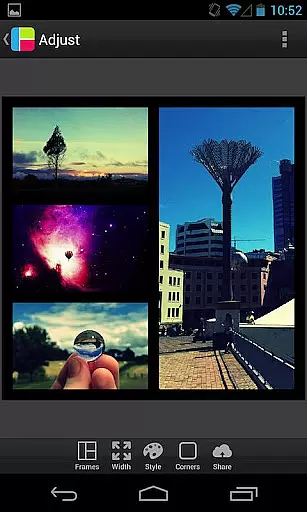
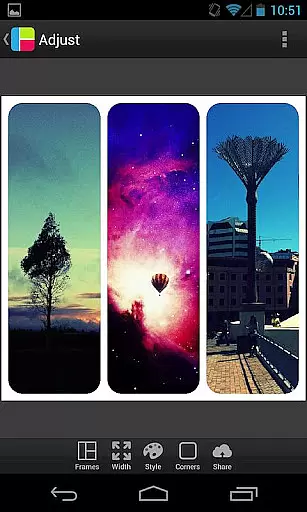

PicFrame is a versatile photography app that allows users to combine multiple photos into stunning frames. With 36 fully adjustable frames, users can customize their creations by adjusting borders, corners, and photo effects. The app supports up to five photos per frame, offering endless customization possibilities including rounded corners, adjustable border widths, and various shapes like circles and hearts.
Designed for creative expression, PicFrame provides tools such as brightness, contrast, and saturation adjustments for each photo. Users can also rotate images, zoom in using pinch gestures, and choose from 52 background patterns. Whether sharing on social media or saving to the gallery, PicFrame ensures your collages look unique and professional.
PicFrame stands out with its extensive customization options. The app includes 36 adjustable frames that support up to five photos, allowing users to drag inner borders for personalized layouts. Unique features like rounded corners, shape transformations (circle, heart, hexagon), and an easy-to-use color picker for borders make every frame distinct.
Additional functionalities include 52 background patterns, brightness/contrast/saturation controls, and six aspect ratios. Users can rotate photos, pinch to zoom, and drag to reposition images. The app supports high-resolution outputs and seamless sharing to platforms like Instagram, Facebook, and Twitter, ensuring professional-quality results every time.
PicFrame offers a unique real-time capture and preview feature that allows users to see their photos come to life as they are being framed. This functionality is crucial for ensuring that each photo fits perfectly within its designated frame before finalizing the layout.
The app provides adjustable frames with up to five photos, enabling endless customization through dragging the inner frame borders. Users can also change the shape of their photos to various forms like circles, hearts, or hexagons, all in real time.
With PicFrame's live preview, users can adjust photo effects such as brightness, contrast, and saturation for each photo individually. This immediate feedback empowers users to create visually stunning collages that meet their exact specifications without any guesswork.
This real-time interaction not only enhances user experience by providing instant visual feedback but also streamlines the editing process, making it faster and more intuitive. The ability to pinch to zoom and drag to move photos ensures precise control over the final composition.
While PicFrame does not focus on AI beauty enhancements, it excels in offering natural and authentic photo adjustments that enhance the overall aesthetic of your photo collages. The emphasis is on maintaining the originality of the images while providing tools for subtle enhancements.
Users have access to 52 patterns for the frame backgrounds and an easy-to-use border color picker. These features allow for creative expression without altering the innate beauty of the photographs themselves, preserving their natural state.
The app includes rounded corners and adjustable border width options, which contribute to a clean and polished look. This approach ensures that any enhancement complements the photos rather than overpowering them.
By focusing on genuine and tasteful modifications, PicFrame delivers a product that feels both professional and personal. Users can share their creations with friends and family, confident that the memories captured remain true to life yet artistically enhanced.
User-friendly interface
Extensive customization
Variety of frame styles
High-quality output
Social media integration
Limited free features
Ads in free version
Advanced tools require purchase
Occasional bugs
Learning curve for beginners

Be your best in every shot! Fix, edit and retouch your face in selfies & photos.
 3.70
3.70
Take videos and pictures with the popular TikTok TIME WARP SCAN filter.
4.60
Create Business Headshots, Polaroid Filter, Retake Photos,Profile Pics,AI Photos
4.50
Transform photos into videos! Create realistic or anime-style images easily!
4.50
HD Camera Pro with HD Video shooting, Panorama, Photo editor , Beauty Camera.
4.50
Professional photography on your mobile phone
4.20
Turn photos into cartoons & avatars! - Photo Editor, Cartoon Face!
3.90
Effortlessly make high-quality GIFs from images & videos without any watermarks.
4.70
Try an anime version, cartoon yourself, and generate AI hug or aging videos!
3.70
See your baby AI baby face generator AI baby maker Face generator babymaker fun!
4.70
Cut and paste photo editor & eraser to customize photos easy and swap faces fun
4.50
Search, tag and rate your way to an organized image gallery
4.40
Future baby face generator: AI kids generator, kid face! What my baby look like?
4.40
Virtual makeup, hair filters & body tuner—edit from face to full body!
4.20
The #1 app for B&W film developing featuring an advanced darkroom timer.
4.10
Photo editor: face & body editor, beauty cam, filters and quality enhancer.
4.00
How would you look like with a differently shaped nose, chin or lips?
3.90
USB Storage Access for Photos, Videos, Music and Documents
3.80
An interval timer to automate photo taking process for timelapse
2.90


User Reviews