

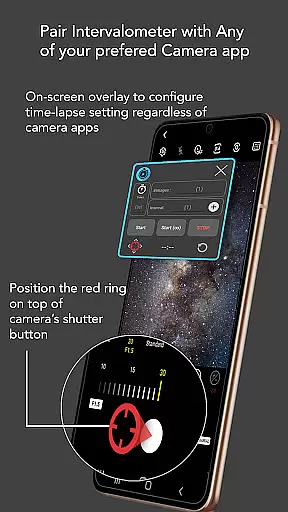
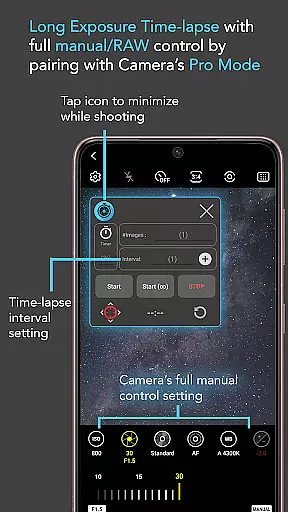
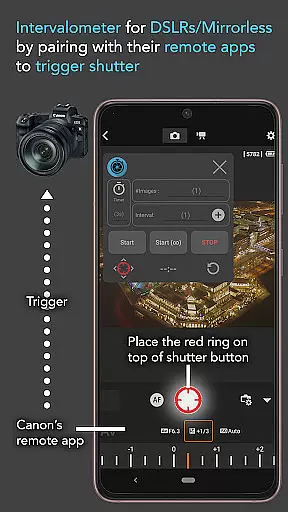
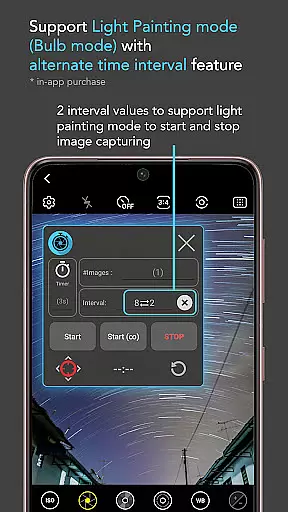
Intervalometer for TimeLapse is a powerful photography tool designed to automate the process of capturing time-lapse sequences. This app allows photographers to configure specific time intervals for triggering the camera shutter, enabling greater control over exposure settings and supporting RAW format capture.
The application works seamlessly with any camera app on Android devices running version 7 or higher. It utilizes AccessibilityService API to automatically trigger the shutter button, mimicking the functionality of a physical intervalometer. Additionally, it can integrate with dedicated camera remote apps from brands like Canon, Sony, and Nikon, making it versatile for both smartphone and professional-grade cameras.
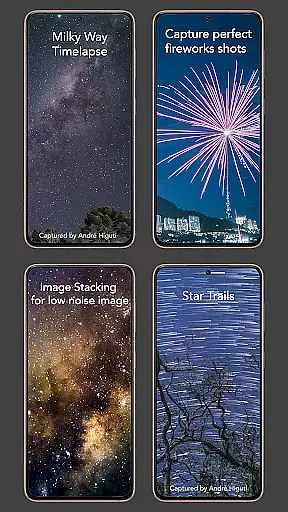
With its flexible configuration options, Intervalometer supports various specialized types of time-lapse photography including low light, long exposure, HDR, Milky Way/Star Trails, Holy Grail (day to night transition), ultra-wide angle, and light painting. Beyond time-lapse, it also facilitates image stacking techniques for achieving higher quality images through post-processing.
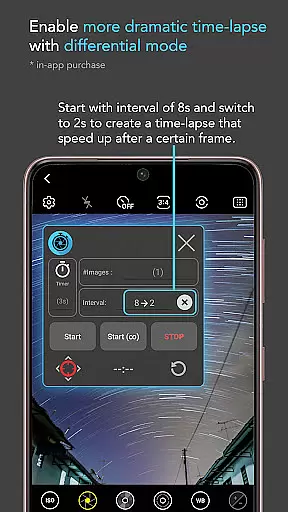
Intervalometer offers an extensive set of features tailored for advanced time-lapse photography. Users have full control over their time-lapse configurations, including delay timers, interval times, and the number of shots. The infinite mode allows continuous shooting until manually stopped, while bulb mode provides extended exposure capabilities.
This app's standout feature is its compatibility with virtually any camera app available on Android devices. Whether using standard photo modes or more specialized settings such as light-painting, HDR, night mode, manual adjustments, telephoto, or ultra-wide angles, Intervalometer ensures that each frame in your sequence is captured precisely as intended. Its ability to work across different camera applications makes it an indispensable tool for photographers seeking flexibility and precision in their projects.
Moreover, by automating repetitive tasks involved in time-lapse creation, this app not only saves time but also enhances creativity by allowing users to focus on composing stunning visual narratives without being tied down by technical limitations.
Real-time capture and preview functionality is essential for ensuring that every moment of your time-lapse photography is captured accurately. Intervalometer for TimeLapse offers this by integrating seamlessly with any camera app, allowing users to automate the shutter triggering process.
This app leverages Android's AccessibilityService API to provide a reliable and automated way to trigger the camera shutter at user-defined intervals. This ensures that each frame of your time-lapse sequence is captured precisely when it should be, without missing a beat.
Users benefit from the ability to configure various settings such as delay timers, interval times, and the number of shots. This flexibility allows photographers to experiment with different types of time-lapse photography, including low light, long exposure, and HDR scenarios.
The real-time aspect of this app means that photographers can rely on it to work with dedicated camera remote apps from brands like Canon, Sony, and Nikon. This makes it an indispensable tool for both smartphone and professional camera users looking to enhance their time-lapse projects.
While Intervalometer for TimeLapse does not focus on AI beauty or enhancement features, its precision in automating the photo-taking process ensures that the natural beauty of each scene is captured without artificial alterations.
The app works with any camera mode, including manual, night, and ultra-wide angle modes, which allows photographers to maintain the authenticity of their images. This is crucial for achieving high-quality time-lapse sequences that reflect true lighting and environmental conditions.
Photographers can use this app to capture frames for post-processing techniques like image stacking, star trails, and lightning stacking. These methods enhance the natural aspects of the images, resulting in higher quality outputs without relying on AI enhancements.
By focusing on accurate and flexible time-lapse configurations, Intervalometer ensures that the final output remains as natural as possible, preserving the integrity and authenticity of the photographeru2019s vision.
User-friendly interface
Wide compatibility range
Customizable settings
Supports professional workflows
Enhances creative possibilities
Requires accessibility permissions
May not work on all devices
Limited iOS support
No built-in editing tools
Dependent on third-party camera apps

HD Photo gallery and photo manager to edit, hide private photos, videos & albums
 4.4
4.4
The #1 app for B&W film developing featuring an advanced darkroom timer.
4.10
A must-have app for landscape photographers
4.60
Unblur, enhance & restore photos with powerful AI photo enhancer tools.
4.60
Turn photos into cartoons & avatars! - Photo Editor, Cartoon Face!
3.90
Pro version: AR sun/moon tracker for any date. Tool for photographers & planners
4.90
RAW video capture with advanced controls
4.40
Remote control the phone camera shutter from your smartwatch and take a picture
1.60
Your Family Calendar + Photos. Manage your Skylight Calendar and Skylight Frame.
4.40
Create funny photos and videos with the popular Time Warp Scan filter.
4.90
Amazing Photo Effects - The most fun you can have with your photos!
4.70
See your baby AI baby face generator AI baby maker Face generator babymaker fun!
4.70
Photo editor & gallery. Crop pictures & edit photos offline, no wifi!
4.50
[3DSteroid Pro] is a stereoscopic application for Android.
4.30
AI-powered video creator by MiniMax - Where ideas meet cinema
4.20
What celebrity do you look like? Celebs will find your celebrity match!
4.10
All-in-One Editor & AI Photo Enhancer, Collage, Cartoonify, Funny Stickers & BGS
4.10
Astrophotography with your smartphone, photo live stacking and much more!
3.90
GCamera allows all GCam features on all phone models! Better photos with GCamera
3.30


User Reviews