
Vivid Navigation Gestures is a powerful tool that revolutionizes the way you interact with your Android device. This app allows users to control their devices through intuitive gestures instead of traditional button presses, offering a more modern and fluid user experience.
With features like beautiful visual effects during gesture execution, multiple gesture triggers across the screen, and a wide range of customizable actions, this app caters to power users who want more control over their navigation methods. Whether launching Google Assistant, toggling split-screen mode, or taking screenshots, Vivid Navigation Gestures provides an extensive suite of options.
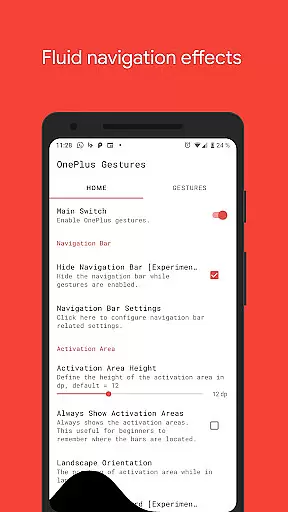
The app also supports advanced functionalities such as hiding the stock navigation bar for a cleaner interface, provided users have ADB or root access. It's an ideal solution for those looking to enhance their device interaction without waiting for native system updates.
Vivid Navigation Gestures offers a comprehensive set of features designed to enhance user interaction with Android devices. The app includes fluid visual effects during gesture operations, making navigation not only functional but also visually appealing.
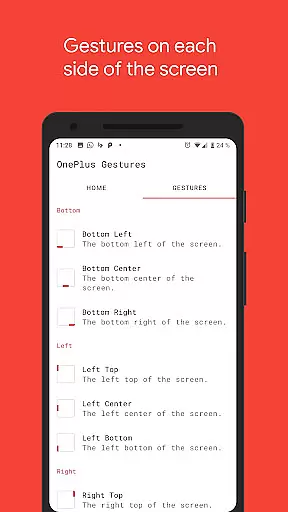
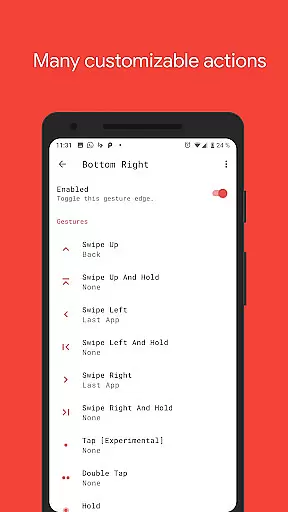
Users can choose from multiple gesture triggers located at various points on the screen, including bottom left, center, right, and more. Each trigger supports different swipe actions like swipe up, swipe left, double tap, and hold, allowing for personalized navigation schemes tailored to individual preferences.
Beyond basic navigation, the app provides numerous actions such as launching apps, controlling media playback, opening notifications, and even taking screenshots. These features collectively ensure that users have extensive control over their device's functionality through simple, intuitive gestures.
Gestures are revolutionizing the way users interact with their devices, and Vivid Navigation Gestures excels in this domain by offering precise gesture controls that replace traditional button presses. The app supports a wide array of gestures including swipes, holds, taps, and more, each triggering specific actions like launching Google Assistant, navigating back, or opening quick settings.
What sets this tool apart is its meticulous attention to detail in gesture recognition. Whether you swipe from the bottom left or double tap on the right center, every gesture is registered accurately, ensuring seamless navigation. This precision is crucial for maintaining user productivity and preventing accidental inputs.
The effectiveness of Vivid Navigation Gestures is further enhanced by its fluid visual effects during gesture execution. These animations not only make the experience aesthetically pleasing but also provide real-time feedback, helping users understand when a gesture has been successfully recognized. Such thoughtful design elements contribute significantly to the overall user satisfaction.
Moreover, the app's ability to hide the stock navigation bar while gestures are enabled showcases its commitment to maximizing screen real estate without compromising functionality. Although this feature requires ADB or root access, it demonstrates the app's dedication to delivering a truly immersive and modern Android experience.
Vivid Navigation Gestures stands out for its intuitive interface that simplifies complex navigation tasks into easy-to-remember gestures. With nine distinct trigger zones and multiple gesture types, the app offers an extensive yet straightforward setup process that caters to both novice and advanced users.
The app provides clear instructions for enabling Developer Mode and USB Debugging, which are prerequisites for certain features like hiding the navigation bar. By guiding users through these steps, Vivid Navigation Gestures ensures that even those unfamiliar with ADB can take full advantage of its capabilities.
Furthermore, the inclusion of accessibility services allows the app to execute actions such as going back, returning home, or accessing quick settings programmatically. Despite using these powerful services, the app maintains transparency by explicitly stating that no data is collected via these means, thus fostering trust among its user base.
Lastly, the availability of numerous customizable actionsu2014from launching apps to controlling media playbacku2014demonstrates the app's versatility. Users can tailor their navigation experience according to personal preferences, making daily interactions with their device not only simpler but also more enjoyable. This balance between simplicity and customization underscores the app's intuitive design philosophy.
Intuitive gesture controls
Customizable actions
Beautiful visual effects
Comprehensive trigger options
Advanced navigation features
Requires ADB or root for some features
Complex setup for beginners
Limited iOS compatibility
Potential learning curve
Some features may drain battery

A convenient photo, video, and file recovery tool.
 4.00
4.00
PDF Reader - Document Viewer: Read, Manage & Organize Your Documents
3.10
Complete kernel toolbox with features to manage and tweak your rooted device
4.30
Head tracking for PC sim games such as MSFS 2024 or Elite:Dangerous. No headset!
4.50
Save any video in HD - paste the link, download fast and watch offline.
4.3
eXtended Permission Manager - a small app to manage permissions and AppOps
4.50
Best leveling tool for your Android device. Hang paintings like a pro.
4.90
Navigate with Ease and Style
4.90
Clean up your phone, find files, play media, and share files offline
4.50
Support Fossify apps with a warm thank you!
5.00
Enjoy smooth gameplay with Game Booster
4.90
Extremely fast, secure, and protects your privacy
4.80
Remote Play with FSR upscaling, low latency & full controller support
4.80
Fast Video Downloader, Movie Downloader, Torrent Downloader & Adblock Browser
4.70 4.50
4.50
An open-source APK explorer for Android!
4.10
Family Locator, Share location, StayConnect with your family in real time
3.90
A powerful, easy-to-use flight computer on your phone or tablet!
3.80
Fun lie-detection pranks for friends and parties.
3.80


User Reviews