
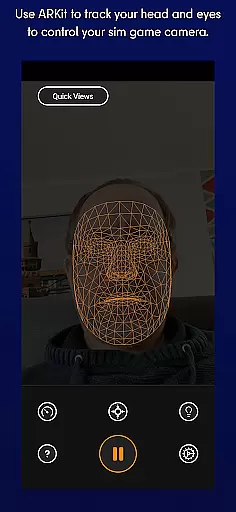
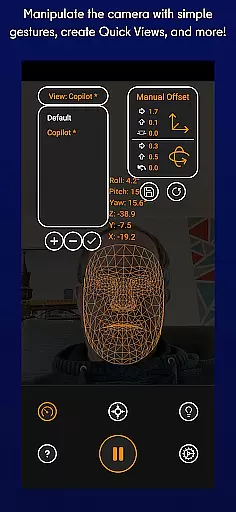
SmoothTrack is an innovative tool that transforms your mobile device into a 3D head tracking controller for sim games. By leveraging the AR capabilities of your device, it allows you to intuitively control your game's camera without any additional equipment. Simply position your device to see your face, and with slight head movements, you can manipulate in-game perspectives.
The app supports any game compatible with TrackIR, FreeTrack, or similar protocols, making it versatile for flight simulators, space adventures, and driving simulations. Whether you're peeking at cockpit controls in Microsoft Flight Simulator or scanning the horizon in Elite: Dangerous, SmoothTrack provides an immersive experience by translating your natural head motions into responsive in-game camera actions.
This seamless integration enhances realism and immersion, allowing gamers to focus more on their virtual experience rather than manual controls. With added features like dark mode for battery savings and compatibility across numerous simulation titles, SmoothTrack delivers both functionality and convenience.
SmoothTrack stands out with its unique use of AR technology to enable precise head-tracking functionality. The app uses your device’s camera to detect facial movements, converting them into corresponding in-game perspective shifts. This creates a highly intuitive and responsive control scheme that feels almost magical as users navigate complex simulation environments effortlessly.
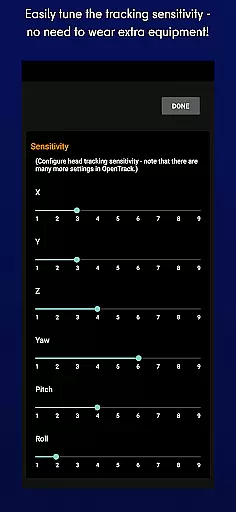
One notable feature is the adjustable sensitivity settings, which allow users to customize how much their real-world movements affect the virtual viewpoint. For instance, leaning slightly forward brings you closer to your Flight Simulator cockpit, while tilting your head upwards reveals overhead panels in an A320 aircraft. Additionally, SmoothTrack offers two display modes: dark mode to conserve battery life and protect OLED screens, and bright mode for optimal visibility in low-light conditions.
Compatibility extends across various popular simulation games such as Microsoft Flight Simulator, Elite: Dangerous, IL2: Sturmovik, Euro Truck Simulator 2, and Kerbal Space Program. Furthermore, ongoing support via Discord and email ensures users receive timely assistance and updates, enhancing overall reliability and user satisfaction.
SmoothTrack offers a highly accurate and effective core functionality by utilizing the AR capabilities of your device to provide 3D head tracking. This allows for intuitive control over your simulation game's camera without the need for any additional equipment.
The app supports any game compatible with TrackIR, working seamlessly with titles like Microsoft Flight Simulator, Elite: Dangerous, and Euro Truck Simulator 2. By simply moving your head, you can change your in-game perspective, making it an innovative tool for gamers.
Users benefit from enhanced immersion as slight head movements translate into in-game camera actions, magnified for more effortless control. Whether it's leaning forward to inspect a cockpit or looking up to view an overhead panel, SmoothTrack delivers a near-magical experience that feels natural and responsive.
This level of precision not only elevates gameplay but also caters to different gaming environments through features such as dark mode for battery savings on OLED screens and bright mode for low-light conditions. The effectiveness of SmoothTrack ensures that users enjoy both functionality and comfort during extended gaming sessions.
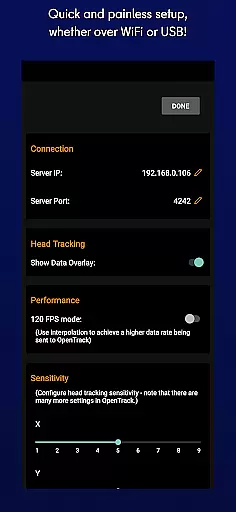
SmoothTrack excels in providing an interface that is both simple and intuitive, ensuring that gamers can easily set up and use the app without a steep learning curve. Its design eliminates the need for extra equipment, relying solely on the deviceu2019s camera to track head movements.
With straightforward camera gestures, users can quickly shift their perspective in-game. The app intelligently exaggerates head motions, allowing for subtle shifts that result in significant changes within the game environment, enhancing user interaction.
Gamers will appreciate the minimal setup required; just position your device to see your face, and you're ready to go. This ease-of-use makes SmoothTrack accessible even to those who may be new to head-tracking technology or motion controls in gaming.
In addition to its intuitive operation, SmoothTrack provides support via Discord and email, offering assistance with any issues or feature suggestions. Such comprehensive yet user-friendly support further underscores the app's commitment to maintaining an interface that is approachable for all levels of users.
Intuitive head tracking
No extra hardware needed
Wide game compatibility
Battery-saving dark mode
Responsive customer support
Requires good lighting
Limited to AR-enabled devices
Dependent on stable internet
Potential lag issues
Subscription fees may apply

A convenient photo, video, and file recovery tool.
 4.00
4.00
Just one-tap to easy translate in any language after calls within seconds.
4.20
HD Camera captures every special moment.
4.60
Family Locator, Share location, StayConnect with your family in real time
3.90
eXtended Permission Manager - a small app to manage permissions and AppOps
4.50
Undelete and recover your lost or deleted files with DiskDigger!
3.40
Connect wirelessly to your computer to watch movies, browse the web, play games
5.00
Creation, Learning, Entertainment & More — The All-in-One AI Search Engine
4.70
Protect your device with antivirus, storage cleanup, and system monitoring
4.70
NFC Tools can read and write NFC tags.
4.70
Small and simple app to Verify Root Access and BusyBox Install!
4.70
Canon PRINT is a companion app for your Canon printer.
4.60 4.50
4.50
Universal TV remote control all TVs, Roku, LG, Samsung, Fire, Vizio, Sony, TCL.
4.40
Pro Emulator is an easy to use game console emulator for a range of consoles.
4.40
Making emulation easy for everyone!
4.30
pdf merge, word to pdf, jpg to pdf, edit pdf, convert to pdf and much more!
4.20
VESC Tool can monitor and configure VESC-compatible devices over BLE and Wifi
4.20
Effortlessly run ADB commands directly on your device without a PC.
4.20


User Reviews