
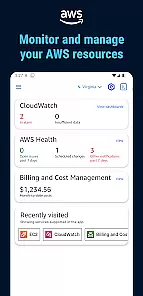
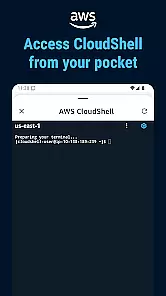
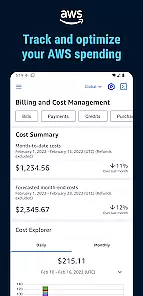
Amazon Web Services (AWS) provides a comprehensive suite of cloud computing services designed to empower businesses with scalable infrastructure and advanced tools. The AWS mobile app allows users to manage their cloud resources on the go, offering real-time monitoring and control over their deployments.
This application is particularly beneficial for IT professionals and business owners who require immediate access to their cloud environments. With its intuitive interface, users can easily navigate through various services such as EC2 instances, S3 storage, and RDS databases, ensuring optimal performance and cost-efficiency.
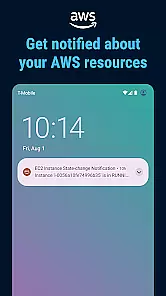
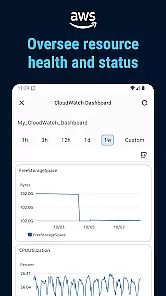
The AWS app boasts an array of features tailored for efficient cloud management. Users can view real-time metrics, set up custom alarms, and receive notifications about their infrastructure's status. This ensures that any potential issues are promptly addressed, minimizing downtime.
Additionally, the app supports secure access through multi-factor authentication and detailed billing reports. These capabilities enable users to maintain tight security protocols while optimizing their cloud spending. The ability to perform these tasks from a mobile device significantly enhances operational flexibility.
Collaborative work features are essential for modern business applications as they enable teams to work together efficiently regardless of location. Amazon Web Services offers a robust platform that supports seamless collaboration through its cloud-based infrastructure.
The app provides shared workspaces where users can access the same resources and tools, ensuring everyone is on the same page. Real-time updates and notifications keep all team members informed about any changes or developments within their projects.
With AWS, permissions and roles can be finely tuned, allowing administrators to control who has access to specific resources. This ensures that sensitive data remains secure while still being accessible to authorized personnel.
Users benefit from enhanced productivity as they can collaborate without the hindrance of physical proximity. The ability to quickly share insights and feedback leads to faster decision-making and project completion.
Effective task management is crucial for businesses aiming to optimize their workflows and ensure timely project delivery. Amazon Web Services equips users with powerful tools designed to streamline task allocation and tracking.
The application allows for the creation of detailed task lists which can be assigned to individual team members or groups. Each task can have specific deadlines, priorities, and associated resources, making it easier to manage complex projects.
AWS also integrates with various project management methodologies such as Agile and Scrum, providing flexibility in how tasks are organized and executed. This adaptability ensures that businesses can tailor their task management processes to fit their unique needs.
By leveraging these capabilities, users experience improved organization and clarity in their daily operations. Managers gain better oversight into project progress, enabling them to make informed decisions and adjustments as needed.
Comprehensive cloud service management
Real-time monitoring and alerts
Secure multi-factor authentication
Intuitive user interface design
Detailed billing and cost tracking
Complex for beginners
Limited offline functionality
Occasional UI lag
Advanced features require expertise
High cost for small businesses

ANDROID'S TOP MOBILE OFFICE - Word, Excel, PowerPoint and PDF at your fingertips
 4.50
4.50
Manage Your Shop
4.70
viewing and sharing PDFs and other files—anytime, anywhere!
4.4
Delivery Track App - Tracking with Fedex, USPS, UPS, DHL. Monitor your Orders.
3.20
Grow your business and connect with more people with Meta Business Suite.
4.60
Build a store in minutes with our full suite of AI tools. Start for free!
4.20
Collaborate seamlessly with Google Chat, part of Google Workspace
4.50
We help people get jobs
4.70
Make money as a delivery driver with DoorDash and work when you want as a Dasher
4.30
FaxCover - Create fax cover pages. Works with any app or fax machine.
4.90
All your team communication in one place
4.70
Make invoices, bills, receipts & estimates on the go with Invoice Generator.
4.70
Master crypto trading with real-time simulations and exciting challenges!
4.50
A secure, all-in-one team collaboration app
4.30
Formerly Facebook Ads Manager. Manage and create ads on the go.
4.20
The Penny Puss app with DG penny finder
4.10
Work happy with AI Companion
4.10
Quickly open and manage PDF files on your device.
3.80
viewing and sharing of PDFs
3.60


User Reviews