





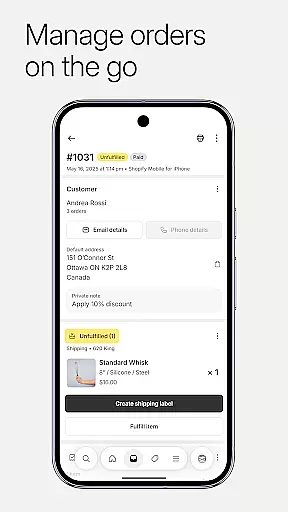


Shopify is the ultimate commerce platform designed for entrepreneurs who want to sell online and in person, locally and globally. This powerful platform enables you to manage your entire business on the go, with features like order processing, inventory tracking, sales analysis, and marketing campaign launches all from your mobile device.
One of the standout features of Shopify is its innovative suite of AI tools that require zero coding or design skills, allowing you to start and manage your ecommerce business from anywhere. Whether you're looking to streamline dropshipping operations, optimize product management, or launch marketing campaigns, Shopify provides a comprehensive solution to turn your business dreams into reality.
Shopify offers an extensive range of features tailored to meet the needs of modern entrepreneurs. The app simplifies dropshipping by allowing seamless inventory management, order automation, and operational optimization. With real-time business insights, users can watch live sales and visitor traffic, receive instant order notifications, and communicate with their team effortlessly.
Product management is made easy with capabilities to upload stunning product photos, set product details and pricing, and organize products into collections. The app also supports quick order processing, enabling users to fulfill, refund, or archive orders with just a few taps. Additionally, Shopify's powerful marketing tools allow you to launch Google Smart Shopping campaigns, create social media ads, and track performance metrics to optimize your business strategy.
Effective collaboration is essential for modern businesses, and Shopify excels in providing robust collaborative work features. The platform allows business owners and their teams to manage various aspects of their online store from anywhere, ensuring seamless teamwork.
Shopify's app enables real-time communication and coordination among team members. Whether it's processing orders, tracking inventory, or launching marketing campaigns, users can perform these tasks collaboratively. This ensures that everyone is on the same page, which is crucial for maintaining operational efficiency.
Moreover, Shopify offers tools for customer relationship management, allowing teams to view and manage customer segments, edit customer details, and communicate directly with customers through the app. These features enhance team productivity by centralizing information and making it accessible to all relevant parties.
The ability to customize your store further supports collaboration. Team members can access all Shopify apps, browse professional free themes, and update the store's appearance on the fly. This flexibility empowers teams to make necessary changes quickly and efficiently, fostering a dynamic and responsive business environment.
Task management is a critical component of running a successful ecommerce business, and Shopify provides comprehensive tools to help entrepreneurs stay organized and efficient. With Shopify, users can manage their entire business on the go, streamlining operations and enhancing productivity.
The platform allows for quick order processing, enabling users to fulfill, refund, or archive orders with just a few taps. Additionally, buying and printing shipping labels is hassle-free, ensuring that orders are processed promptly and accurately. This streamlined approach to task management helps businesses maintain high levels of customer satisfaction.
Shopify also offers real-time business insights, allowing users to watch live sales and visitor traffic as they happen. Instant new order notifications ensure that business owners are always aware of their store's performance, enabling them to make informed decisions quickly. These insights are invaluable for optimizing business operations and driving growth.
Furthermore, Shopify's powerful marketing tools enable users to launch Google Smart Shopping campaigns and create Facebook and Instagram ads on the go. By tracking results and optimizing for better performance, entrepreneurs can effectively manage their marketing efforts, ensuring that their business remains competitive in a crowded marketplace.
User-friendly interface
Comprehensive ecommerce tools
Real-time business insights
Seamless multi-channel selling
Robust financial management
Subscription fees apply
Limited free themes
Advanced features need learning
Occasional app glitches
Transaction fees on certain plans

Measure distances, surfaces and draw plans in seconds with CamToPlan!
 4.40
4.40
Scan Business Cards & Conference Badges - Capture Leads at Events & Tradeshows
4.20
VSD Viewer - Visio Drawings Viewer for Android Preview VSD, VDX, VSDX drawings
4.10
The All-in-One File Manager for Phone, TV, Watch, Cars, XR / VR, Chromebook
4.10
TurboScan turns your phone into a full-featured PDF document scanner.
4.80
Simple, Fast & Lightweight
3.90
Use Generative Summary to understand your rental or insurance docs in seconds.
4.70
Smarter career moves start here. AI job alerts, insights & the right tools.
4.20
We help people get jobs
4.70
Start earning fast. Apply Today.
4.80 4.70
4.70
The MyWalmart App is available for all associates in stores.
4.70
USPS Mobile®Access USPS.com’s most popular tools on-the-go.
4.70
Finance, Investing, Stocks, Trading and Stock news
4.60
No more passwords, easier sign-in, and greater protection for your accounts.
4.60
All Your Gig Work. One App.
4.30
Find work, shifts and gigs near you. Jobs lasting a few hours to a few months.
4.30
Windows App allows you to connect to remote PCs and virtual apps.
3.70
Completed Course Lectures on how to use IBM Maximo in Maintenance issues
4.4


User Reviews