
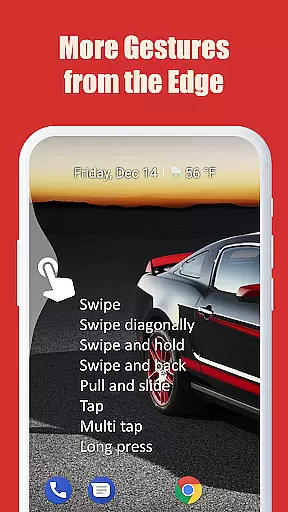
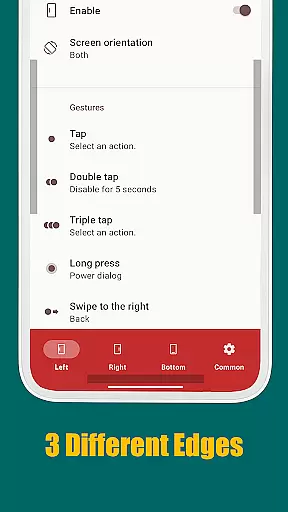
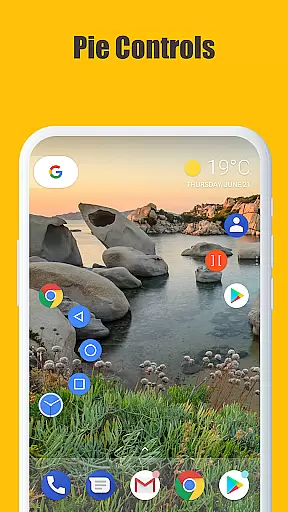
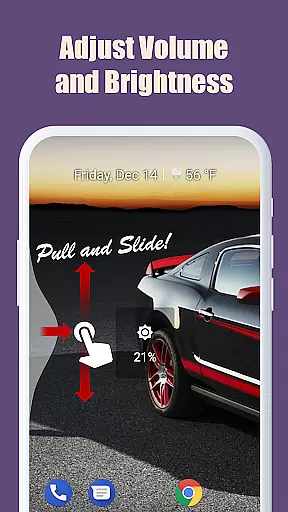
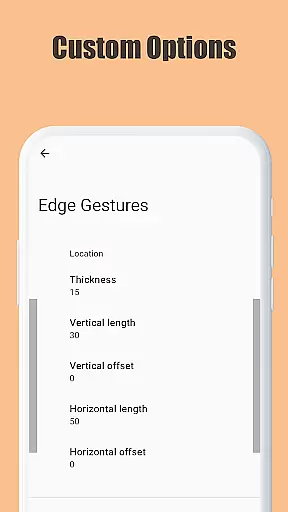
Edge Gestures is a powerful tool designed to enhance your Android device's usability through intuitive screen edge gestures. With support for multiple gesture types, including tap, swipe, and pie controls, this app allows you to perform various actions quickly and efficiently. Whether you want to launch applications, adjust settings, or navigate your device, Edge Gestures streamlines these tasks with customizable options tailored to your preferences.
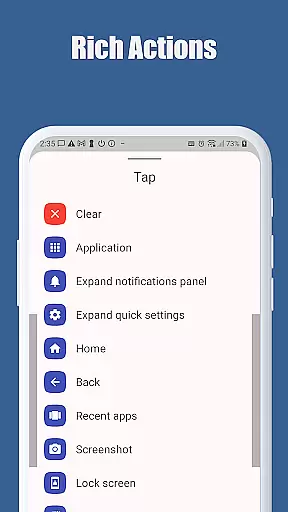
The app supports an extensive range of actions such as launching apps, controlling soft keys, expanding the status bar, and even adjusting brightness or volume. Its customization capabilities extend to the edge area's thickness, length, and position, ensuring a personalized experience that fits seamlessly into your workflow. By using accessibility service APIs responsibly, Edge Gestures ensures reliable performance while maintaining user privacy and security.
Edge Gestures stands out with its diverse gesture recognition system, supporting tap, double tap, long press, swipe, and more. This variety enables users to execute commands like launching applications, navigating soft keys, and managing notifications with ease. The app's ability to customize gestures according to individual preferences makes it a versatile tool for enhancing productivity.
One of the key features is its comprehensive action support, which includes launching apps, controlling navigation buttons, expanding the status bar, and adjusting device settings. Users can also toggle split-screen mode, switch between apps, and scroll efficiently. Additionally, Edge Gestures offers precise customization of the edge area, allowing adjustments in thickness, length, and position to suit different hand sizes and usage habits. These features collectively contribute to a smoother and more intuitive user experience on Android devices.
Edge Gestures provides a highly accurate and effective way to interact with your device through simple gestures on the screen edge. The app supports various gesture types, including tap, swipe, and long press, each triggering specific actions.
The tool's core functionality lies in its ability to execute commands such as launching applications, controlling soft keys, expanding the status bar, and adjusting settings like brightness or media volume. These features are implemented with precision, ensuring that every gesture is recognized and processed correctly.
Users benefit from the app's reliability in performing tasks quickly and efficiently. Whether it's navigating between apps, accessing quick settings, or managing notifications, Edge Gestures delivers a seamless experience without delays or errors.
Furthermore, the customization options for edge areas enhance the overall effectiveness of the gestures. Users can adjust thickness, length, and position to suit their preferences, making daily interactions more intuitive and productive.
Edge Gestures offers an interface that prioritizes simplicity and intuitiveness, allowing users to easily understand and utilize its features. Upon opening the app, users are greeted with clear instructions and visual cues that guide them through setting up their preferred gestures.
The app's design ensures that even those new to gesture-based controls can quickly adapt. Each gesture type is accompanied by straightforward explanations and examples, reducing the learning curve significantly.
Customization is made easy through a streamlined settings menu where users can modify edge area parameters. This approach keeps the interface uncluttered while still providing powerful tools for personalization.
Overall, Edge Gestures creates an engaging user experience by combining functional depth with an accessible interface. Its intuitive nature encourages regular use, ultimately enhancing productivity and convenience on mobile devices.
Highly customizable gestures
Wide range of supported actions
User-friendly interface
Efficient navigation tools
Privacy-focused design
Limited to Android devices
Requires accessibility permissions
May have a learning curve
Some features need higher Android versions
Potential conflicts with other apps

Connect instantly to a fast, encrypted VPN with one tap
 4.60
4.60
Extremely fast, secure, and protects your privacy
4.80
Carry a FTP server in your pocket and avoid USB cables for file transfer
4.20
Keep track of your Palia friendships, tasks, and inventory with Palia Notebook
4.60
Create your own live wallpaper or check out thousands already made presets
3.90
Unleash gamepad precision for ultimate mobile gaming dominance.
3.90
The Ultimate Bluetooth Keyboard & Mouse. Securely control your PC, Mac, and more
4.50
Screen Mirroring for Roku Sticks, Roku TCL TV and Roku Hisense TV
4.50
The ideal app to be the digital eye of your family
3.40
Connect wirelessly to your computer to watch movies, browse the web, play games
5.00
Learn the vast amount of system information about device and monitor it's state
4.70
Optimize your WiFi network, turn your phone into Wifi Analyzer
4.70
Fast Video Downloader, Movie Downloader, Torrent Downloader & Adblock Browser
4.70
NFC Tools can read and write NFC tags.
4.70
FV File Manager Pro, Fast and powerful file manager for Android
4.60
App to pay for FUTO Keyboard
4.60
Quickly check the frequency of the Earth
4.30
Smart and comfortable browsing experience.
3.80
Fun lie-detection pranks for friends and parties.
3.80


User Reviews