
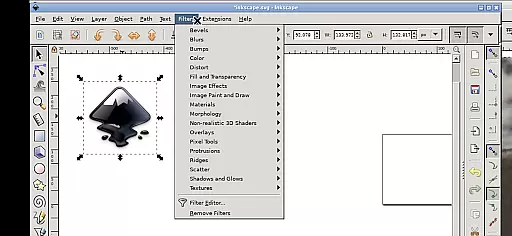
Inky is a feature-rich vector graphics editor tailored for Android devices, allowing users to create and manipulate vector images in Scalable Vector Graphics (SVG) format. The app supports importing and exporting various file formats, making it versatile for professional design work.
With Inky, users can render primitive vector shapes such as rectangles, ellipses, polygons, arcs, spirals, stars, and 3D boxes. It also offers advanced features like adjustable transparency for solid colors, patterns, radial or linear color gradients, and the ability to trace raster graphics to create vector images from photos.
This app is ideal for graphic designers who need a mobile solution for creating scalable graphics on-the-go. Its intuitive touch interface and comprehensive toolset make it a valuable asset for both casual and professional design projects.
Inky stands out with its comprehensive set of design tools that cater to both novice and experienced designers. The app allows users to manipulate vector shapes with transformations such as moving, rotating, scaling, and skewing, providing flexibility in design creation.
One of the key features of Inky is its support for touch gestures, enabling users to navigate the interface easily. Pinch to zoom, pan by pressing and holding, and scroll with two-finger slides enhance the user experience on mobile devices. Additionally, the app provides access to files across the Android system through useful links in the home directory, eliminating the need for cumbersome file imports and exports.
Inky's integration with the Android ecosystem and its adherence to open-source principles under the GPLv3 license make it a unique offering in the Art & Design category. Users benefit from the app's professional support and regular updates, ensuring a reliable and efficient design tool.
Inky offers a comprehensive suite of creative tools that cater to both professional designers and hobbyists. The app provides full-featured vector graphics editing capabilities, enabling users to create intricate designs with ease.
With support for primitive vector shapes such as rectangles, ellipses, polygons, arcs, spirals, stars, and 3D boxes, Inky allows for versatile design options. Users can fill these objects with solid colors, patterns, or gradients while adjusting transparency levels to achieve the desired effect.
The ability to embed and trace raster graphics means that users can transform existing images into scalable vector formats. This feature is particularly useful when creating vector graphics from photos or other raster sources, providing flexibility in design projects.
Transformations such as moving, rotating, scaling, and skewing further enhance the manipulation of created shapes, ensuring that Inky meets the diverse needs of its users in the realm of digital art and design.
Inky excels in canvas and format flexibility, allowing artists to work seamlessly across different mediums and devices. The app supports Scalable Vector Graphics (SVG) as its primary format, but also facilitates the import and export of various other file types.
Users will find it easy to adapt their workflow on Android devices, thanks to intuitive touch controls optimized for tablets and styluses. Gestures like pinch-to-zoom, pan with a press-and-hold, and two-finger scrolling make navigation effortless even on smaller screens.
Accessing files is straightforward due to useful links within the home directory that connect to Documents, Pictures, and more. This eliminates the need for cumbersome imports or exports, streamlining the creative process.
Whether you're designing on a phone or tablet, Inky ensures your workspace is adaptable and efficient, empowering you to focus on bringing your artistic visions to life without technical hindrances.
User-friendly interface
Comprehensive vector tools
Open-source flexibility
Touch gesture support
Cross-platform file access
Steep learning curve
Resource-intensive
Limited stylus support
Occasional bugs
No cloud sync

Discover Cartoon Dream : Unleash Your Creativity with CuttingEdge AI
 4.50
4.50
Sketch, plan, take notes and illustrate on an infinite canvas.
4.20
Meet the magic aı 3d photo generator and smart AI video generator app.
3.20
AI Assistant, powered by ChatGPT GPT-4 & GPT-4o. Your intelligent companion.
3.50
Draw on screen: FP sDraw is a simple and lightweight drawing app
4.70
Nano Banana AI Image Generator, Anime Filter, AI Portrait, AI Photo Generator
4.30
Art of Combination Wear OS Watch faces (for Wear OS 5+ devices)
3.90
Explore future self face age filter & remove background image for a unique look.
3.50
How to draw anime step by step for beginner easily by AR drawing sketch & paint.
3.60
Your AI soulmate — meaningful chats, and unique emotional moments
4.70
The ultimate tool for creating animations
4.60
Get an overview over all your embroidery threads, projects and more.
4.60
Kling AI is an image and video generation and editing studio powered by AI.
4.50
Create and Design Custom Logos in Seconds with AI-Powered Tools!
4.40
Trace, draw, and create art with AR - from memes to masterpieces!
4.30
Floor Plan Creator lets you create, edit and share floor plans.
4.00
Design unique, funny and adorable cat stickers that reflect your own style!
3.80
Experience next-gen icons with a modern liquid glass look.
3.60
Art of Combination Wear OS Watch faces
4.3


User Reviews