
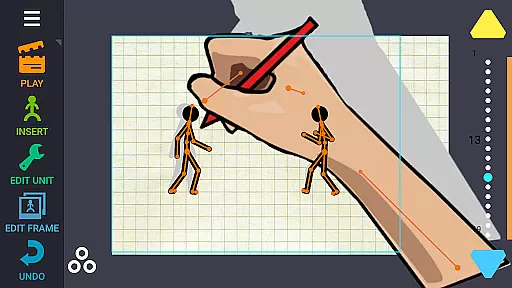
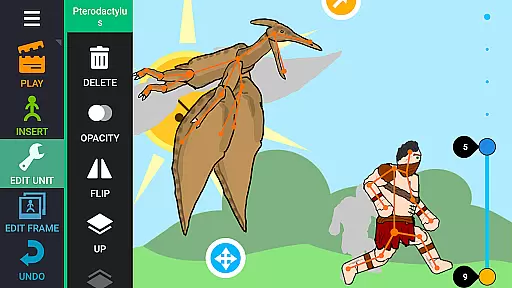
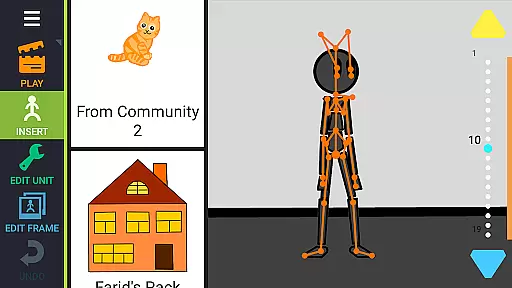
Draw Cartoons 2 PRO is a comprehensive 2D animation app that simplifies the complex process of cartoon creation. Using advanced motion smoothing techniques, users only need to set start and end positions for characters, allowing the program to generate smooth transitions automatically. The app provides a complete library of pre-made characters and objects, including dragons, people, and vehicles, while also offering a character editor for custom creations.
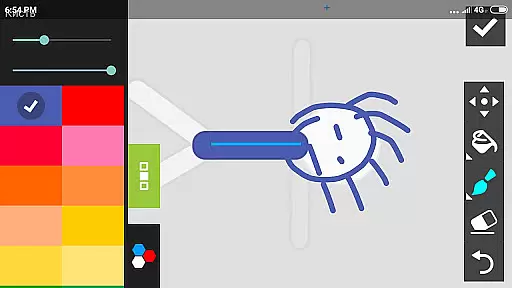
With its intuitive bone-based animation system, users can either draw directly within the app or import images to create unique characters and objects. Additional professional tools include dramatic camera effects for dynamic close-ups and speed manipulation features for slow-motion or fast-paced sequences. Creators can enhance their animations with music and voiceovers, exporting finished projects as MP4 videos or GIFs ready for sharing on platforms like YouTube using the #drawingcartoons2 tag.
This versatile app caters to both beginners and advanced animators, providing an accessible entry point into 2D animation while offering sophisticated features for experienced users. Its robust sharing capabilities allow creators to exchange assets, fostering a collaborative community of animators who can build upon each other's work.
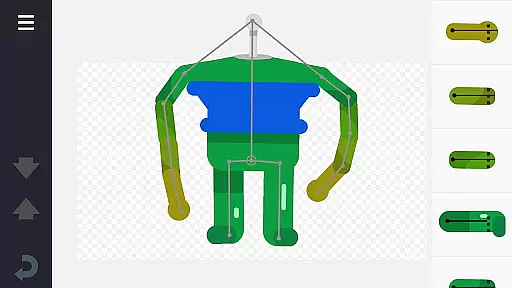
Draw Cartoons 2 PRO stands out with its innovative bone-based animation system, where each character is constructed from a skeleton of several bones. This approach allows for intuitive manipulation of character movements through simple start and end position settings, with the app automatically generating smooth transitions. The built-in library offers a vast collection of ready-to-use characters and objects, while the powerful character editor enables users to create custom creatures and objects by assembling bones or importing images.
The app includes advanced tools designed for professional animators, such as a virtual camera system that facilitates dramatic close-ups and dynamic shots reminiscent of cinematic techniques. Speed effects provide precise control over animation pacing, allowing for both slow-motion sequences and accelerated actions. Users can further enhance their creations by adding music tracks or voiceovers, creating fully realized animated productions.
Export options are equally impressive, supporting both MP4 video format and GIF animations. The app's sharing capabilities extend beyond final animations, enabling users to save and distribute individual elements as separate files. This feature promotes a thriving community of creators who can exchange assets and collaborate on projects, all while maintaining high-quality standards in their animated works.
In Draw Cartoons 2 PRO, the suite of creative tools is designed to cater to both beginners and advanced animators. The application provides a comprehensive library of characters and objects, including dragons, people, cars, and much more, ensuring that users have all they need to bring their ideas to life.
One of the standout features is the character editor, which allows users to create unique creatures and objects out of 'bones'. This innovative approach to character creation offers unparalleled flexibility and creativity. Additionally, users can draw bones directly within the app or use photos to craft custom elements, further expanding the creative possibilities.
Beyond character creation, the app includes specialized tools such as a virtual camera for dramatic close-ups and speed effects to manipulate the pacing of animations. These tools enable users to add professional touches to their work, making each animation truly distinctive.
Draw Cartoons 2 PRO excels in providing canvas and format flexibility, allowing animators to fully express their creativity without constraints. Users can customize their workspace to suit their specific needs, whether they are crafting simple animations or complex scenes with multiple elements.
The app supports various formats for saving and exporting animations, including MP4 video and GIF files. This versatility ensures that users can share their creations on different platforms, such as YouTube, where they can be discovered via the #drawingcartoons2 tag.
Moreover, the ability to save individual items as separate files enhances collaboration within the animator community. By sharing custom figurines and objects, users can contribute to a rich ecosystem of content, fostering creativity and innovation among fellow animators.
User-friendly interface
Extensive library of assets
Advanced animation tools
Smooth motion generation
Active creator community
Steep learning curve
Requires powerful device
Limited free resources
Occasional bugs
Subscription fees apply

Learn how to draw with step-by-step tutorials, fun lessons & multiplayer drawing
 4.70
4.70
Art of Combination Wear OS Watch faces (for Wear OS 5+ devices)
3.00
Image/ Text to Video Generator
4.40
Sketch, trace and master AR drawing with awesome anime art!
3.30
Draw on screen: FP sDraw is a simple and lightweight drawing app
4.70
Your Essential Color Theory Guide: Red, Yellow, Blue (RYB)
4.3
Get an overview over all your embroidery threads, projects and more.
4.60
Everything you need to create hand drawn animation, anywhere you go!
4.40
An intuitive, high-performance painting app that lets you focus on creating
4.40
Mobile pixel art editor. Simple. Fast. Portable.
4.80
Create stunning art with AI.
4.80
Logo Generator powered by AI: Create stunning logos effortlessly!
4.70
Your AI soulmate — meaningful chats, and unique emotional moments
4.70
Stylish letters, Stylish Keyboard, Symbols, Emojis, Cool nickname
4.40
Nano Banana AI Image Generator, Anime Filter, AI Portrait, AI Photo Generator
4.30
Resize photos and print photos in exact size with our powerful photo printer!
3.80
Create cute cat emojis & PFPs! Fun, custom avatars for cat lovers.
3.70
Vidu is an AI video generator made for creators and aspiring makers.
3.30
Android 14 style widgets and wallpapers app.
4.5


User Reviews