
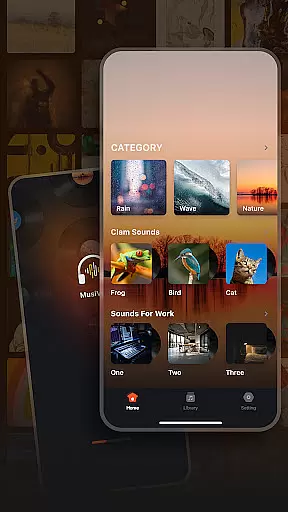


Musivibe is a feature-rich offline music player designed to enhance your listening experience. It offers an intuitive interface that categorizes sounds into various themes such as Rain, Ocean Waves, and Nature, making it easy to find the perfect soundtrack for any moment.
With personalized playlist creation and editing capabilities, users can tailor their music library to match their mood or activity. The app's sleek design ensures seamless navigation while providing powerful tools for streaming and sharing playlists.
Whether you're looking to relax with soothing melodies or focus with ambient sounds, Musivibe delivers a premium audio experience right at your fingertips.
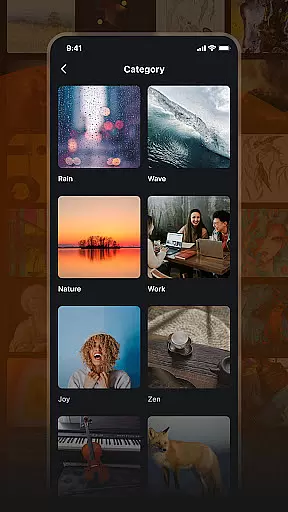
Musivibe stands out with its diverse sound categories ranging from natural environments like rain and ocean waves to thematic selections such as work and zen. This variety allows users to immerse themselves in different auditory landscapes.
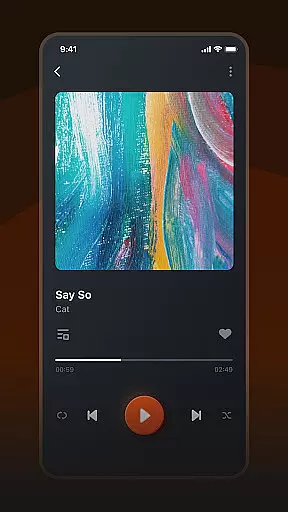
The app empowers users to create and organize custom playlists effortlessly. With simple controls for editing and streaming, managing your music has never been easier. Sharing your favorite tunes with friends is also streamlined through integrated social features.
A user-centric UI design ensures that all these powerful features are accessible and enjoyable to use. Every function is crafted to maintain a balance between aesthetics and usability, enhancing the overall interaction with the app.
When it comes to music applications, the size and authenticity of the music library are crucial factors. Musivibe offers a vast collection of categorized sounds including Rain, Ocean Waves, Nature, Work, Cheerful, Zen, Instruments, and Animals. This extensive range ensures that users have access to a wide variety of music and sound options.
The application not only focuses on providing a large music library but also emphasizes copyright authenticity. By ensuring all tracks are properly licensed, Musivibe guarantees users can enjoy their favorite songs without legal concerns. This commitment to copyright compliance enhances user trust and satisfaction.
Musivibe's dedication to maintaining an expansive and legally compliant music library means users receive a high-quality listening experience. Whether you're looking for ambient sounds to relax or energetic tunes to boost productivity, Musivibe has something for everyone.
Audio quality is a significant aspect of any music player, determining the richness and clarity of sound output. Musivibe excels in offering various audio quality options, allowing users to customize their listening experience according to their preferences and device capabilities.
With its advanced settings, users can adjust audio parameters to achieve the desired sound quality. Whether using high-end headphones or standard speakers, Musivibe ensures optimal performance. The app supports multiple formats, enhancing compatibility across different devices.
Moreover, Musivibe's user-friendly interface makes it easy to navigate through these settings. Users can effortlessly switch between different audio qualities, enjoying a tailored experience that meets their auditory needs. This flexibility sets Musivibe apart as a premier choice for discerning listeners.
User-friendly interface
Customizable playlists
Wide range of sound categories
Offline playback capability
Seamless sharing options
Limited advanced equalizer settings
No lyrics display feature
Occasional app crashes reported
In-app purchases required for full functionality
Ads present in free version

Equalizer, Bass Booster and Volume Booster (Eq & Bass) improve sound quality
 4.30
4.30
Offline and always ad-free - stream in the highest quality available.
4.10
Permanently backup Now Playing. Maps, filters & listening stats.
4.00
24,000 free audio books and no ads!
4.90
Smart piano keyboard, Classical to Pop, Real-time multiplayer connection!
4.20
The Minimalistic Premium Music Player. Handmade with passion for music
2.20
Learn the notes on the guitar fretboard fast with this easy and fun app
4.60
Play KORG’s revolutionary touch-based instrument on a variety of devices.
4.40
Responsive piano with great sounds, graphics, and songs
4.80
Tune in to the greatest hits on UK Radio | The home of Capital, Smooth & Heart.
4.90
Record, Mix & Master with all n-Track effects, 64-bit audio and Stem Separation.
4.70
SqueezePlayer turns your Android phone or tablet into a SqueezeBox on its own!
4.60
The best music and audio player, with beautiful UI, music search and equalizer.
4.60
Super Sound Editor, Song Maker & Mixer, Vocal Remover, Voice Recorder & Changer!
4.60
Ringtone Maker is free app create ringtone from music files or your recording.
4.40
A High-Precision Audio Spectrum Analysis App
4.20
Turn your Android phone into a professional audio analyser with up to 120 bands.
4.00
Learn to play the piano using falling notes!
3.80
The iconic iOS metronome app is now on Android.
3.70


User Reviews