
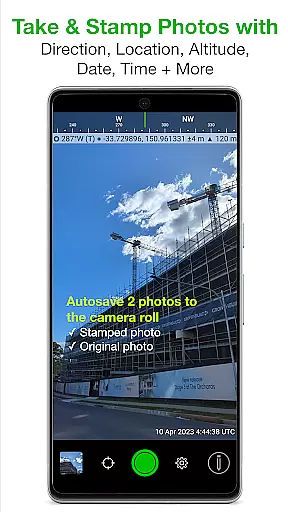
Solocator is a professional GPS camera app designed for fieldwork and photo documentation across various industries. It allows users to overlay critical metadata such as location, direction, altitude, date, and time directly onto photos. With the optional Industry Pack, users can capture additional details like project names, descriptions, and street addresses, making it ideal for professionals who require comprehensive photo records.
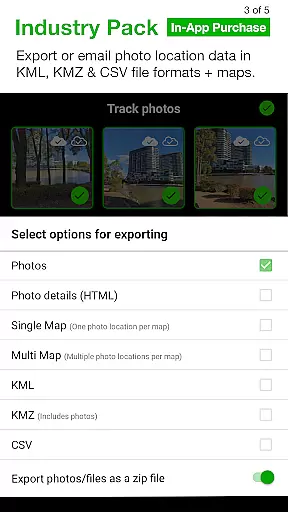
The app supports both front and back cameras, includes advanced features like UTM/MGRS coordinates, tilt and roll angles, and autosaves photos with or without overlays. Solocator also offers cloud storage integration, batch editing, and export options in KML, KMZ, and CSV formats. Its ability to refine and lock GPS locations ensures precision, especially in challenging environments like urban areas or near large structures.
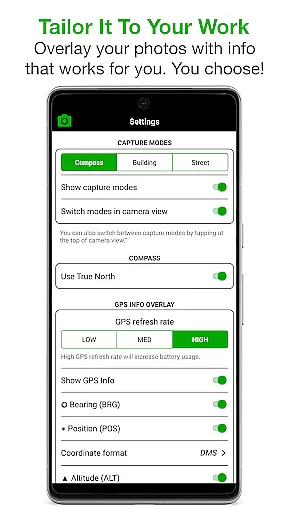
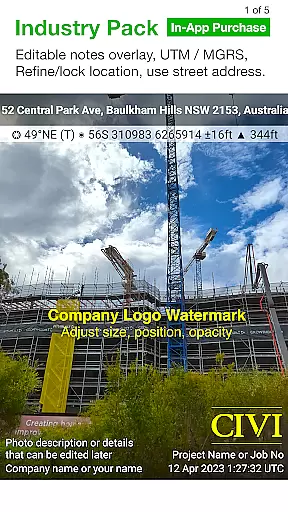
Solocator stands out with its extensive customization options for photo overlays. Users can select from a wide range of data points to stamp on images, including GPS coordinates, compass direction, altitude, and even tilt and roll angles. The optional Industry Pack enhances functionality by adding editable notes overlays, street address tagging, and UTM/MGRS coordinate formats, catering to specialized professional needs.
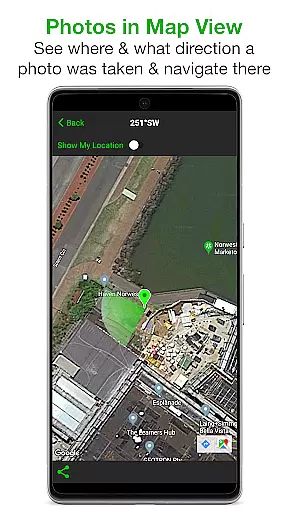
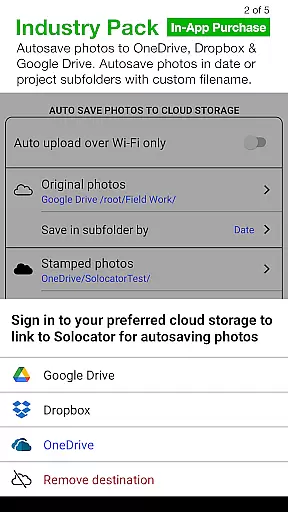
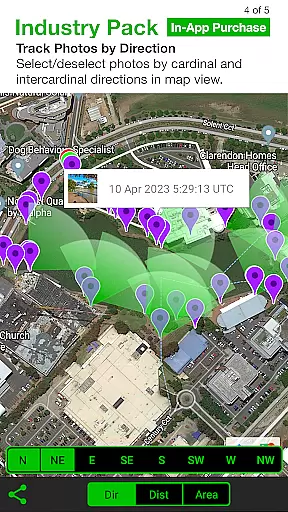
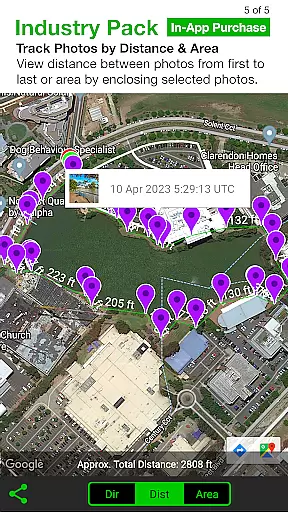
Additional features include autosaving photos to cloud services like Google Drive and Dropbox, map-based photo tracking, and compact view modes. The app also supports batch editing of notes fields, custom export filenames, and refining GPS locations for improved accuracy. These capabilities make Solocator a versatile tool for industries requiring detailed and organized photo documentation.
Real-time capture and preview functionality is essential for photography applications like Solocator. This feature ensures that users can instantly see the results of their shots with all selected overlays applied before taking the final picture.
Solocator excels in this area by offering a comprehensive set of camera controls, including pinch zoom, self-timer, flash, and exposure adjustments. These tools allow users to fine-tune their images while seeing exactly how the overlaid information will appear on the final photo.
The app supports both back and front cameras, making it versatile for different types of photography needs. Whether capturing field notes or documenting project progress, users benefit from the immediate feedback provided by real-time previews.
This instant visualization helps professionals across various industries ensure that each photo contains the necessary documentation details without needing post-processing, saving valuable time and resources.
While Solocator does not focus on AI beauty enhancements typical in social media apps, it offers powerful features that enhance photo documentation naturally. The app's ability to overlay critical data such as GPS coordinates, compass direction, altitude, and timestamps provides an authentic enhancement to each photograph.
The Industry Pack extends these capabilities further by allowing users to add project names, descriptions, and watermarks directly onto photos. This professional touch maintains the natural integrity of the image while adding valuable contextual information.
Additionally, Solocatoru2019s autosave function creates two versions of each photou2014one with overlays and one originalu2014ensuring that users retain unaltered copies for reference or compliance purposes. This dual-saving approach preserves the authenticity of the captured moment.
By focusing on practical enhancements rather than aesthetic alterations, Solocator delivers a natural enhancement process that meets the stringent requirements of industry professionals who rely on accurate photo documentation.
User-friendly interface
Comprehensive metadata options
Cloud storage integration
Batch editing functionality
Customizable export formats
Industry Pack is paid
No built-in video support
Limited free features
Requires compass for full functionality
Occasional GPS inaccuracies

AI portrait generator and polaroid AI selfie, fun AI generated AI photo creator!
 4.30
4.30
Create funny photos and videos with the popular Time Warp Scan filter.
4.90
What celebrity do you look like? Celebs will find your celebrity match!
4.10
Perfect body tune & face app - photo retouch, makeup, slim body & beautify face.
4.80
Fit multiple photos on one post. Create carousels & scroll layouts for Instagram
4.50
Transform Photos: Edit, Beautify and Craft Memories & Make Collages!
4.10
Unblur, enhance & restore photos with powerful AI photo enhancer tools.
4.60
Turn photos into cartoons & avatars! - Photo Editor, Cartoon Face!
3.90
RAW video capture with advanced controls
4.40
Find time and duration of different sunlight phases at any location
4.90
Easily create custom gifts, cards, photo books & more on the Shutterfly app!
4.60
Smart, light, and fast photo and video gallery
4.30
AI-powered video creator by MiniMax - Where ideas meet cinema
4.20
The #1 app for B&W film developing featuring an advanced darkroom timer.
4.10
live datamoshing
4.00
Astrophotography with your smartphone, photo live stacking and much more!
3.90
Hair color changer, AI haircut app, fun hair editor and buzz cut filter for all!
3.80
Raw Image Viewer. Gallery with support of raw images (.cr3, .cr2, .nef, .raf).
2.00
Add a dreamy vibe to your selfies and videos with soft style filters
4.0


User Reviews