
The Everything Key is a powerful utility app designed to unlock the hidden potential of your device's hardware button. With its intuitive interface and advanced remapping capabilities, this tool allows you to customize the functionality of your device's Essential Key, transforming it into a versatile productivity tool.
Whether you want instant access to your camera, favorite messaging app, or most-used utility, The Everything Key makes it possible through simple double or triple presses. The app works seamlessly with supported devices and requires no root access, ensuring a smooth user experience right out of the box.
This app is especially useful for users of Nothing Phone models, offering a personalized experience that integrates beautifully with the device’s design aesthetic while prioritizing privacy and security.
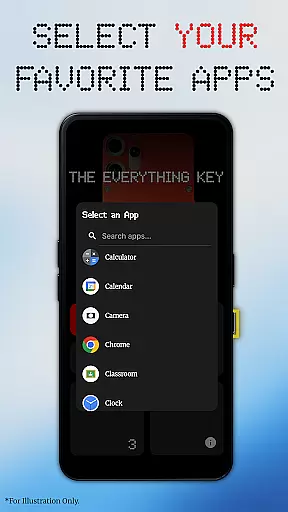
The Everything Key stands out with its powerful remapping features, enabling users to assign specific apps to both double-press and triple-press actions. This flexibility ensures that your hardware button can be tailored to suit your unique needs and preferences.
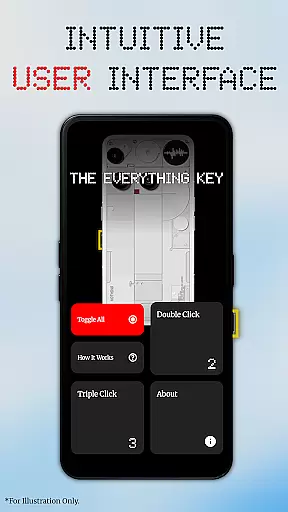
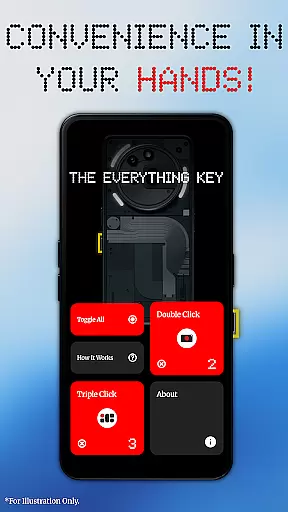
Its minimalist and intuitive UI provides clear visibility of mapped apps and their active status. Advanced control options allow you to enable, disable, or un-map apps with ease, while the 'Toggle All' feature offers quick management of all mappings at once. These thoughtful design elements ensure a seamless user experience.
Privacy and security are at the core of The Everything Key. Using Android's Accessibility Service, the app detects hardware key presses without accessing any on-screen content, passwords, or personal information. This commitment to user trust sets it apart from other tools in its category.
The Everything Key focuses on providing users with an accurate and effective way to remap their device's special hardware button. This app leverages Android's Accessibility Service to detect specific key presses without accessing or logging any personal information, ensuring privacy while enhancing functionality.
With its powerful remapping feature, users can assign specific actions to both double-press and triple-press events. This allows for quick access to frequently used apps such as the camera or messaging services, significantly boosting productivity by reducing navigation time.
The app also includes advanced control options that let users easily enable or disable mapped actions through a simple tap on the respective card within the interface. Additionally, a 'Toggle All' feature provides the convenience of activating or deactivating all mappings simultaneously, offering unparalleled ease of use.
By eliminating the need for root access or complex ADB commands, The Everything Key ensures that even non-technical users can take full advantage of their deviceu2019s capabilities. Its intuitive UI and seamless integration make it a reliable tool for personalizing and optimizing your smartphone experience.
The Everything Key boasts a clean and minimalist user interface inspired by the Nothing aesthetic, making it incredibly straightforward for users to navigate and customize their device settings. Upon launching the app, users are greeted with a visually appealing layout that clearly displays mapped applications and their current status.
Each mapped action is represented by a card that users can interact with directly. Tapping a card toggles the activation state of the associated app, while an 'X' icon allows for permanent un-mapping if needed. This level of direct manipulation simplifies the management process, ensuring users can make changes effortlessly.
On first launch, the app assists users in selecting their specific device model and color, which then integrates into a stunning background design. This personalized touch not only enhances visual appeal but also reinforces the connection between software and hardware, creating a cohesive user experience.
Overall, The Everything Key combines form and function seamlessly, delivering an intuitive platform where users can harness the full potential of their deviceu2019s hardware button without unnecessary complexity or confusion.
Customizable button mapping
User-friendly interface
No root access required
Strong privacy safeguards
Supports multiple devices
Limited to specific devices
Requires accessibility permissions
No advanced automation
Independent developer support
Device model restrictions

 4.50
4.50
A powerful, easy-to-use flight computer on your phone or tablet!
3.80
Connect instantly to a fast, encrypted VPN with one tap
4.60
App to pay for FUTO Keyboard
4.60
VESC Tool can monitor and configure VESC-compatible devices over BLE and Wifi
4.20
Fast Video Downloader, Movie Downloader, Torrent Downloader & Adblock Browser
4.70
Connect wirelessly to your computer to watch movies, browse the web, play games
5.00
Fun lie-detection pranks for friends and parties.
3.80
Protect your device with antivirus, storage cleanup, and system monitoring
4.70
Excellent scientific calculator with symbolic algebra, integrals, derivatives
4.80
Bedrock Together: Join any bedrock server on Xbox/PS
4.80
Learn the vast amount of system information about device and monitor it's state
4.70
Button mapper, mouse toggle, sleep timer and a lot of another features
4.50
Forza Tuning Calculator App for Forza Horizon 5, Motorsport and Earlier Titles
4.40
Pro Emulator is an easy to use game console emulator for a range of consoles.
4.40
Remote for Roku, Fire TV, Samsung TV, LG TV, Android TV, Chromecast and VIZIO TV
4.20 4.10
4.10
This app unlocks the Pro features of the Central for DayZ app
3.60
PDF Reader - Document Viewer: Read, Manage & Organize Your Documents
3.10


User Reviews