
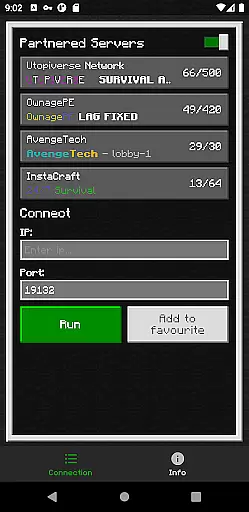
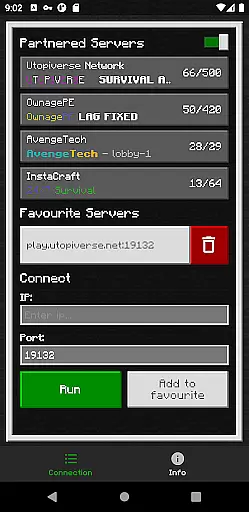
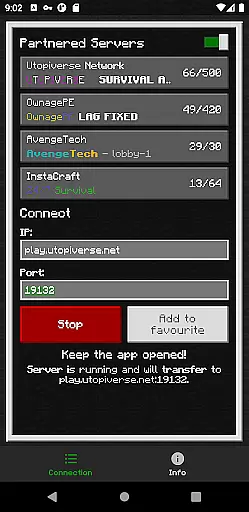
BedrockTogether (Pro) is an innovative tool designed to simplify the process of connecting to Bedrock Edition servers for Minecraft players. This ad-free version offers a seamless experience by enabling any Bedrock server to appear as a LAN server on Xbox or PlayStation clients, allowing users to connect easily without DNS rerouting. Although Realms and Nintendo Switch compatibility are not supported, this app provides a straightforward solution for other platforms.
The app's core functionality lies in its ability to facilitate quick connections. Users simply input their desired server IP and port, click 'Run', and navigate to the 'Friends' tab within the game. The server will then be accessible via the LAN tab, streamlining multiplayer sessions. Once connected, users can close the app, ensuring it doesn't run in the background unnecessarily.
This tool is particularly valuable for Minecraft enthusiasts who frequently engage in multiplayer gaming sessions with friends across different devices. By eliminating complex network configurations, BedrockTogether (Pro) enhances the overall gaming experience, making it more accessible and enjoyable for all players involved.
BedrockTogether (Pro) stands out with its array of practical features tailored for Minecraft Bedrock Edition players. One of its key capabilities is transforming any Bedrock server into a visible LAN server on supported consoles, thus simplifying the connection process significantly. This feature alone removes the need for complicated DNS rerouting techniques, making multiplayer gaming more accessible.
In addition to its primary function, the app provides a user-friendly interface that guides players through the connection steps efficiently. After entering the server details and initiating the 'Run' command, users can swiftly join their friends' games via the 'Friends' tab. The app also emphasizes network compatibility, ensuring that both gaming consoles and mobile devices are on the same LAN network for optimal performance.
Furthermore, BedrockTogether (Pro) fosters community engagement by offering support channels through Discord and Telegram. Players encountering issues can report bugs directly in dedicated forums, enhancing the collective troubleshooting effort. With its focus on ease-of-use and community support, this tool proves indispensable for avid Minecraft gamers seeking hassle-free multiplayer experiences.
BedrockTogether (Pro) focuses on providing a seamless connection experience for Minecraft Bedrock Edition players. The app's core function is to enable any Bedrock Edition server to appear as a LAN server on Xbox or PlayStation clients, simplifying the connection process without DNS rerouting.
The application achieves this by allowing users to input their desired server IP and port, then clicking the 'Run' button to establish the connection. This streamlined approach ensures that even novice users can easily connect to servers through the 'Friends' tab in the game.
For users, this means they can enjoy an uninterrupted gaming experience with minimal setup hassle. The app effectively bridges the gap between different devices, making multiplayer gaming more accessible and enjoyable.
By focusing on accuracy and effectiveness, BedrockTogether (Pro) delivers a reliable solution for connecting to Minecraft servers, enhancing the overall user experience while maintaining simplicity.
The interface of BedrockTogether (Pro) is designed to be straightforward and user-friendly, ensuring that players can quickly understand and utilize its features. With a clean layout, users simply enter the server IP and port, then press the 'Run' button to initiate the connection process.
This intuitive design minimizes the learning curve, allowing users to focus on their gaming experience rather than struggling with complex settings. The app provides clear instructions on how to connect, guiding users step-by-step from entering server details to joining via the LAN tab in Minecraft.
Additionally, the app offers troubleshooting tips, such as ensuring all devices are on the same LAN network, further enhancing the ease of use. These features collectively contribute to a hassle-free user experience.
Overall, BedrockTogether (Pro) excels in delivering an interface that is both simple and intuitive, catering to gamers who prioritize efficiency and ease of use in their gaming setup.
Easy server connection
No ads included
Efficient network setup
Active community support
User-friendly interface
No Nintendo Switch support
Limited to Bedrock Edition
Manual network checks needed
Third-party application risks
Premium version cost

 4.50
4.50
Just swipe the edge to do something!
4.40
This app unlocks the Pro features of the Central for DayZ app
3.60
Use your phone as a webcam on your computer over WiFi or USB.
4.40
Unlock your Essential Key. Create custom shortcuts to your favorite apps!
4.2
Safely recover deleted photos, videos, and files with a single easy tap.
3.70
Canon PRINT is a companion app for your Canon printer.
4.60
ADB support Android 4.X-Android 13(Support wireless pair mode).No root required!
4.70
Navigate with Ease and Style
4.90
The ultimate tool for network analysis, wifi scanning and problem detection.
4.90
Small and simple app to Verify Root Access and BusyBox Install!
4.70
The Ultimate Flex Drivers Utility App - Convenient Tapping & Block Filters
4.70
HD Camera captures every special moment.
4.60
With videos, electrical calculators, and built-in ebook, Ugly’s has your answer.
4.50
Game Booster, GFX Tool is now compatible with newer game update
4.50
Clean up large files and similar photos, fast and easy to use
4.40
Quickly & easily calculate the spacing of handrail balusters
4.20
View detailed information about your Nissan Leaf the dealer never shows you.
4.10
Unleash gamepad precision for ultimate mobile gaming dominance.
3.90


User Reviews