
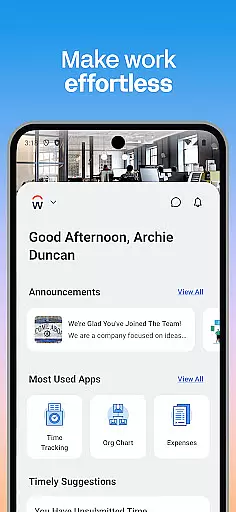
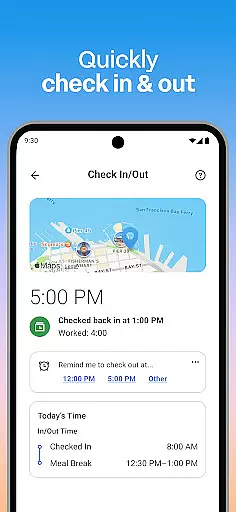
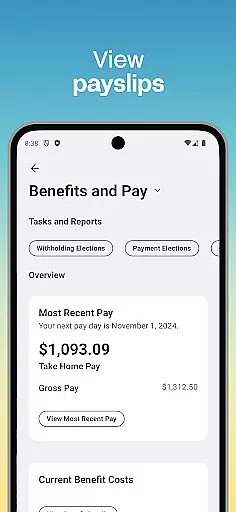
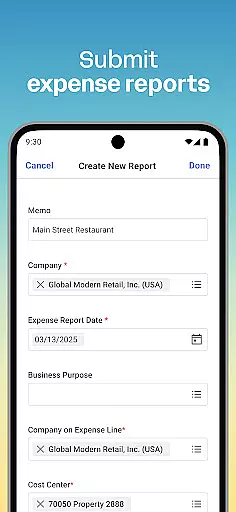
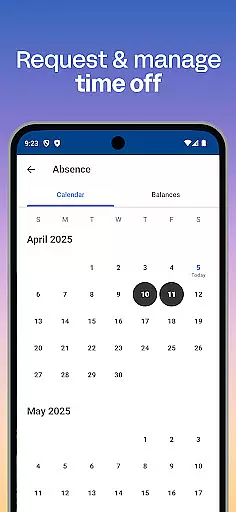
Workday is a comprehensive business application designed to streamline workplace productivity through an all-in-one mobile platform. The app provides instant access to a wide array of Workday tasks, including time tracking, expense submissions, and team communication. With its intuitive interface, users can easily navigate features such as viewing payslips, requesting time off, and learning new skills via training videos.
Beyond individual employee tools, Workday also offers specialized functionalities for managers, allowing them to approve requests, manage payroll, and conduct performance reviews with ease. Its flexible and personalized approach ensures that users have quick access to the specific tools and insights they need most, enhancing their ability to manage work life efficiently from any location.
The app's commitment to security ensures that sensitive data remains protected through advanced measures like biometric authentication and cloud-based storage. This guarantees not only the safety of your information but also its constant availability and up-to-date status. Whether you're an employee looking to stay on top of your tasks or a manager needing to oversee your team's operations, Workday delivers a powerful, secure solution tailored to meet the demands of today's dynamic work environments.
Workday stands out with its extensive feature set tailored to both employees and managers within an organization. For employees, the app provides essential tools such as push notification reminders for important tasks, submission of timesheets and expenses, and the ability to view payslips and request time off. Additionally, it facilitates professional growth by offering training videos and internal job opportunities, making it a versatile tool for personal development.
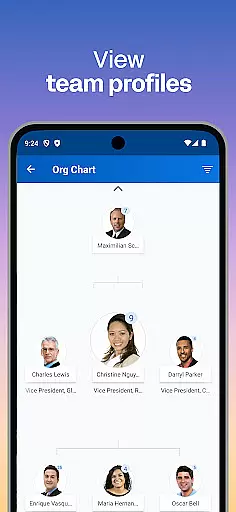
For managers, Workday offers advanced HR and employee management capabilities. These include approving employee requests with a simple tap, viewing detailed team and employee profiles, and managing payroll adjustments. Managers can also utilize the hours tracker, browse interactive reports and dashboards, and conduct performance reviews, ensuring comprehensive oversight of their team's activities.
One of the key innovations of Workday is its emphasis on user experience. The app is designed to be simple and intuitive, organizing all necessary functions in a manner that is easy to navigate. Furthermore, its flexibility allows users to personalize their experience, accessing the tools and insights most relevant to their roles. Coupled with top-tier security features such as biometric authentication and cloud-based data storage, Workday ensures that users can manage their work life confidently and securely from anywhere, at any time.
Workday's collaborative work features are designed to enhance team productivity and streamline communication. The app allows users to connect with teammates, approve employee requests with a simple tap, and view comprehensive team and employee profiles.
Managers can efficiently manage their teams by adjusting employee roles, giving performance reviews, and using the hours tracker to monitor timesheets. These capabilities ensure that collaboration is not just about communication but also about managing resources effectively.
The app provides interactive reports and dashboards, offering real-time insights into team performance and operational efficiency. This feature helps businesses make informed decisions quickly, ensuring that all team members are aligned with the company's goals.
By integrating these collaborative tools into one intuitive platform, Workday ensures that teams can work together seamlessly, regardless of their physical location, thus promoting a flexible and dynamic work environment.
Task management in Workday is comprehensive and user-friendly, allowing employees to maintain high levels of productivity. Users can perform a variety of tasks such as checking in to work, submitting timesheets and expenses, and requesting time off, all from their mobile devices.
The app sends push notification reminders for important tasks, ensuring that users never miss deadlines or critical actions. This feature is particularly useful for managing time-sensitive activities like payroll adjustments and compensation changes.
Additionally, Workday offers learning opportunities through training videos and internal job postings, enabling employees to develop new skills and advance their careers. This focus on personal and professional growth is integral to effective task management.
Overall, Workday's task management capabilities provide a flexible and personalized experience, empowering users to manage their work life efficiently from anywhere, at any time.
User-friendly interface
Comprehensive task management
Advanced security features
Personalized user experience
Extensive managerial tools
Limited customization options
Occasional syncing issues
High resource consumption
Steep learning curve
Subscription costs

viewing and sharing of PDFs
 3.60
3.60
Find flexible, hourly jobs hiring near you in restaurant, retail & hospitality!
4.00
The Penny Puss app with DG penny finder
4.10
Scan Business Cards & Conference Badges - Capture Leads at Events & Tradeshows
4.20
Start earning fast. Apply Today.
4.80
Build a store in minutes with our full suite of AI tools. Start for free!
4.20
Access All PDF Files
3.40
Permission Guard is a security app that helps you manage app permissions.
4.80
ADP Mobile Solutions is an employee self service app
4.50
FaxCover - Create fax cover pages. Works with any app or fax machine.
4.90
GoTo Mobile is a simple & secure calling, messaging & meetings solution
4.80
USPS Mobile®Access USPS.com’s most popular tools on-the-go.
4.70
Make invoices, bills, receipts & estimates on the go with Invoice Generator.
4.70
Paychex Flex - Save Time and Stay Connected
4.60
Chat, meet, and collaborate to achieve more together, all in one place on Teams
4.60
Amazon A to Z is the place to manage your work-life at Amazon.
4.50
A secure, all-in-one team collaboration app
4.30
view, manage, and share every PDF file you have
3.60
We are a dynamic team of creatives people of design, marketing, web & apps
3.00


User Reviews