
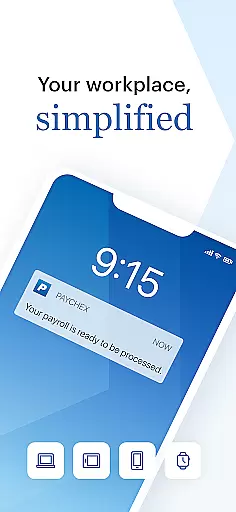
Paychex Flex is a comprehensive business management application designed specifically for employers and employees who are registered users of the Paychex Flex platform. This app provides seamless access to essential payroll and benefits features, ensuring that businesses can manage their operations efficiently from anywhere. Employers can utilize advanced authentication methods like Touch ID and Face ID to submit payroll on the go, access detailed reports, and view employee profiles with comprehensive data including compensation, taxes, and time-off balances.
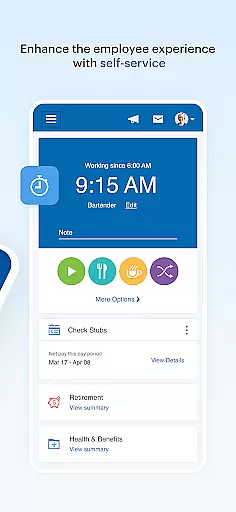
Employees also benefit significantly from Paychex Flex by having instant access to their check stubs, W2s, retirement plan details, and health benefits information. The app's intuitive interface allows users to update personal information, review benefits enrollment, and manage deductions effortlessly. With its robust feature set tailored to both employers and employees, Paychex Flex ensures that all users stay connected to their most critical business and payroll data at all times.
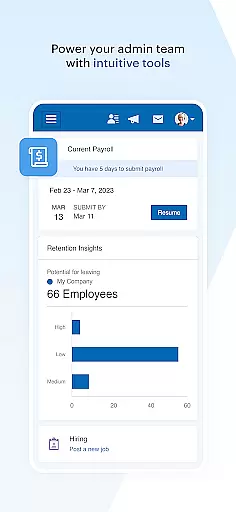
One of the standout features of Paychex Flex is its ability to offer different functionalities based on user roles, ensuring that both employers and employees have access to the tools they need. For employers, the app supports submitting payroll directly from mobile devices, allowing them to enter, review, and finalize payroll tasks efficiently. They can also access a wide range of reports including payroll summaries, cash requirements, and tax documents, which are crucial for maintaining financial oversight.
For employees, Paychex Flex offers easy access to personal financial and benefits information. Users can view their check stubs, W2 forms, and detailed retirement account statuses. Additionally, the app enables employees to make updates to their retirement contributions and investment choices directly through the mobile interface. Both employers and employees can utilize secure authentication methods such as Touch ID and Face ID, enhancing the security of sensitive data while providing a convenient user experience.
Collaborative work features are essential for modern business applications, enabling seamless interaction between employers and employees. Paychex Flex offers a comprehensive suite of tools that foster collaboration within the workplace.
The app provides employers with the ability to authenticate using Touch ID and Face ID, ensuring secure access to payroll functionalities. Employers can submit payroll on the go, enter and review payroll details, and even resume payrolls initiated on other devices, promoting flexibility and efficiency in collaborative financial management.
For employees, the app grants access to vital information such as check stubs, W2s, retirement balances, and benefits details. This empowers them to update personal contributions and investments, effectively managing their compensation, taxes, and benefits. The transparency and accessibility enhance the collaborative environment by keeping everyone informed and engaged.
By integrating these collaborative features, Paychex Flex not only streamlines administrative tasks but also strengthens the employer-employee relationship through shared access to crucial payroll and benefits data.
Effective task management is crucial for businesses to maintain operational efficiency and ensure timely completion of work. Paychex Flex addresses this need by providing robust task management capabilities tailored for employers.
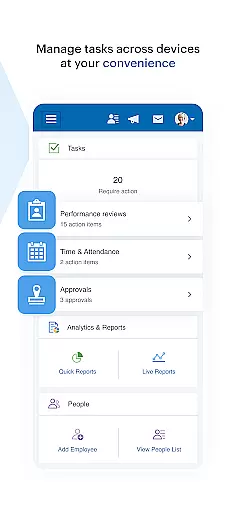
Employers utilizing Paychex Flex can leverage the app's authentication methods, such as Touch ID and Face ID, to securely access and manage various tasks. The app enables employers to handle payroll submissions efficiently, allowing them to enter, review, and submit payroll from anywhere, which is integral to effective task management.
In addition to payroll tasks, the app offers access to essential reports and employee documents. Employers can retrieve all necessary payroll reports, employee check stubs, tax documents, and detailed profiles. This facilitates better tracking and management of employee-related tasks, including compensation, taxes, deductions, and time-off balances.
With these comprehensive task management features, Paychex Flex ensures that businesses can maintain an organized workflow, empowering employers to manage their responsibilities with greater ease and precision.
User-friendly interface
Comprehensive payroll tools
Secure authentication options
Detailed reporting features
Employee self-service capabilities
Limited to registered users
Feature availability varies
Requires company subscription
No offline functionality
Complex initial setup

Zoom built for Chrome OS
 3.90
3.90
All Your Gig Work. One App.
4.30
VSD Viewer - Visio Drawings Viewer for Android Preview VSD, VDX, VSDX drawings
4.10
Employee Management Made Easy
4.80
Simple, Fast & Lightweight
3.90
One marketplace. Hundreds of services. Unlimited possibilities. All on Fiverr.
4.40
Find jobs near you and temp work in minutes, from your phone.
4.50
All-in-one Mobile solutions for employees & managers to succeed at work
4.30
We help people get jobs
4.70
Job search app that finds jobs for you! Takes the work out of looking for a job!
4.90
Start earning fast. Apply Today.
4.80
Grow your business and connect with more people with Meta Business Suite.
4.60
Chat, meet, and collaborate to achieve more together, all in one place on Teams
4.60
The app that lets you deliver with Amazon.
4.50
Say hello to the mobile work experience built to help you thrive at work.
4.30
Scan Business Cards & Conference Badges - Capture Leads at Events & Tradeshows
4.20
Smarter career moves start here. AI job alerts, insights & the right tools.
4.20
FX Plus adds media, networking, and cloud capabilities to FX File Explorer.
4.10
viewing and sharing of PDFs
3.60


User Reviews