
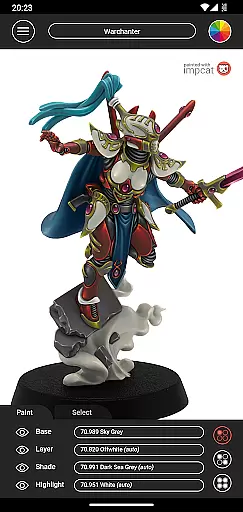
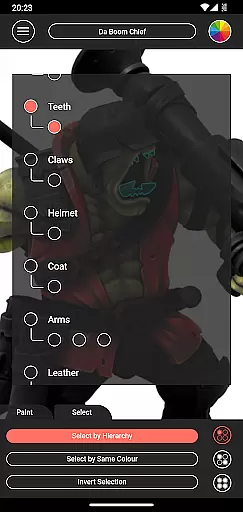
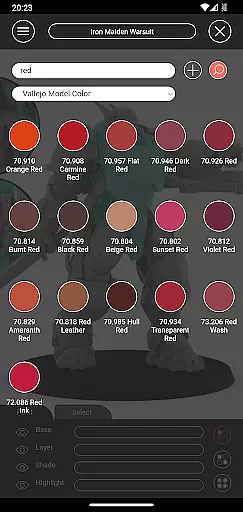
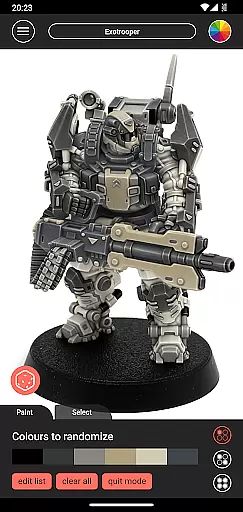
Impcat, short for Interactive Miniature Painting Catalogue, is a powerful simulator designed for hobbyists and professional miniature painters. This app allows users to achieve photorealistic painting results on gaming and tabletop miniatures by simulating a four-step process: base coloring, layering, shading, and highlighting. With its extensive range of built-in color palettes from leading manufacturers like Vallejo Model Color and Vallejo Game Color, impcat provides an immersive experience that helps users visualize their projects before committing to physical paint.
One of the standout features of impcat is its complement recommendation mode, which suggests harmonizing colors for layering, shading, and highlighting based on a selected base color. The app also includes advanced tools such as a color mixer, a color creator for custom shades, and a randomizer tool for experimenting with different color schemes. Additionally, users can access free DLC content, including new miniatures and updated color palettes, ensuring they always have fresh material to work with. Whether you're planning your next project or looking to refine your painting skills, impcat offers a comprehensive solution tailored to miniature enthusiasts.
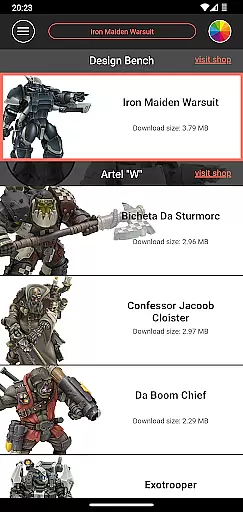
Impcat stands out with its robust set of features tailored specifically for miniature painters. At its core, the app provides six built-in miniatures from Artel "W" and over 300 predefined colors from popular brands like Vallejo Model Color and Vallejo Game Color. These resources allow users to experiment with realistic paint simulations without needing physical materials. The app's complement recommendation mode is particularly innovative, automatically suggesting layer, shade, and highlight colors that harmonize with the chosen base color, streamlining the decision-making process.
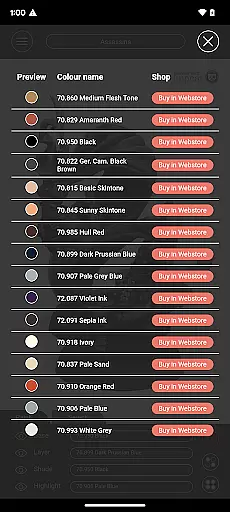
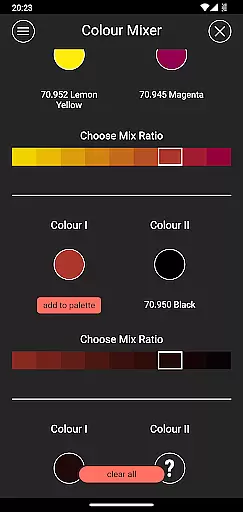
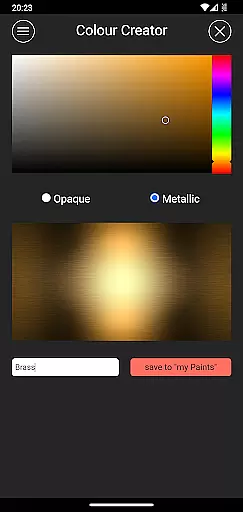
Beyond its primary simulation capabilities, impcat offers several advanced tools. The color mixer lets users blend predefined paints in multiple steps, while the color creator enables them to design and save custom colors. For those seeking inspiration, the randomizer tool distributes colors across a model in unexpected ways, sparking creativity. Furthermore, the app generates shopping lists with direct links to purchase used colors, simplifying supply management. With regular updates through free DLCs, impcat ensures users always have access to the latest miniatures and color palettes, making it an indispensable tool for both amateur and professional painters.
Customization is at the heart of impcat, allowing users to explore a vast array of miniature painting possibilities. The app provides six built-in miniatures and over 300 color options from popular brands like Vallejo Model Color and Vallejo Game Color.
Users can also access additional downloadable content (DLC) for more templates and color palettes, ensuring that their creative options are virtually limitless. These updates are provided free of charge, enhancing the user experience without any hidden costs.
The complement recommendation mode further enriches customization by suggesting harmonious layering, shading, and highlighting colors based on a selected base color. This feature empowers users to experiment with new techniques and achieve photorealistic results effortlessly.
impcat ensures seamless theme compatibility by integrating predefined color palettes that align perfectly with manufacturer specifications. This meticulous attention to detail guarantees that every paint simulation appears true to life.
In addition to its impressive library of built-in colors, the app offers tools such as the color mixer and creator, which allow users to craft unique shades. These personalized colors blend naturally within the app's framework, maintaining visual consistency across all models.
With features like the shopping list generator and randomizer tool, impcat not only supports diverse themes but also enhances workflow efficiency. Users can easily transition from digital experimentation to real-world application, making it an indispensable tool for both novice painters and seasoned hobbyists.
User-friendly interface
Extensive color library
Realistic paint simulation
Innovative recommendation mode
Free DLC updates
Limited initial miniatures
No real-time collaboration
Advanced tools require learning
Color mixing can be complex
Mobile-only experience

Ultra realistic high quality analog watch face for Wear OS.
 4.60
4.60
Wear Os Watch Face - Seasonal - Animated Snow Effect - 9 Animals
4.20
Transform your phone with Launcher iOS 26 - Smooth & elegant iOS experience
4.50
Art & Emoji Keyboard with Cool Fonts, Cute Themes and Custom Designs.
4.40
Ultimate Gallery Lock App - Hide Pictures, Videos and Lock Apps Instantly!
4.60 3.50
3.50
Your go to Weather App & Home Screen. Get your weather at a swipe of a finger!
3.80
Amazing letter fonts in your messages and social statuses
4.70
Fast SMS & group chat - use GIFs and emojis from your home screen launcher.
4.50
One 8 icons glass color version
4.80
Nothing Icon pack with more than 3750+ highly crafted icons.
4.70
Stunningly Different look with Line Icons and Neon Colors
4.60
Classic analogue watch face. For wear os devices.
4.60
Bring adorable pets to life on your screen. Playful, interactive and full of fun
4.60
Zip lock screen with magic wallpaper to decorate your phone with fun zipper lock
4.60
Stylish Pink Cute Hippo keyboard with 10000+ customized keyboard themes!
4.60
Customizable screen pets that play, climb, and keep you company.
4.50
Magic fluids wallpaper 4D: Relax with stunning fluid simulation wallpaper app
4.20
Customize glowing edges, wallpapers, and caller screen with EdgeAura.
3.50


User Reviews