
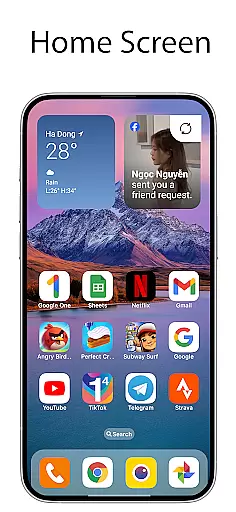
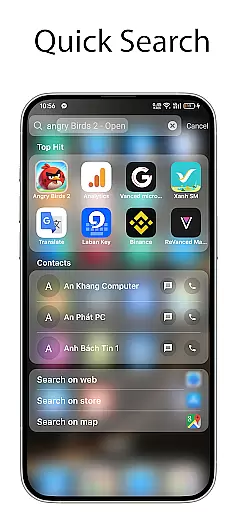
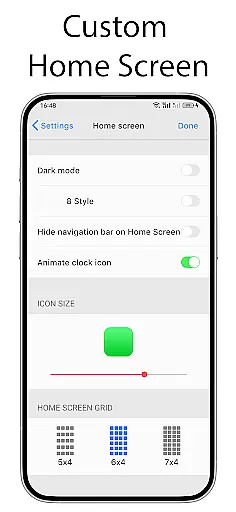
OS Launcher 18 - Phone 16 Max is a personalization app that transforms the visual appearance of Android devices into a more simple and luxurious interface. This launcher provides users with a customized experience, including redesigned app icons, wallpapers, and various other features. It allows Android users to modify their device's look while maintaining the core functionality and versatility of the Android operating system.
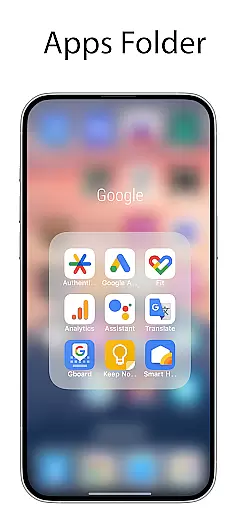
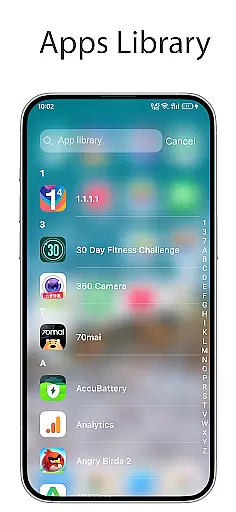
The app offers an intuitive layout with features like an Apps Library for organizing apps into categories, Today View for weather updates and calendar events, and customizable widgets. Users can also create folders by dragging and dropping apps together, hide apps from the home screen, and even lock specific apps to prevent unauthorized access. These features make it ideal for users who want both aesthetics and practicality in their mobile experience.
With its elegant design and user-friendly features, OS Launcher 18 - Phone 16 Max enhances usability while offering a premium feel. Whether you're looking to simplify your interface or add luxury to your device, this app delivers significant value by combining style with essential functionalities.
OS Launcher 18 - Phone 16 Max stands out with its rich set of features designed to enhance personalization on Android devices. One of its key highlights is the Apps Library, which automatically groups installed applications into categories, making navigation easier and more organized. Additionally, the Lock App feature ensures privacy by preventing unauthorized access to sensitive apps without permission.
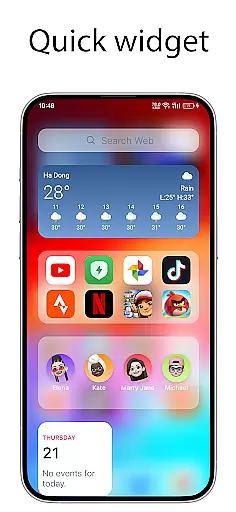
Another notable feature is the Today View, which displays useful information such as weather forecasts, favorite contacts, and upcoming calendar events directly on the home screen. The app also supports creating folders by dragging one app onto another, allowing users to declutter their screens efficiently. Furthermore, the Weather widget provides detailed insights like temperature, wind speed, and humidity, ensuring users stay informed.
Customization options are abundant, including the ability to modify app icons and names, hide apps from the home screen, and enable unread notification dots for messaging apps. These innovative tools empower users to tailor their devices exactly how they want, blending luxury with utility seamlessly.
OS Launcher 18 - Phone 16 Max offers a wide array of customization options that allow users to personalize their Android devices extensively. This app provides features such as customizable app icons, wallpapers, and the ability to modify both the icon and name of applications. Users can tailor their device's interface to match their personal style while retaining the core functionality of the Android operating system.
The launcher includes an Apps Library that categorizes apps for better organization, along with the option to create folders by simply dragging and dropping apps onto each other. Additionally, it allows hiding apps from the home screen, ensuring that only the most relevant apps are displayed. These diverse customization options empower users to design a unique and streamlined user experience tailored specifically to their preferences.
Furthermore, OS Launcher 18 supports widgets which can be added to the home screen for quick access to information like weather forecasts, calendar events, and favorite contacts. The Today View feature consolidates essential details in one place, enhancing usability without cluttering the interface. With these varied customization choices, users gain control over both aesthetics and practicality on their devices.
Theme compatibility is a crucial aspect of OS Launcher 18 - Phone 16 Max, ensuring that all visual elements work seamlessly together. This app provides beautifully designed themes that integrate perfectly with its customizable features, offering users a cohesive look across their entire device interface. Whether you prefer a simple or luxury appearance, this launcher ensures that every element aligns harmoniously with your chosen theme.
In addition to supporting various themes, OS Launcher 18 also allows users to apply custom icons and wallpapers that complement their selected theme. This flexibility ensures that even when modifications are made, the overall design remains visually appealing and consistent. By maintaining high standards of theme compatibility, the app guarantees a polished and professional appearance regardless of how much customization is applied.
Moreover, advanced features like unread notification dots enhance the thematic experience by providing functional yet stylish indicators for new messages. Users can trust that any changes they make will not disrupt the integrity of their chosen theme but rather enhance it through thoughtful integration. This commitment to theme compatibility makes OS Launcher 18 an ideal choice for those seeking both beauty and functionality in their mobile experience.
User-friendly interface
Highly customizable
Enhanced privacy controls
Beautiful widgets
Organized app library
Limited default themes
Occasional performance lags
No live support
Ads in free version
Complex settings for beginners

Transform your phone with Launcher iOS 26 - Smooth & elegant iOS experience
 4.50
4.50
Sparkle your screen with Glitter Wallpapers For Girls and Cute Backgrounds!
4.80
A launcher for Samsung Good Lock and Good Guardians modules without ads
4.70
Interactive Miniature Painting Catalogue
3.30
Ultimate widget creator. Design custom widgets for a truly unique home screen!
3.90
Aesthetic Widgets, HD Wallpapers, Themes in Mico Widget for Home and Lock Screen
4.50
Design your screen with unique, vibrant clocks
3.80
Yandex Browser — stylish and secure, with voice search and data compression
4.40
Emoji Maker app - Design custom emojis and effortlessly blend them with Mixer
3.80
Only for Wear OS devices!
4.90
Enjoy a variety of amazing live wallpapers and colorful EDGE lighting borders!
4.80
400+ Beautifully crafted widgets inspired by NOTHING.
4.70
Stylish Pink Cute Hippo keyboard with 10000+ customized keyboard themes!
4.60
Beautiful realistic hybrid watch face with numerous customization options.
4.50
Try creating your own keyboard with "Keyboard theme for android" app now!
4.50 4.50
4.50
Color phone with cool effects for call screen, flash alert & ringtones music
4.50
Wear Os Watch Face - Seasonal - Animated Snow Effect - 9 Animals
4.20 4.10
4.10


User Reviews