
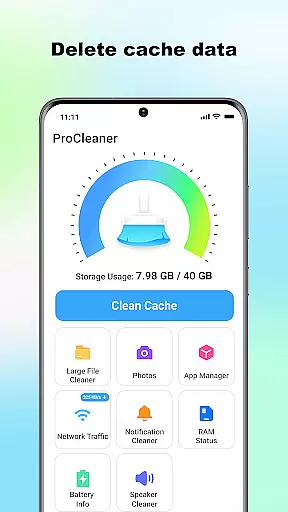
ProCleaner is a comprehensive device optimization tool designed to help users efficiently manage their smartphone storage. The app's core functionality revolves around scanning and cleaning various types of unnecessary files, including cache, residual, and junk files that accumulate over time.
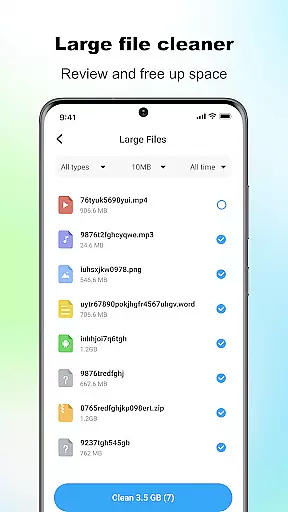
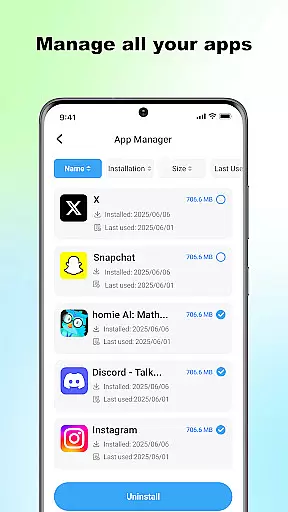
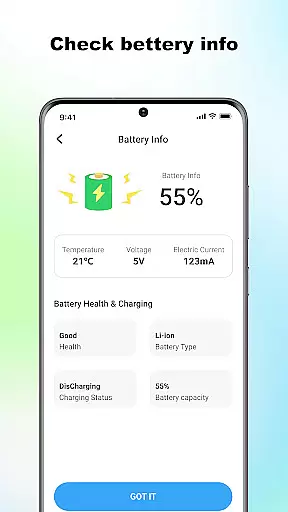
Beyond basic cleaning capabilities, ProCleaner offers advanced features for managing large files and uninstalling multiple applications simultaneously. Users can also monitor their network speed and check battery status, providing a complete solution for device maintenance and performance optimization.
This tool proves especially valuable for users who frequently encounter storage issues or wish to maintain optimal device performance. By providing both basic and advanced management features, ProCleaner serves as an essential utility for anyone looking to keep their device running smoothly.
ProCleaner distinguishes itself through its comprehensive suite of device management tools. The application's primary feature is its intelligent scanning system, which thoroughly examines device storage and identifies various types of unnecessary files, including cache, residual, and junk files.
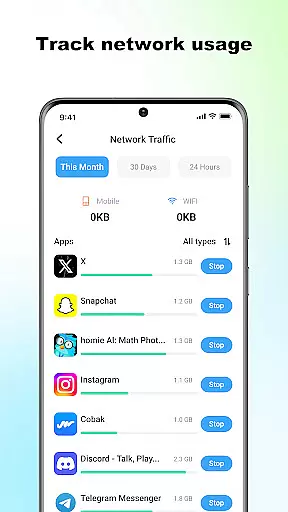
The app's advanced file management capabilities allow users to locate and organize large files, while its batch uninstallation feature enables efficient removal of multiple applications at once. Its network monitoring tool provides real-time speed tracking, and the battery status checker helps users optimize their device's power consumption.
All operations are performed locally on the device, ensuring user privacy and data security. The application requires only necessary permissions for storage access and app management, maintaining a balance between functionality and privacy protection.
ProCleaner excels in delivering accurate and effective core functions that enhance device performance. The app meticulously scans and cleans cache files, ensuring no unnecessary data occupies your storage space. It also removes residual and junk files left behind by uninstalled apps or system operations, freeing up valuable memory.
In addition to file cleaning, ProCleaner offers a robust feature for managing large files. Users can easily identify and remove sizable files that contribute to storage clutter. With the ability to uninstall multiple applications simultaneously, the app streamlines the process of freeing up space and optimizing device performance.
The effectiveness of these features is further complemented by network speed monitoring and battery status checking. These tools empower users with real-time insights into their device's operational health, ensuring optimal performance at all times. All operations are performed locally, guaranteeing user privacy and data security.
ProCleaner boasts an interface designed for simplicity and intuitive navigation, making it accessible even to novice users. Upon launching the app, users are greeted with a clean layout that categorizes its features into easily identifiable sections. This logical arrangement ensures that users can quickly locate and utilize the tools they need without any learning curve.
The scanning process is straightforward, providing clear progress indicators and results that are easy to interpret. Each detected file type is presented with relevant details, allowing users to make informed decisions about which files to delete. Additionally, the app provides simple toggles and buttons for managing installed applications and large files, enhancing the overall user experience.
By focusing on clarity and ease of use, ProCleaner ensures that users can maintain their devices efficiently without feeling overwhelmed by complex settings or procedures. This commitment to user-friendly design sets ProCleaner apart as a reliable tool for device management.
Comprehensive cleaning tools
Batch app uninstallation
Local data processing
Network speed monitoring
Battery status tracking
Limited advanced features
No cloud backup option
Basic UI design
Occasional scan errors
Ads in free version

Easily install aab(Android App Bundle) files on your Android device with our app
 4.80
4.80
Use your phone as a webcam on your computer over WiFi or USB.
4.40
Optimize your WiFi network, turn your phone into Wifi Analyzer
4.70
VESC Tool can monitor and configure VESC-compatible devices over BLE and Wifi
4.20
A non-root local ADB shell client. READ BELOW!
3.40
Connect wirelessly to your computer to watch movies, browse the web, play games
5.00
Create your own custom widget with endless possibilities
3.90
Remote Play with FSR upscaling, low latency & full controller support
4.80
A clean app.
4.50
Unit and currency converter with easy and simple UI.
4.80
WiFi Signal Strength Meter help you detect WiFi Signal Strength in real time.
4.80
ADB support Android 4.X-Android 13(Support wireless pair mode).No root required!
4.70
Small and simple app to Verify Root Access and BusyBox Install!
4.70
HD Camera captures every special moment.
4.60 4.50
4.50 4.10
4.10
MS-DOS in your pocket. Play old DOS games anywhere you are ;)
4.10
Create your own live wallpaper or check out thousands already made presets
3.90
This app unlocks the Pro features of the Central for DayZ app
3.60


User Reviews