
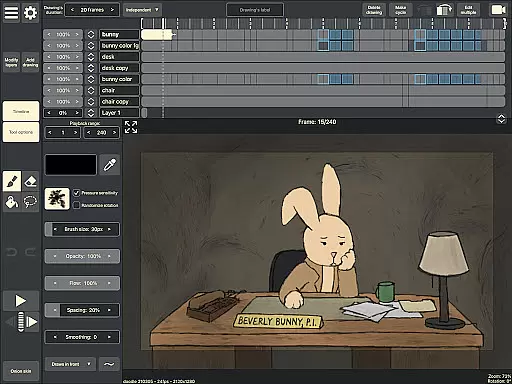
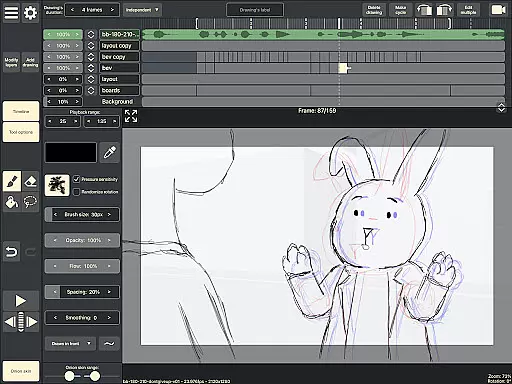
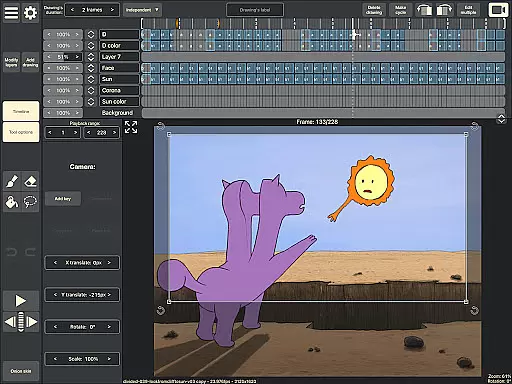
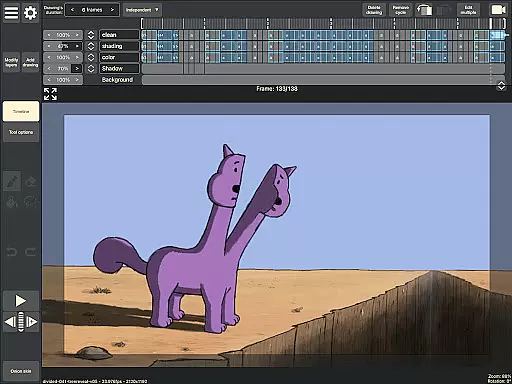
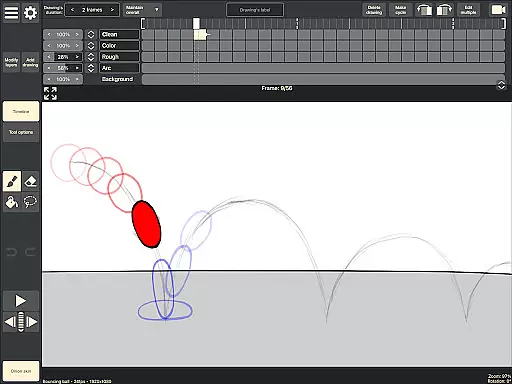
RoughAnimator is a professional-grade hand-drawn animation app designed for both Android tablets and smartphones. This powerful tool provides animators with everything needed to create frame-by-frame animations on the go. With its robust feature set, it caters to professional animators while remaining accessible to beginners.
The application offers an intuitive timeline interface with unlimited layers, customizable drawing exposure, and advanced tools like onion skinning and audio syncing. Animators can work seamlessly with features that support rotoscoping, custom brushes, and pressure-sensitive devices like the Samsung S-Pen. The app also enables exporting projects to industry-standard formats, making it compatible with software like Adobe Animate and Toon Boom Harmony.
RoughAnimator stands out with its comprehensive set of animation tools tailored specifically for creative professionals. The app's timeline functionality supports unlimited layers and adjustable exposure lengths, allowing users to perfect pose-to-pose or straight-ahead animations with precision.
One of the key highlights is its compatibility with professional workflows. Users can import audio tracks for lip-syncing, video files for rotoscoping, and export their projects in multiple formats including Quicktime video, GIFs, or image sequences. The app's support for pressure-sensitive devices and custom brush settings ensures high-quality drawing experiences.
Additional notable features include real-time preview playback, scrubbing along the timeline, and seamless integration with desktop animation software. These capabilities make RoughAnimator a versatile choice for creating traditional hand-drawn animations anywhere, anytime.
Creative tools are essential for any artist or animator, and RoughAnimator excels in this area. This application offers a comprehensive suite of features that cater to both professional animators and beginners alike. With unlimited layers on the timeline, adjustable exposure lengths, onion skinning, and custom brushes, users have all they need to create traditional hand-drawn animations.
RoughAnimator supports pose-to-pose or straight-ahead animation styles with its robust drawing tools. The app also allows for preview playback and scrubbing along the timeline, which is crucial for reviewing work in progress. Animators can import audio for lip-syncing and video for rotoscoping, adding another layer of depth to their projects.
For those who require precision, RoughAnimator is compatible with Samsung S-Pen and other pressure-sensitive devices, ensuring that every stroke is captured accurately. Users can control the framerate and resolution, giving them the flexibility to fine-tune their animations according to their specific needs.
Flexibility in canvas and format options is vital for creative freedom, and RoughAnimator provides just that. Artists can work on their projects with confidence, knowing that they have the ability to adjust the canvas size and format to suit their artistic vision. Whether it's for mobile viewing or large screen presentations, RoughAnimator has got it covered.
The app allows exporting animations into various formats such as Quicktime video, GIF, or image sequences, making it versatile for different uses. This means that whether you're creating content for social media or preparing files for further editing in software like Adobe Flash/Animate, After Effects, or Toon Boom Harmony, RoughAnimator can deliver the right format.
Moreover, RoughAnimator projects are not only confined to mobile devices; they can also be imported onto desktop platforms. This cross-platform compatibility ensures that no matter where inspiration strikes, creators have the freedom to continue their work seamlessly across different devices without losing quality or functionality.
Powerful animation tools
User-friendly interface
Professional export options
Supports pressure sensitivity
Cross-platform compatibility
Steep learning curve
Requires specific hardware
Limited free features
No automatic backups
Occasional performance issues

AI generated images & photos, turn your words into drawing, painting & pictures.
 4.30
4.30
The ultimate tool for creating animations
4.60
Transform photos into amazing monochrome dither art with professional algorithms
4.0
Create neon drawing with magic doodle and fun doodle art effects!
4.50
Your Essential Color Theory Guide: Red, Yellow, Blue (RYB)
4.3
Art of Combination Wear OS Watch faces
4.1
Turn your drawings into flipbook-style animations with simple creative tools
4.60
Kling AI is an image and video generation and editing studio powered by AI.
4.50
AI-powered photo & video creation—fast, fun, and effortless with Quick Actions
4.60
Mobile pixel art editor. Simple. Fast. Portable.
4.80
Logo Generator powered by AI: Create stunning logos effortlessly!
4.70
Digital illustration drawing & painting pad app to paint Anime and Manga art
4.50
Draw Trace image sketch by, AR art projector app, Easy to trace any image.
4.50
Photo blender app to create overlay photos & double exposure.
4.40
Unleash the artist in you with our AR drawing and tracing tool for photo drawing
4.10
Easy 3D drawing design maker & creator. Model designing, Sculpting. Create&paint
4.00
Sketch and paint on your device with the feel and freedom of drawing on paper
4.00
AI Face Swap, Video Effects Editor, Realtime Morph, Funny Video FX,AI Filters
3.70
Inky runs Inkscape on Android devices and Chromebooks
2.90


User Reviews