




XPlay Browser is a versatile app designed for users seeking fast, private, and video-focused browsing. It combines speed, privacy protection, and seamless video tools into one lightweight package. With its modern interface and efficient performance, it ensures smooth navigation even on older devices.
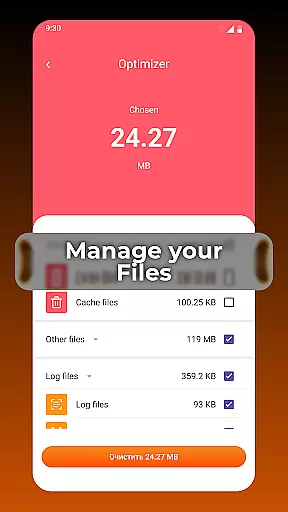
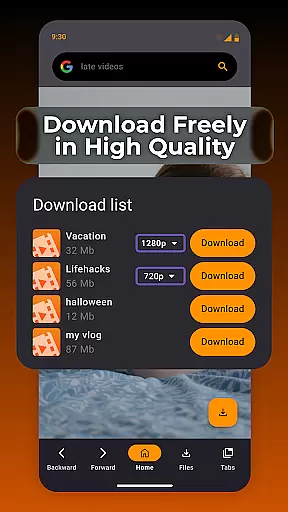
Key features include Private Browsing Mode, which protects user privacy by not storing history, and Easy Video Downloads, allowing users to save videos from supported websites directly. Additionally, the Smart File Management system helps keep device storage organized, making XPlay Browser an all-in-one solution for web browsing and media management.
This app is ideal for users who prioritize speed, privacy, and offline video access. Whether you're streaming content or managing files, XPlay Browser delivers a convenient and secure experience tailored to enhance productivity and entertainment.
XPlay Browser stands out with its comprehensive set of features tailored for modern users. The app's Fast & Smooth Browsing capability ensures quick page loads and flawless performance, even on older devices. Its clean UI and instant navigation make everyday browsing comfortable and efficient.
Privacy is a top priority, and XPlay Browser's Private Browsing Mode offers a secure environment by not storing any history and using only essential permissions. This feature is perfect for confidential sessions where security matters most.
Another highlight is the Easy Video Downloads functionality, enabling users to save videos from supported websites without needing extra apps. Combined with Smart File Management, which helps organize and maintain files, XPlay Browser provides a complete package for both browsing and media management.
Video format compatibility is a crucial feature for any video player, ensuring that users can enjoy content in various formats without technical barriers. XPlay Browser excels in this area by supporting an extensive range of video formats, making it versatile and user-friendly.
The browser's advanced decoding capabilities allow it to handle both common and less popular video formats seamlessly. Whether you're streaming online or playing locally stored files, XPlay Browser ensures smooth playback without the need for additional plugins or converters.
For users, this means unparalleled flexibility in consuming video content. You can download videos from supported websites and watch them offline, knowing that XPlay Browser will support the format you've downloaded. This eliminates the frustration of encountering unsupported files and enhances your overall browsing experience.
Moreover, the inclusion of smart file management tools helps maintain an organized library of videos, regardless of their format. By highlighting unnecessary items and keeping storage efficient, XPlay Browser not only plays videos but also manages them effectively, providing a comprehensive solution for all your video needs.
AI-powered editing features are revolutionizing how users interact with multimedia content, offering intuitive tools that simplify complex tasks. XPlay Browser incorporates these cutting-edge features to provide users with powerful video editing capabilities directly within the app.
One standout feature is the automatic video enhancement tool, which uses AI algorithms to optimize video quality. This includes adjusting brightness, contrast, and color balance to ensure that every video looks its best. Users no longer need to rely on external software for basic edits; everything can be done effortlessly within XPlay Browser.
In addition to visual enhancements, the browser offers intelligent cropping and trimming functions. These tools analyze video content to suggest optimal cuts and adjustments, streamlining the editing process. This is particularly useful for creating concise clips or preparing videos for social media sharing.
By integrating AI-powered editing features, XPlay Browser not only enhances the viewing experience but also empowers users to become creators. The combination of fast browsing, secure private mode, and robust editing tools makes it a versatile choice for anyone looking to engage more deeply with digital content.
Fast browsing speed
Private browsing mode
Easy video downloads
Smart file management
Lightweight design
Limited video support
No advanced privacy
Few customization options
Basic file tools
Occasional bugs

Client application for NextPVR software
 3.00
3.00
Watch full episodes of your favorite Cartoon Network and Cartoonito shows!
3.50
Snaptubè Video Downloader app allows to download videos and music in Snaptube. .
4.60
Turn your phone into a wireless camera!
4.20
Powerful Video Editor & Photo Editing App —— Quick Edits & Stunning Effects!
4.30
Watch IPTV on your Android device
4.60
Flud is a simple and beautiful BitTorrent client for Android.
4.80
Web Browser for LG TV to stream webvideos, online movies and livestreams in HD
4.20
Make videos you’re proud to share with Edits, a video editor for creators.
4.70
Pro video editor app for Instagram, edit video with song, AI, effect & slowmo.
4.80
?100% FREE! Download & save videos? safely in this app. All formats supported.
4.60
Watch a large amount of high-definition short drama content
4.60
Auto video maker with music & exclusive filters. Video editing made simple.
4.50
Fast & Private HD Video Downloader with Built-in Proxy Browser and Video Player.
4.50
Movie maker & video editing app with AI effects and green screen
4.30
Make your own Animations, Video and Photo Edits, Visual Effects, and more!
4.00
Capture images & record videos for USB Camera, Webcam, Microscopes, Endoscopes
3.80
Livestream, news, & gaming content. Watch, chat, and upload. Join Rumble today!
3.80
A full editing room to accompany your Insta360 cameras and handheld gimbals.
3.30


User Reviews