
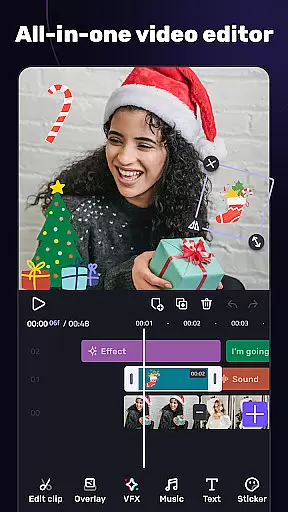
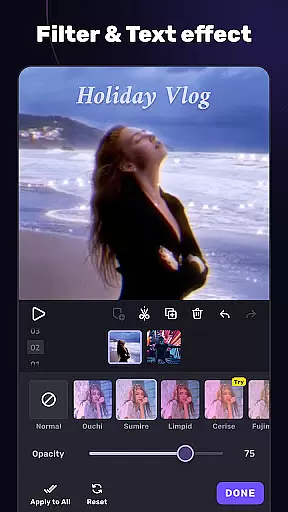
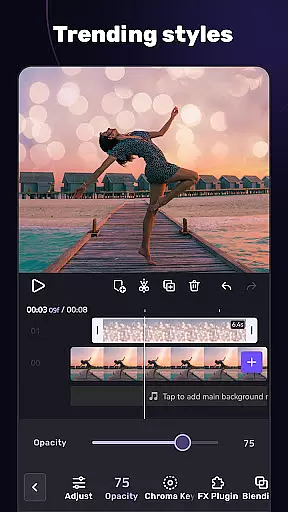
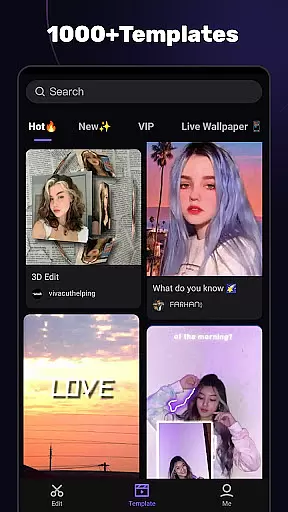
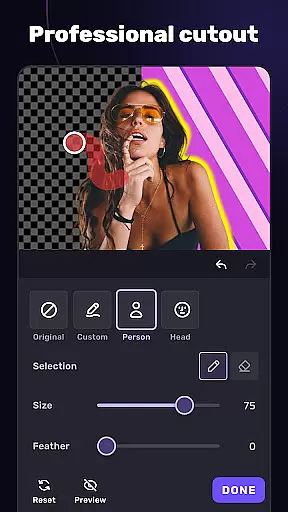
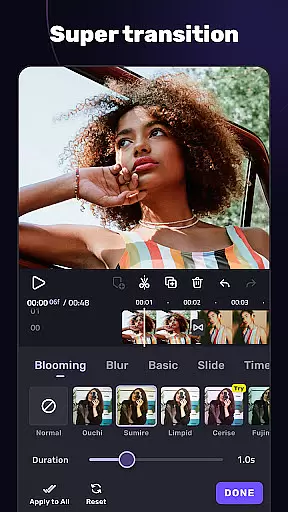
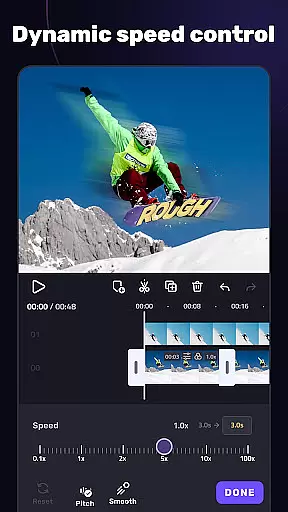
VivaCut is a versatile video editing app that combines professional-grade features with user-friendly tools, making it suitable for both casual creators and advanced video editors. The app offers a comprehensive suite of editing capabilities including multi-layer timelines, chroma key effects, and precise trimming tools.
With its advanced features like keyframe animation, picture-in-picture, and customizable overlays, VivaCut allows users to create Hollywood-level videos. The app also provides a rich selection of filters, transitions, and glitch effects, enabling content creators to produce visually stunning videos for platforms like YouTube, Instagram, and TikTok.
Whether you're looking to make short videos with ready-made templates or dive deep into detailed editing, VivaCut caters to various needs. Its ability to export videos in resolutions up to 4K ensures high-quality output, while the intuitive interface makes video creation accessible to everyone.
VivaCut stands out with its extensive feature set tailored for modern video creators. The app includes basic editing tools such as trimming, splitting, and combining clips, along with more sophisticated options like speed control and text customization. These features ensure precision and creativity in every project.
For advanced users, VivaCut offers professional tools like green screen effects, mask animations, and blending modes. The keyframe animation feature allows detailed control over video elements, while the picture-in-picture functionality lets users layer videos seamlessly. Additionally, the app's audio tools, including music markers and audio extraction, enhance the overall production quality.
The app also excels in providing trendy music and transition effects. Users can apply cinematic filters, glitch effects, and rhythmic transitions to give their videos a contemporary edge. With one-click sharing options to social media platforms and customizable export settings, VivaCut streamlines the process from creation to distribution.
Video format compatibility is a crucial feature for any video editing application, ensuring that users can work with a wide range of video files without conversion hassles. AI Video Editor supports an extensive array of formats, allowing creators to import and export videos in resolutions up to 4K. This versatility ensures that whether you're editing footage from a professional camera or a smartphone, the app maintains the original quality while offering flexibility in project requirements.
The app's dedication to comprehensive format support extends to its rendering options. Users can customize video resolution settings, choosing between standard HD, Full HD, or Ultra HD outputs. This means your final product can be tailored for various platforms, from mobile-optimized social media clips to high-definition YouTube uploads. The ability to adjust these settings empowers content creators to optimize file sizes without compromising visual fidelity.
Furthermore, AI Video Editor incorporates advanced encoding technologies that preserve color accuracy and dynamic range during the export process. This attention to detail guarantees that your carefully crafted color grades and visual effects translate accurately across different devices and viewing environments. Such commitment to technical excellence makes the application suitable for both casual editors and professionals who demand precise control over their video output parameters.
By supporting industry-standard formats alongside emerging codecs, the app future-proofs your projects while maintaining backward compatibility. This strategic approach to format inclusion enables seamless collaboration with other video production tools and simplifies integration into professional post-production workflows. The result is an editing experience that removes technical barriers, letting creators focus on their artistic vision rather than worrying about file compatibility issues.
AI-powered editing features represent a significant advancement in video editing technology, transforming how creators approach their projects. AI Video Editor harnesses artificial intelligence to streamline complex editing tasks, making professional-grade results accessible to users of all skill levels. The app's intelligent algorithms automatically analyze footage, suggesting optimal cuts, transitions, and effects based on content analysis and established cinematic principles.
One of the standout AI capabilities is the smart scene detection system, which accurately identifies shot boundaries and suggests natural transition points. This feature saves considerable time during the initial assembly phase, particularly when working with lengthy recordings. Additionally, the AI-driven audio synchronization tool precisely aligns visual elements with soundtracks, creating perfectly timed music videos or dialogue sequences without manual adjustments.
The application also incorporates machine learning models trained on professional editing patterns, enabling automated color grading that adapts to different lighting conditions and moods. These intelligent presets go beyond basic filters, analyzing each frame's composition and adjusting parameters to enhance visual storytelling. Furthermore, the AI-powered stabilization feature corrects shaky footage while preserving natural motion, delivering smooth results without the artificial warping often associated with traditional stabilization methods.
Perhaps most impressively, the app's AI assistant provides real-time creative suggestions throughout the editing process. From recommending complementary visual effects to optimizing export settings based on intended platform requirements, this virtual collaborator helps users make informed decisions while maintaining creative control. These sophisticated AI-powered tools collectively elevate the editing experience, combining technological innovation with artistic expression to produce exceptional video content efficiently.
User-friendly interface
Advanced editing tools
High-quality export options
Rich filter and effect library
One-click social sharing
Paid subscription model
Complex for beginners
Limited free features
Occasional bugs reported
Resource-intensive

Watch full episodes of your favorite Cartoon Network and Cartoonito shows!
 3.50
3.50
This app was created to edit the metadata of music files.
4.20
KMPlayer Plus (Divx Codec) officially support Divx codec.
4.30
Mix with Virtual DJ directly from your phone or tablet !
3.10
Connect EasyCap or UVC devices for recording and broadcast video/audio stream
3.60
Watch IPTV on your Android device
4.60
Browser for Fire TV to stream webvideos, online movies, livestreams in HD
4.40
Fast private browser with secure, seamless access & supported video downloads!
4.00
Video&Drama Player All Format is a HD video player, music player
3.00
An easy-to-use and all-round screen recorder with audio
4.80
Video Trimmer, Video to MP3 Converter. Extract music from video, Easy & Fast.
4.80
Cast Videos from Web Browser, IPTV to Roku, Chromecast, DLNA, Smart TV +more
4.60
Cast to Chromecast, Xbox, Fire Stick, Roku, DLNA, Smart TV & No Feature Limited!
4.50
Download website videos fast&privacy
4.40
Livestream, news, & gaming content. Watch, chat, and upload. Join Rumble today!
3.80
Download videos easily & play them all in one smart, powerful video manager.
3.40
A full editing room to accompany your Insta360 cameras and handheld gimbals.
3.30
IPTV Player - Watch live TV from m3m & m3u8 playlist, stream IPTV on mobile
3.30
Stream high quality video from your camera over NDI protocol
4.5


User Reviews