
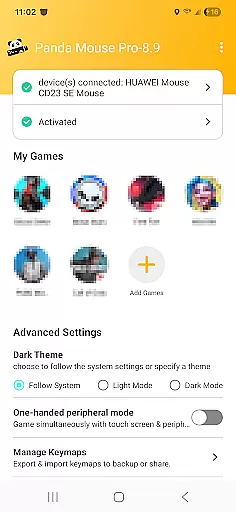
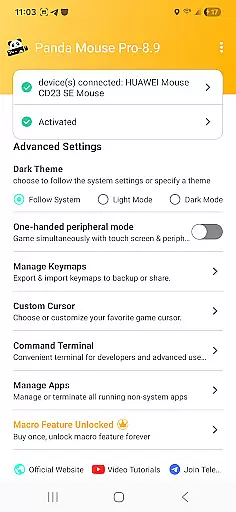
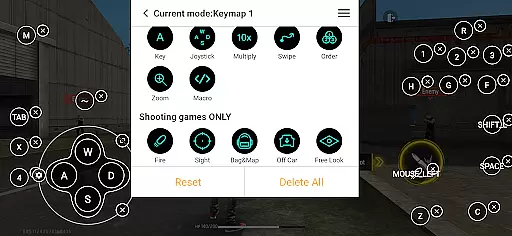
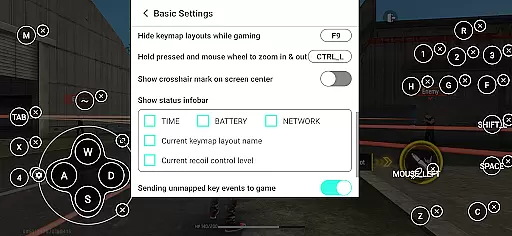
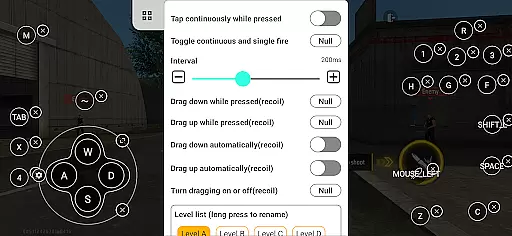
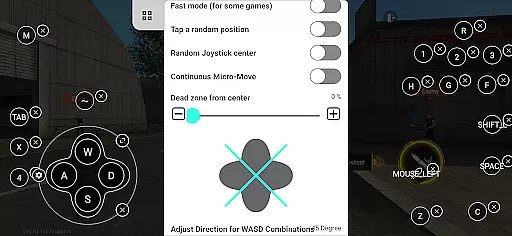
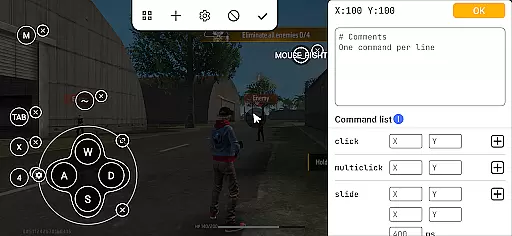
Panda Mouse Pro is a powerful keymapper tool designed to revolutionize mobile gaming by enabling gamers to use keyboard and mouse controls. This app bridges the gap between PC-like precision and mobile gaming, offering features such as direct game launch, secure Google Play login, and ban-proof technology that ensures uninterrupted gameplay. With extensive compatibility across devices and game genres, Panda Mouse Pro provides an edge in competitive gaming environments.
The app supports virtually all keyboard and mouse brands, making it versatile for different setups. Whether you're into shooters, MOBAs, or sports games, Panda Mouse Pro enhances control and accuracy. Its user-friendly activation process accommodates various Android versions and rooted devices, ensuring a smooth experience for all users.
Panda Mouse Pro stands out with its innovative features tailored for modern mobile gamers. The direct game launch functionality eliminates the need for cloning apps, allowing players to jump straight into their favorite titles. Secure Google Play login ensures your account remains protected while enjoying enhanced gameplay.
Ban-proof technology is another highlight, giving peace of mind to gamers concerned about restrictions on duplication running. The app's universal compatibility means it works seamlessly with any keyboard and mouse brand, while its extensive game support covers multiple genres. Additionally, the hassle-free activation options cater to different Android versions and rooted devices, providing flexibility and convenience.
Panda Mouse Pro is designed to provide unparalleled precision and control for mobile gaming using keyboard and mouse setups. The core functionality revolves around its ability to map keyboard keys and mouse actions to touchscreen inputs, allowing gamers to execute complex maneuvers with ease.
The app supports a wide range of games including shooters, MOBAs, and sports games, ensuring that users can enjoy an authentic PC-like gaming experience on their mobile devices. With direct game launch capabilities, players can jump straight into the action without any cloning hassles, enhancing both convenience and gameplay fluidity.
One of the standout features is its ban-proof technology which ensures that users can play without the fear of being banned due to duplication running restrictions in certain games. This gives gamers peace of mind while they focus on honing their skills and dominating the competition.
The interface of Panda Mouse Pro is crafted to be user-friendly and intuitive, making it accessible even for those who may not be tech-savvy. Upon launching the app, users are greeted with a straightforward setup process that guides them through connecting their keyboard and mouse.
With extensive compatibility across various brands of input devices, setting up is hassle-free and quick. Whether you're using Android 11+ or earlier versions, activation processes are streamlinedu2014be it directly on your device, via PC or Mac, or automatically if your device is rooted.
Additionally, Panda Mouse Pro offers video tutorials and comprehensive guides available at https://www.youtube.com/@0xgary and https://pandagame.app/a respectively, ensuring users have all the resources needed to make the most out of this powerful tool. These educational materials further enhance the overall intuitiveness of the application.
Enhanced precision
Secure login
Ban-proof technology
Universal compatibility
Extensive game support
Requires setup time
Premium pricing
Device compatibility issues
Limited touchscreen use
Learning curve

Learn the vast amount of system information about device and monitor it's state
 4.70
4.70
Optimize your WiFi network, turn your phone into Wifi Analyzer
4.70
ADB support Android 4.X-Android 13(Support wireless pair mode).No root required!
4.70
Signal Strength, Mobile, Wifi, Speed Test, Bad Signals, Cellular, 5G, LTE, 4G
4.20
The Ultimate Flex Drivers Utility App - Convenient Tapping & Block Filters
4.70
NFC Tools can read and write NFC tags.
4.70
Pro Emulator is an easy to use game console emulator for a range of consoles.
4.40
Clean up large files and similar photos, fast and easy to use
4.40
Clean up your phone, find files, play media, and share files offline
4.50
Powerful collection of electronics tools and reference.A must for any enthusiast
4.90
The ultimate tool for network analysis, wifi scanning and problem detection.
4.90
Monitor car performance in real time and troubleshoot malfunctions.
4.80
Head tracking for PC sim games such as MSFS 2024 or Elite:Dangerous. No headset!
4.50
Screen Mirroring for Roku Sticks, Roku TCL TV and Roku Hisense TV
4.50
Forza Tuning Calculator App for Forza Horizon 5, Motorsport and Earlier Titles
4.40
Remote for Roku, Fire TV, Samsung TV, LG TV, Android TV, Chromecast and VIZIO TV
4.20
Family Locator, Share location, StayConnect with your family in real time
3.90
Safely recover deleted photos, videos, and files with a single easy tap.
3.70
A recovery soft,it features photo recovery, video recovery, file recovery.
3.40


User Reviews