
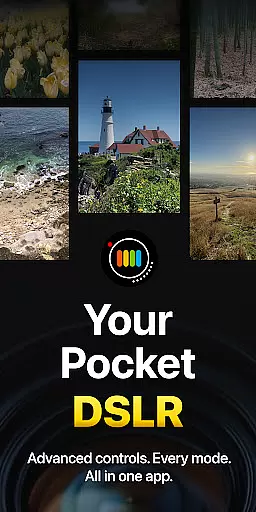
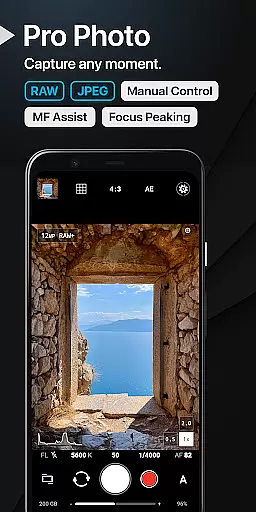
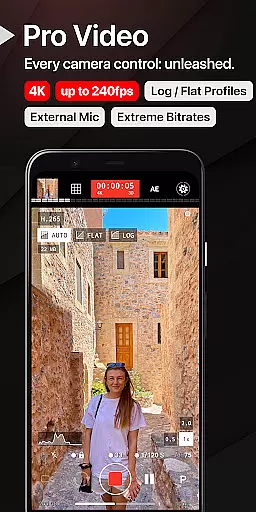
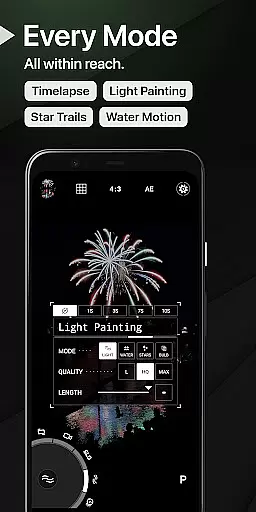
ProShot is a professional-grade photography and filmmaking application designed for Android users who demand full control over their mobile photography experience. This app offers an extensive range of manual controls akin to those found in DSLR cameras, including ISO, shutter speed, white balance adjustments, and more. It supports various shooting modes such as Auto, Program, Manual, and Custom, alongside advanced features like RAW (DNG) capture, HEIC support, and Light Painting modes.
The app's interface is crafted to ensure ease of use while providing powerful tools for both amateur and professional photographers. With capabilities such as Bulb mode for astrophotography, timelapse functionality, and up to 8K video recording with extreme bitrate options, ProShot caters to diverse photographic needs. Its privacy-conscious design ensures that no personal data is collected or transmitted, making it a secure choice for capturing images and videos.
ProShot stands out with its comprehensive feature set tailored for photography enthusiasts. The Dual Dial system allows swift navigation through camera settings, while the app's dedication to privacy reassures users about their data security. Video features are equally impressive, offering all photo mode controls within video mode, supporting up to 8K resolution, LOG and FLAT color profiles, and real-time audio level monitoring.
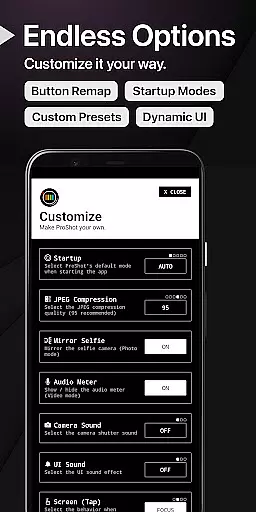
Additional functionalities include customizable accent colors, focus peaking, histogram display, and zero-lag bracket exposure. Users can also enjoy seamless integration of the camera roll into the viewfinder, adjustable JPEG quality settings, and shortcuts for essential functions like GPS and screen brightness. The customization panel lets users tailor the app to their preferences, from startup modes to filename formats, ensuring a personalized experience.
Real-time capture and preview functionality is essential for photographers who need to see exactly what their camera is capturing before taking the shot. ProShot offers a sophisticated real-time viewfinder that mirrors the DSLR experience, providing users with an accurate representation of their scene.
The app leverages advanced camera2 API capabilities to ensure minimal lag between the action and what you see on your screen. This immediacy allows users to make precise adjustments to settings such as exposure, focus, and white balance, ensuring every photo or video reflects their creative vision.
With features like manual focus assist and focus peaking with customizable color, ProShot enhances the precision of real-time adjustments. Users can zoom up to 10x using just one finger, offering unprecedented control over composition and framing.
This level of responsiveness and accuracy in real-time capture not only saves time but also significantly improves the quality of the final image or footage, making it an indispensable tool for both amateur and professional photographers.
While ProShot does not specifically market itself with AI beauty enhancements, its robust feature set provides users with tools that allow for natural-looking enhancements. The emphasis on manual controls means photographers have the power to adjust elements like tone mapping, sharpness, and noise reduction to enhance images without compromising their authenticity.
ProShot's ability to shoot in RAW (DNG), JPEG, or RAW+JPEG formats gives photographers flexibility in post-processing. This ensures that any enhancements made are done so with high fidelity to the original scene, maintaining the natural aesthetics of the captured moment.
Additionally, options such as adjustable frame rates and LOG/FLAT color profiles for video contribute to a more dynamic range, allowing creators to produce content that retains its natural qualities even after editing.
By prioritizing user control and offering industry-standard tools, ProShot empowers photographers to create stunning visuals that remain true to life, thus achieving enhancement naturalness through skilled craftsmanship rather than automated processes.
Full manual controls
Privacy-focused design
Advanced video capabilities
Customizable user interface
Comprehensive feature set
Steep learning curve
High system requirements
Limited free features
No built-in editor
Premium price tag

How would you look like with a differently shaped nose, chin or lips?
 3.90
3.90
Add Watermark - Sign your pictures with a text or logo. Effective, quick, easy!
4.50
1M influencer's special filter
4.60
Application for remote controlling DSLR
3.00
HD Camera Pro with HD Video shooting, Panorama, Photo editor , Beauty Camera.
4.50
Create AI photos & videos with Enhancer; restore, fix, beautify, enhance photos
4.50
Turn photos into cartoons & avatars! - Photo Editor, Cartoon Face!
3.90
Pro version: AR sun/moon tracker for any date. Tool for photographers & planners
4.90
Snap photos remotely using your Garmin watch as the camera trigger
4.0
Photo editor: AI filters, photo enhancer, pic collage maker, AI art generator.
4.80
PhotoSync Bundle Add-On License. Enables all features and services in PhotoSync.
4.60
Movie camera, supports pro recording settings for filming. Try it and be amazed!
4.50
Trendy TikTok time warp scan funny filter app brings you unique photos & videos.
4.40
Edit like a pro with Hypic. Apply filters, AI effects, & magic touch.
4.40
AI portrait generator and polaroid AI selfie, fun AI generated AI photo creator!
4.30
Turn your phone into a professional camera - full DSLR manual photography
4.30
Smart, light, and fast photo and video gallery
4.30
Professional camera app that brings DSLR manual photography controls to Android.
4.20
Photobooth mini FULL app will allow you to add more fun to your parties
4.00


User Reviews