
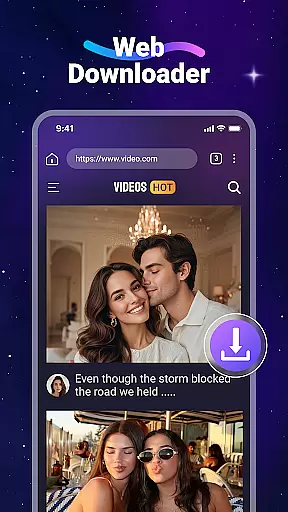



Video Downloader is a versatile utility app designed to help users download videos and music from websites directly to their devices. With this app, you can access your favorite content offline without worrying about internet traffic. The app supports all major file formats including MP4, AVI, and PDF, making it an ideal tool for both entertainment and productivity.
The application features a built-in web browser that automatically detects downloadable video content on web pages. It also includes a dedicated media player for offline playback, ensuring seamless viewing experiences. Whether you're commuting or traveling, Video Downloader allows you to enjoy videos anytime, anywhere. Its support for SD cards provides additional storage flexibility, while background downloading ensures uninterrupted usage.
This app is particularly useful for users who frequently consume online video content but face connectivity issues or want to save data. By enabling offline access to videos and music, it offers significant convenience and cost savings. However, users should be mindful of copyright restrictions and ensure they have proper permissions before downloading content.
Video Downloader stands out with its comprehensive feature set tailored for efficient media management. The app's built-in browser not only allows users to surf the web but also automatically identifies downloadable video content, streamlining the acquisition process. This functionality is complemented by robust format support, accommodating various file types such as MP4, AVI, and PDF.
One of the standout features is the ability to download videos in the background, allowing users to multitask without interrupting their downloads. The app also supports SD cards, providing expanded storage options for users with limited device memory. Additionally, the bookmarking feature enables quick access to favorite websites, enhancing user convenience.
The integrated media player ensures smooth offline playback of downloaded videos, eliminating the need for third-party applications. While the app doesn't support YouTube downloads due to service restrictions, it remains compatible with numerous other platforms like Instagram and Facebook. These features collectively create a powerful tool for managing and enjoying digital content across different scenarios.
Video Downloader stands out for its extensive video format compatibility, ensuring that users can download and play videos in a wide array of formats without any hassle. This feature is crucial for users who frequently download content from various sources, as it eliminates the need for additional conversion software.
The app supports all major formats including mp3, m4a, mp4, m4v, mov, avi, wmv, and more. This versatility allows users to enjoy their favorite content in the best possible quality, whether they are downloading music, movies, or other video content.
Moreover, Video Downloader's ability to handle different file types extends beyond just video and audio files. It also supports documents such as PDFs, DOCs, and XLSs, making it an all-in-one solution for downloading and managing digital content on your device.
By offering comprehensive format support, Video Downloader ensures that users have a seamless experience when accessing their downloaded files, regardless of the original source or intended use.
While Video Downloader primarily focuses on providing a robust platform for downloading videos and music, it also incorporates AI-powered editing features that enhance the user experience. These features allow users to make quick edits to their downloaded content, such as trimming clips or adjusting audio levels, directly within the app.
The built-in editor is designed to be intuitive and easy to use, catering to both beginners and more experienced editors. With AI assistance, users can achieve professional-looking results without needing extensive knowledge of video editing techniques.
Additionally, the app's AI capabilities extend to its download management system, where it intelligently organizes and categorizes downloaded files. This smart organization helps users quickly locate and manage their content, streamlining the overall workflow.
By integrating these advanced AI-powered tools, Video Downloader not only simplifies the process of acquiring digital content but also empowers users to refine and customize their media library with ease.
User-friendly interface
Fast download speeds
Wide format compatibility
Background downloading
Built-in media player
No YouTube support
Copyright limitations
Requires permissions
Limited official integration
Potential legal risks

Your media, on your terms.
 4.10
4.10
Tik & Story Saver-Download ALL social media videos, photos & reels no watermark.
4.80
Powerful HD video player with support for all formats & subtitles.
4.5
Capture images & record videos for USB Camera, Webcam, Microscopes, Endoscopes
3.80
Turn your phone into a wireless camera!
4.20
Video Downloader, Multiple Resolution Options, Video Player
4.50
Make your own Animations, Video and Photo Edits, Visual Effects, and more!
4.00
This app is an emulator of some specific IPTV boxes
3.50
convenient, safe and fast at Video Downloader & Player
4.60
Download Hub, easy and private way to download and enjoy your videos offline
4.80
Download videos and play them offline
4.70
Search & download videos from net with all video downloader, auto-detect & safe.
4.60
Watch IPTV on your Android device
4.60
Full HD Video mp3 Player, MP4 player play 1080p, File manager, Video Downloader
4.40
Browser for Fire TV to stream webvideos, online movies, livestreams in HD
4.40
1)AirPlay/DLNA Mirroring/Streaming, up to 4 connections; 2)Samba/NAS/DMS Player.
4.00
Kodi media center, a free and open source cross-platform entertainment hub
3.60
Download videos easily & play them all in one smart, powerful video manager.
3.40
You can play SWF format file!
2.50


User Reviews