
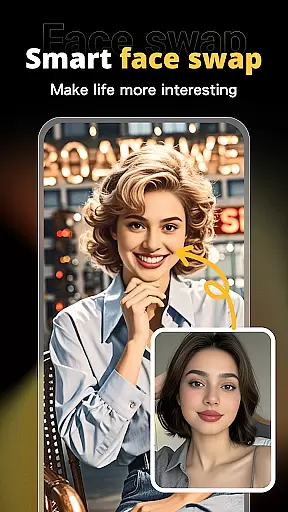
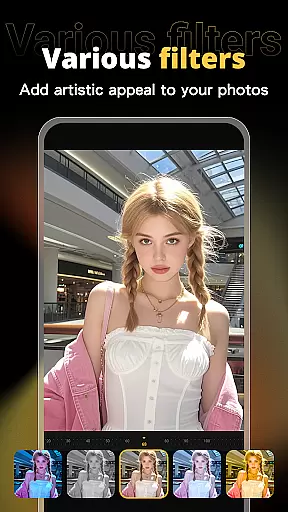



X PhotoKit is a versatile photo editing app that empowers users with creative tools like AI face swapping, photo editing, collage creation, and templates. Designed for both casual and professional use, it offers an intuitive platform to enhance photos and create unique visual content anytime, anywhere.
The app features advanced AI algorithms for seamless face swaps, a comprehensive suite of editing tools, and pre-designed templates for various occasions. Whether you're looking to beautify personal portraits or create professional-quality posters, X PhotoKit provides the resources to achieve stunning results effortlessly.
X PhotoKit stands out with its powerful yet easy-to-use features tailored for photography enthusiasts. The AI Face Swap tool uses intelligent algorithms to replace faces in images while maintaining natural effects, making it ideal for fun social media content or creative projects.
In addition to face swapping, the app includes robust photo editing capabilities such as filters, effects, and adjustment tools. Users can also explore built-in templates for posters, collages, and image stitching options, which are perfect for crafting panoramic visuals or combining multiple photos into cohesive designs.
Designed for simplicity and functionality, X PhotoKit caters to all skill levels, ensuring everyone from beginners to professionals can produce high-quality edits without needing extensive technical knowledge.
Real-time capture and preview functionality is essential for ensuring that every photo taken meets the user's expectations without delay. X PhotoKit offers a seamless experience by providing instant feedback on images as they are captured, allowing users to make immediate adjustments.
This app employs advanced processing capabilities to render edits and effects live, so users can see exactly how their final image will look before pressing the shutter button. This feature not only saves time but also enhances the creative process by letting photographers experiment with different settings.
With real-time previews, users can fine-tune their compositions using various filters, exposure settings, and AI-driven enhancements directly within the viewfinder. This ensures that even amateur photographers can achieve professional-looking results with minimal effort.
The ability to visualize changes instantly empowers users to take full control of their photography projects, whether it's for social sharing or creating detailed travel memories. By delivering accurate representations of the final product during capture, X PhotoKit elevates the standard of mobile photography.
AI beauty and enhancement features have become a cornerstone of modern photo editing, offering users the ability to refine and perfect their images with natural-looking results. X PhotoKit leverages sophisticated AI algorithms to enhance facial features while maintaining authenticity.
The application intelligently identifies facial landmarks and applies subtle modifications that highlight natural beauty without appearing artificial. Users can adjust skin tone, smooth imperfections, and enhance eye details with precision, ensuring each edit complements the original photo.
What sets X PhotoKit apart is its commitment to preserving the unique characteristics of each individual. The AI-driven tools adapt to different skin types and lighting conditions, delivering consistent quality across diverse scenarios from personal portraits to commercial designs.
By focusing on natural enhancement, this app caters to both casual users looking to beautify social media posts and professionals seeking high-quality retouching options. With X PhotoKit, achieving stunning yet believable photo edits has never been more accessible.
User-friendly interface
Advanced AI technology
Variety of templates
Comprehensive editing tools
Creative collage options
Limited free features
Occasional ads
Premium subscription required
High system requirements
Learning curve for new users

All-in-One Editor & AI Photo Enhancer, Beautify & Retouch, Collage, Cartoonify
 4.20
4.20
Search, tag and rate your way to an organized image gallery
4.40
Edit like a pro with Hypic. Apply filters, AI effects, & magic touch.
4.40
Be your best in every shot! Fix, edit and retouch your face in selfies & photos.
3.70
Take videos and pictures with the popular TikTok TIME WARP SCAN filter.
4.60
The #1 app for B&W film developing featuring an advanced darkroom timer.
4.10
AI Photo Editor with 100+ Filters, Effects! Remove BG, Retouch & Photo Enhancer.
4.80
Turn photos into cartoons & avatars! - Photo Editor, Cartoon Face!
3.90
Remote control the phone camera shutter from your smartwatch and take a picture
1.60
A collection of tools and reference tables for DPs, ACs, DITs and Operators.
4.70
Create Business Headshots, Polaroid Filter, Retake Photos,Profile Pics,AI Photos
4.50
RAW video capture with advanced controls
4.40
[3DSteroid Pro] is a stereoscopic application for Android.
4.30
Create AI Photos, Improve and restore quality of blurry, old or damaged pics.
4.20
Professional camera app that brings DSLR manual photography controls to Android.
4.20
Gallery Slideshow is slideshow maker app for slideshow from your gallery photos.
3.90
GCamera allows all GCam features on all phone models! Better photos with GCamera
3.30
An interval timer to automate photo taking process for timelapse
2.90
Raw Image Viewer. Gallery with support of raw images (.cr3, .cr2, .nef, .raf).
2.00


User Reviews