
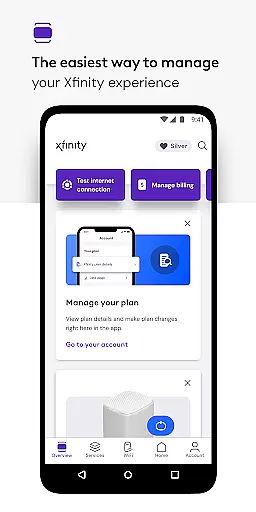
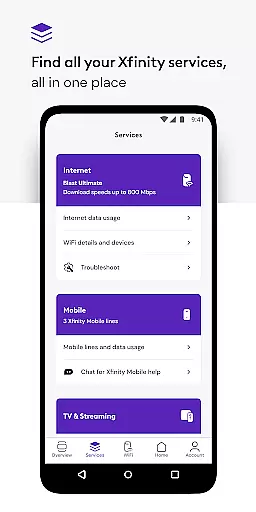
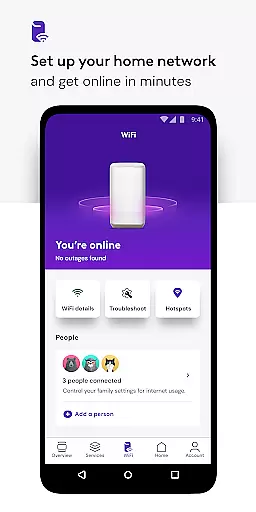
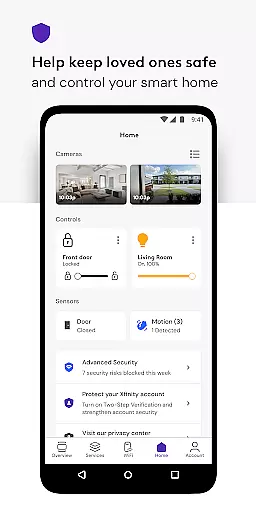
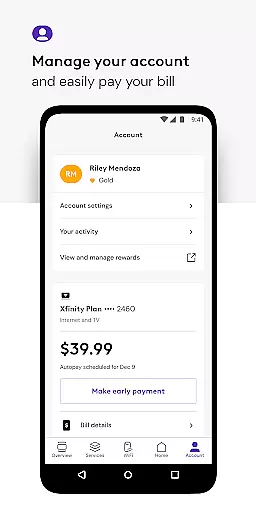
Xfinity offers a comprehensive productivity solution by consolidating internet, mobile, and account management into one app. The platform introduces NOW, a simplified approach to obtaining essential services with transparent pricing. Xfinity's app provides users with tools for seamless equipment activation, real-time support, and internet speed testing.
For customers who rent equipment, the app extends functionalities like personalized WiFi performance tips, parental controls, and advanced security features both at home and on-the-go. These capabilities ensure a safe and optimized digital environment for all users. With an intuitive interface and robust features, Xfinity enhances both connectivity and control.
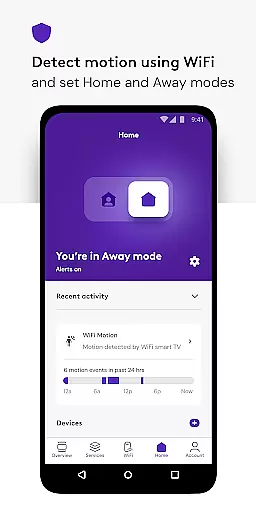
The Xfinity app is packed with features designed to enhance user productivity and connectivity. One standout feature is the Advanced Security system, which safeguards devices against online threats and provides data protection when connected to unsecured networks away from home. This ensures peace of mind for users concerned about cybersecurity.
Another key feature is the suite of parental controls that allow guardians to manage browsing permissions and pause WiFi access to any device. Additionally, the app offers Xfinity Rewards, granting customers exclusive benefits and experiences. With these innovative features, Xfinity not only meets but anticipates the needs of modern households and professionals.
In today's fast-paced digital world, managing multiple tasks efficiently is crucial for productivity. The Xfinity app excels in core task management by providing users with a centralized platform to oversee all their services. This includes the ability to pay bills, review plan details, and make service changes effortlessly.
The app goes beyond basic management features by offering personalized tools that enhance user experience. For instance, customers can access tailored tips to optimize WiFi performance and ensure seamless connectivity across devices. These capabilities empower users to maintain optimal internet conditions without requiring technical expertise.
Furthermore, Xfinity integrates advanced security measures within its task management suite. Users benefit from comprehensive protection features that safeguard connected devices and offer peace of mind when browsing online. With functionalities like parental controls and secure browsing on-the-go, the app ensures a safe digital environment for families.
By consolidating these essential functions into one intuitive interface, Xfinity simplifies the complexities associated with modern digital life. Whether at home or away, customers enjoy unparalleled control over their services, making daily operations more efficient and secure.
Cross-device synchronization is a cornerstone of modern productivity applications, ensuring data consistency across various platforms. The Xfinity app delivers reliable synchronization capabilities, allowing users to seamlessly transition between devices while maintaining real-time updates and service information integrity.
This reliability extends to critical account management functions such as bill payments and service modifications. Regardless of whether customers use their smartphone, tablet, or computer, they can trust that their actions will be accurately reflected across all devices. This consistent experience eliminates potential discrepancies and enhances overall user confidence in managing their accounts.
Moreover, the app's synchronization infrastructure supports advanced features like remote WiFi management and security settings. Users can adjust network configurations or modify parental controls from any device, knowing that changes will propagate instantly throughout their digital ecosystem. This level of integration demonstrates Xfinity's commitment to providing robust cross-platform functionality.
The underlying architecture that enables this synchronization reliability also incorporates industry-leading security protocols. By implementing enterprise-grade encryption and authentication mechanisms, Xfinity ensures that sensitive customer data remains protected during transmission between devices, establishing a new benchmark for secure cross-device operations in productivity applications.
User-friendly interface
Comprehensive security features
24/7 real-time support
Customizable parental controls
Integrated service management
Limited to Xfinity customers
Advanced features require rented equipment
Occasional service interruptions
VPN dependency for mobile security
Geographically restricted availability

A Revolutionary All-in-One Artificial Intelligence Tools
 3.80
3.80
Experience Reading - Night Mode for Documents
4.40
The upgraded version of Name Wheel with AI and the power to add your own wheels.
4.0
Protect and view your important info on your phone and tablet with eWallet®
4.80
Font maker keyboard with your own handwriting
4.10
Find and delete junk files & block unwanted notifications & manage files
3.70
Code on-the-go with VScode for Android. Edit,debug and collaborate from mobile!!
3.10
Docker, Kubernetes management over Portainer Mobile
4.40
* block pre-roll ads, pop-up and forced redirect ads * Samsung certification app
4.00
Seamlessly integrate data and reports to build your presentation to impress
4.80
QuickBooks Workforce lets teams view pay info and track time in one place.
4.70
Quickly and easily keep track of your work shifts
4.70
Subscribe to Webcal & .ics calendars and keep them up-to-date!
4.50 4.20
4.20
Easily read and manage all your PDF files
4.10
Smart PDF reader & editor to view, organize and manage PDF documents easily.
3.70
Remotely view listen control and record cameras.
3.70
Simple and reliable communication between inmates, friends and family
3.20
A comprehensive suite of tools designed specifically for Lactation Consultants
4.3


User Reviews