
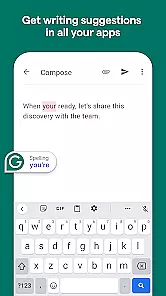
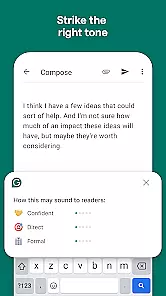
Grammarly is a productivity app designed to enhance your writing by providing real-time grammar, punctuation, and style suggestions. It functions as both a keyboard and a text editor, allowing users to write confidently across various platforms such as email, social media, and document creation.
The app's core feature is its AI-powered writing assistance that checks for errors and offers improvement suggestions. Whether you're crafting an important email or engaging in casual chat, Grammarly ensures your communication is clear, mistake-free, and professional. Its advanced algorithms adapt to your writing style over time, offering personalized recommendations.
With Grammarly, professionals, students, and casual writers can significantly improve their written communication. The app is particularly useful for non-native English speakers who want to refine their language skills while communicating online.
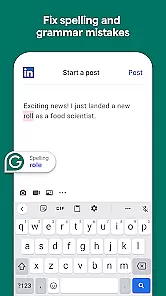
Grammarly stands out with its comprehensive set of features tailored to improve writing efficiency. The app provides real-time suggestions for grammar, spelling, punctuation, clarity, and even tone adjustments. These features work seamlessly across different applications including Gmail, Facebook, and Microsoft Office.
One notable capability is the contextual spelling checker, which catches errors that standard spell-checkers might miss. Additionally, Grammarly offers genre-specific writing style suggestions, helping users tailor their content for professional, academic, or creative purposes. The app also includes a plagiarism detection tool for premium users, ensuring originality in written work.
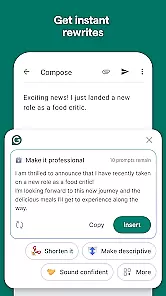
Another key feature is the ability to set writing goals based on audience, formality, and intent. This customization allows users to receive targeted suggestions that align with their specific writing objectives. With its cross-platform functionality and robust integration capabilities, Grammarly streamlines the writing process while maintaining high-quality standards.
Task management is a cornerstone of productivity applications, and Grammarly excels in this area by offering users the ability to handle writing tasks efficiently. The app provides real-time suggestions for grammar, punctuation, and style improvements, which helps users focus on their core writing responsibilities without getting bogged down by errors.
Grammarly's implementation includes an intuitive interface that highlights issues and offers one-click solutions, streamlining the editing process. This ensures that users can manage their writing tasks with minimal distraction, enhancing overall productivity.
For users, this means they can produce higher-quality content in less time. Whether drafting emails, creating reports, or engaging in creative writing, Grammarlyu2019s task management features ensure that the final text is polished and professional.
The true value lies in its seamless integration into various platforms, allowing users to apply Grammarlyu2019s task management capabilities across different writing environments, thus maintaining consistency and quality in all written communications.
Cross-device synchronization is vital for users who work on multiple devices and need their data to be consistent across all platforms. Grammarly addresses this need by providing reliable synchronization that ensures all user preferences, corrections, and custom dictionaries are updated in real time across devices.
The application employs cloud-based technology to sync user data seamlessly between the desktop app, browser extensions, and mobile keyboard. This means that whether you're switching from your computer to your smartphone, Grammarly maintains continuity in your writing process without missing a beat.
Users benefit from this feature by experiencing uninterrupted workflow and access to their personalized Grammarly settings wherever they go. This reliability fosters a dependable writing environment where users can trust that their work is always up-to-date.
Ultimately, Grammarlyu2019s cross-device synchronization stands out as a robust solution for modern writers who demand flexibility and reliability in their productivity tools, ensuring that every piece of writing is as current and refined as possible, regardless of where it was created or edited.
Accurate grammar checking
User-friendly interface
Wide app compatibility
Personalized suggestions
Real-time corrections
Premium subscription required
Limited offline functionality
Occasional incorrect suggestions
Privacy concerns with sensitive data
Resource-intensive operation

Experience Reading - Night Mode for Documents
 4.40
4.40
Total remote control for your Android device, PC and cloud services (IFTTT)!
4.20
All in one sketching tool. Technical and General drawing. Online Maps support.
3.70
8 custom complications. Custom Time Fonts. Beautiful color schemes. A++ Design.
5.00
Android Wallet Password Manager
4.80
Send files, sync SMS, notifications & clipboard across devices via local network
4.40
All in One PDF Reader: Manage, Read and Edit your Documents
4.20
Browse and view your photos and videos from the phone with photo & video hide.
4.10
QuickEdit is a fast, stable and full featured text and code editor.
4.20
Best Tool for the professionals Electrician, Electrical contractors, etc.
4.90
Calendar 2023 widget for Android. Appointment scheduler, planner, and reminder
4.60
Secure, fast, open-source, Remote Desktop Client for Windows and Linux with SSH
4.60
Secure your apps with lock screens, use custom themes and different features.
4.40
When you Focus, so will your Bean in this cozy focus timer
4.30
Cloud storage, automatic phone backup, and more.
4.10
Access your phone's notifications, calls, apps, photos & texts on your PC
3.90
Mega cloud explorer plugin for Solid Explorer
3.80
Auto-shutoff Alarm with Sunrise, Sunset & Fixed Options.
3.50
The upgraded version of Name Wheel with AI and the power to add your own wheels.
4.3


User Reviews