
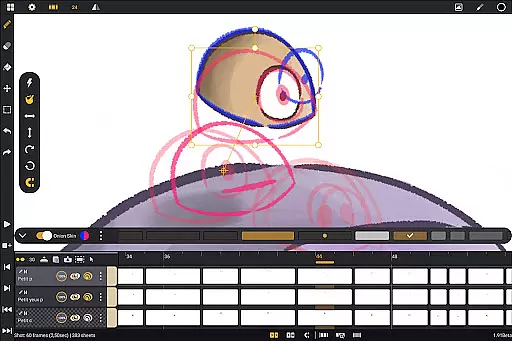
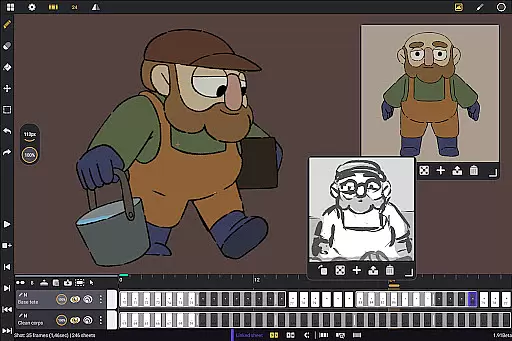
Callipeg is a professional-grade 2D hand-drawn animation app tailored for both professional animators and beginners. It offers all the essential tools of a full-featured animation studio on your Android device, optimized for tablets with stylus support. The app provides an intuitive interface with features like studio-like organization, adjustable frame rates up to 60 FPS, and canvas sizes up to 4K resolution.
With unlimited layer support, users can import images, video clips, and audio files for advanced techniques such as rotoscopy or lip-syncing. Callipeg also includes comprehensive drawing tools, onion skinning, customizable workspaces, and flexible import/export options in multiple formats including .mp4, .gif, and .psd. These features make it ideal for creating storyboards, feature-quality animations, or simple sketches.
Callipeg stands out with its robust set of features designed for professional animators. One key highlight is its studio-like organization system, allowing users to arrange shots by dragging and dropping them into scenes and folders. Color tags and filters help manage assets efficiently, while the integrated search function ensures quick access to specific shots.
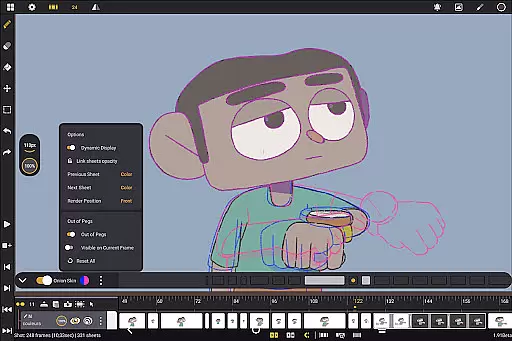
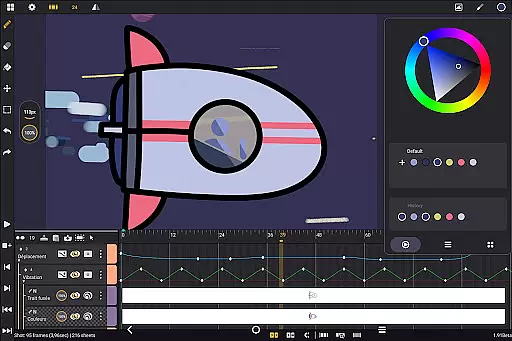
The app supports unlimited layers of various types, including drawing, video, transformation, audio, and group layers. Its drawing tools include a versatile brush set with customizable smoothing, tip shapes, and textures. Onion skinning displays up to eight frames before and after the current frame, with adjustable opacity and color settings. Additionally, users can customize their workspace by switching between right- and left-handed interfaces, positioning sidebars, and importing reference images.
Export flexibility is another major advantage, with support for multiple formats such as .mp4, .gif, .png, and industry-standard project files like .json and .xdts. This ensures seamless integration with other software used in professional workflows.
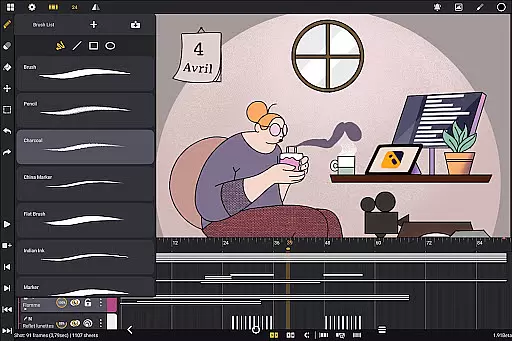
In the realm of 2D animation, having access to a comprehensive suite of creative tools is essential for producing high-quality work. Callipeg offers an all-in-one solution that caters to both professional animators and beginners alike. The app provides a versatile brush set including pencil, charcoal, ink, and more, allowing users to customize brushes' smoothing, tip shape, and texture.
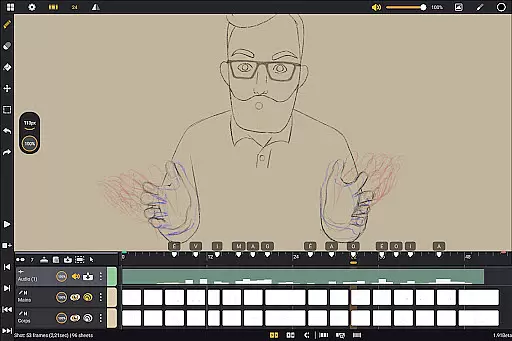
Callipeg's feature set extends beyond just drawing tools. It supports unlimited layers of various types such as drawing, video, transformation, audio, or group layers. This enables creators to import images, video clips, and audio files for advanced techniques like draw-over, rotoscopy, or lip-syncing. With adjustable frame rates and canvas sizes up to 4K, the app meets professional standards while offering flexibility in project settings.
The inclusion of onion skinning with adjustable opacity and color settings for up to eight frames before and after the current frame ensures precise control over animations. Additionally, customizable workspace options allow users to switch between right- and left-handed interfaces, position sidebars as preferred, import unlimited reference images, and invert the canvas to check proportions.
By providing these robust features in a single package, Callipeg empowers animators to execute their vision without limitations. Whether working on feature-quality shots or simple rough sketches, users can rely on Callipegu2019s complete toolkit to support every step of their creative process.
Flexibility in canvas size and format compatibility is crucial for animators who need to adapt their work across different mediums and resolutions. Callipeg addresses this need by offering a large canvas size that supports up to 4K resolution, ensuring that animations meet professional standards regardless of the output requirements.
Beyond its expansive canvas capabilities, Callipeg allows users to export their animations in multiple formats such as .mp4, .gif, .png, .tga, .psd, and .peg. This versatility ensures that projects can be shared or integrated into other workflows seamlessly. Import and export functionalities also extend to project files in .json, .xdts, and .oca formats, maintaining timing and layer structure across industry-standard software.
For those who require additional customization, Callipeg includes features like studio-like organization where shots can be arranged by dragging and dropping, organized into scenes and folders, and managed with color tags and filters. These organizational tools help streamline asset management and enhance productivity during complex projects.
With its focus on usability and flexibility, Callipeg transforms Android tablets into powerful 2D animation studios. Animators can confidently tackle any project knowing they have the necessary tools at their disposal to create stunning visuals with precision and ease.
Professional-grade tools
No subscription model
Unlimited layer support
Customizable workspace
Active community support
Stylus-dependent performance
Steep learning curve
Limited free resources
High system requirements
Occasional bugs

Art of Combination Wear OS Watch faces
 4.3
4.3
Create color palette from Image, RGB & RYB Color wheel harmonies, Color Scheme
4.50
Convert image to JPG PNG HEIC PDF, support almost all kinds of image formats
4.70
Create stunning art with AI.
4.80
Photo editor for art, avatars, filters & fun transformations.
4.60
Novices can also easily complete diamond painting masters
4.70
Photo stitcher for automatically screenshot stitching into a long screenshot
4.70
How to draw anime step by step for beginner easily by AR drawing sketch & paint.
3.60
Multiplayer Drawing game, Coloring, Painting・Sketch, Handwriting・Paint, draw
4.30
Learn how to draw with step-by-step tutorials, fun lessons & multiplayer drawing
4.70
Turn your drawings into flipbook-style animations with simple creative tools
4.60
Video AI: Revolutionize Your Content Creation with Advanced Video Generation
4.50
Trace, draw, and create art with AR - from memes to masterpieces!
4.30
Design unique, funny and adorable cat stickers that reflect your own style!
3.80
Create cute cat emojis & PFPs! Fun, custom avatars for cat lovers.
3.70
AI Assistant, powered by ChatGPT GPT-4 & GPT-4o. Your intelligent companion.
3.50
Art of Combination Wear OS Watch Faces
3.30
Android 14 style widgets and wallpapers app.
4.3
A luxurious gold watch face for an elegant and refined look.
4.1


User Reviews