
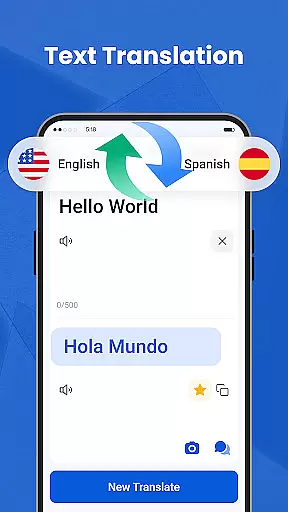
We Translate is a powerful productivity app designed to break language barriers and facilitate seamless global communication. With its comprehensive suite of translation tools, the app supports text, voice, image, and document translation across multiple languages.
Key features include real-time conversation translation, photo translation for signs and documents, and one-tap document translation compatible with PDFs, Word files, and more. Users can also access translation history, save favorites, and customize settings for a personalized experience.
Ideal for travelers, students, professionals, and everyday users, We Translate ensures effortless multilingual communication for work, study, or personal use.
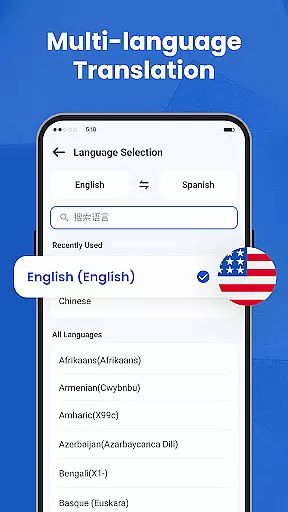
We Translate offers an array of innovative features tailored to meet diverse translation needs. The app provides instant and accurate text translation in multiple languages, making it suitable for various scenarios like travel, education, and business.
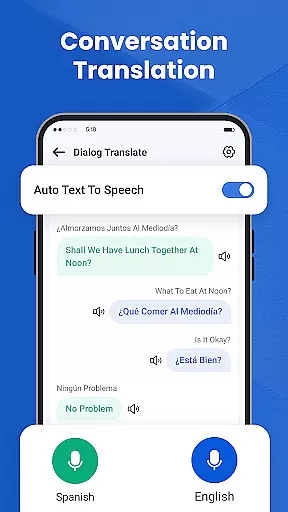
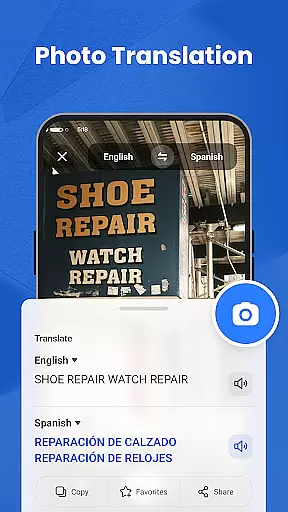
Its standout feature is the real-time conversation translation, which detects both source and target languages automatically. This enables smooth face-to-face or phone conversations without delays. Additionally, the photo translation tool allows users to snap pictures of menus, signs, or documents and receive fast translations without manual input.
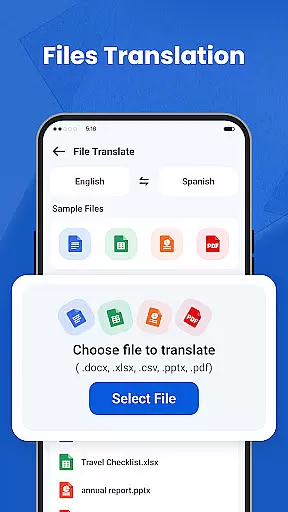
For professionals and students, the document translation function supports common file formats such as PDF, Word, and Excel. Personalized settings like adjustable voice speed and language preferences further enhance user experience.
Efficient task management is essential for productivity apps, and We Translate excels in this area by offering a comprehensive suite of features designed to streamline multilingual communication. The app provides users with the ability to save translation histories and create favorites, ensuring important translations are easily accessible.
We Translate's core task management functionality is evident in its well-organized interface. Users can effortlessly navigate through past translations, making it simple to revisit previous work. This feature is particularly useful for those who need to refer back to specific translations regularly.
The app goes beyond basic task management by integrating personalized settings. Users can customize their experience with options like adjustable voice reading speeds and preferred languages, enhancing overall usability. These settings ensure that each user's interaction with the app is tailored to their individual needs.
By combining robust task management features with personalized customization, We Translate offers a productivity tool that not only meets basic translation needs but also enhances workflow efficiency. This combination makes it an invaluable asset for anyone dealing with multilingual communication in their daily tasks.
In today's interconnected world, reliable cross-device synchronization is crucial for productivity applications. We Translate addresses this need by providing seamless synchronization across multiple devices, ensuring users can access their translations anytime, anywhere.
The app's synchronization capabilities are designed to maintain consistency across all user devices. Whether working on a smartphone, tablet, or computer, users can expect their translation history, favorites, and personalized settings to remain up-to-date and readily available.
We Translate employs advanced cloud technology to guarantee data integrity during synchronization. This approach ensures that all devices reflect the most recent translations and preferences, eliminating the risk of losing important information when switching between devices.
Furthermore, the app's synchronization process is both secure and efficient, protecting user data while maintaining optimal performance. This reliability in cross-device functionality makes We Translate a dependable choice for professionals and students who require consistent access to their translation resources across different platforms.
Accurate translations
User-friendly interface
Multi-language support
Real-time voice translation
Photo translation feature
Limited free usage
Occasional inaccuracies
Premium subscription cost
Requires internet connection
Ads in free version

Wake up & get tasks done! Add alarms & reminders on the Clock Launcher.
 4.00
4.00
The Pro Version of Android's tiniest Notepad app. Just 0.3MB but feature-packed!
4.60
Remotely view listen control and record cameras.
3.70
Activate Two Factor Authentication (2FA or Multi OTP), Password manager and more
4.10
All document reader, all in one file viewer read PDF, DOCX, XLS, PPT, TXT files.
4.60
* block pre-roll ads, pop-up and forced redirect ads * Samsung certification app
4.00
Use powerful, industry-leading AI tools to generate visual charts from any data
4.80
AI Chatbot and AI writing assistant powered by ChatGPT.
4.60
Note taking, handwriting, record audio, PDF annotation, planner & journal
4.20
Seamlessly integrate data and reports to build your presentation to impress
4.80
Functional QR scanner and barcode reader that requires little storage space.
4.60
Planet Free VPN - The best Fast Unlimited and Secure VPN Without Logs
4.50
CalenGoo is a very flexible and feature-rich calendar app
4.40
When you Focus, so will your Bean in this cozy focus timer
4.30
Automates browsing any website and notifies you of important changes or events
4.30
Make apps & sites with natural language prompts
4.10
The ultimate file manager for rooted devices. The original and still the best.
4.00
ID.me Authenticator is a simple and free Two Factor Authentication solution
3.50
The upgraded version of Name Wheel with AI and the power to add your own wheels.
4.1


User Reviews