
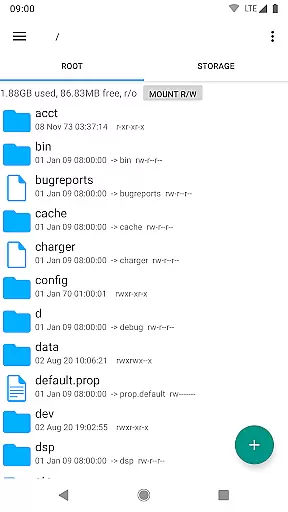
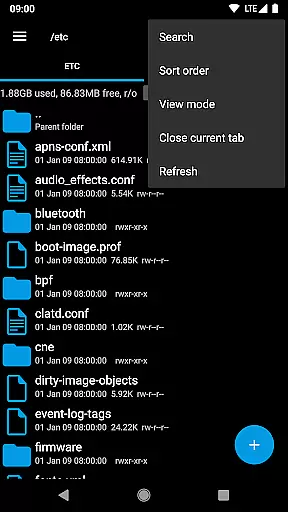
Root Explorer stands as a premier file management solution tailored for root users, providing unrestricted access to Android's entire file system. This includes the typically inaccessible data folder, making it an indispensable tool for advanced users who require deep system interactions.
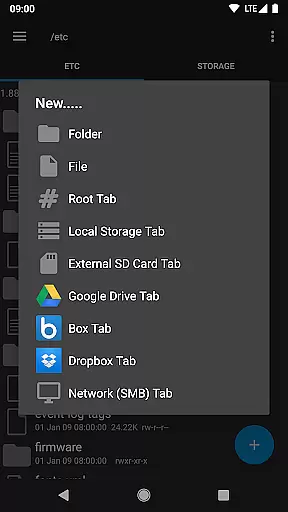
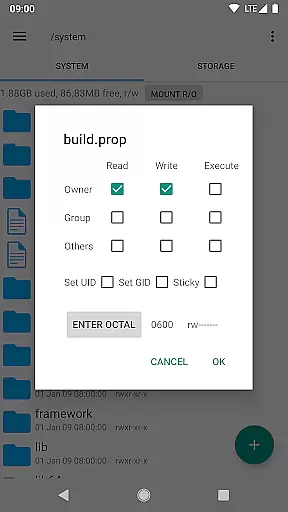
The app is laden with productivity-enhancing features such as multiple tabs, cloud storage support (Google Drive, Box, Dropbox), network (SMB) capabilities, and an SQLite database viewer. It also offers a text editor, zip/tar/gzip creation and extraction, rar extraction, multi-select options, script execution, search functionality, remount operations, permission settings, bookmarks, and file sharing via email or Bluetooth.
With its comprehensive feature set, Root Explorer is perfectly suited for tech-savvy individuals who need to perform complex file operations on their Android devices efficiently and effectively.
Root Explorer boasts an impressive array of features designed to maximize user productivity and streamline file management tasks. The inclusion of multiple tabs allows users to multitask seamlessly within the app, while integrated cloud storage services like Google Drive, Box, and Dropbox ensure that files are accessible from anywhere.
Advanced functionalities such as SQLite database viewing, text editing, and archive handling (zip, tar/gzip, rar) cater to users with specific technical needs. The ability to execute scripts, perform searches, remount drives, adjust permissions, create bookmarks, and share files via various methods adds layers of convenience and control.
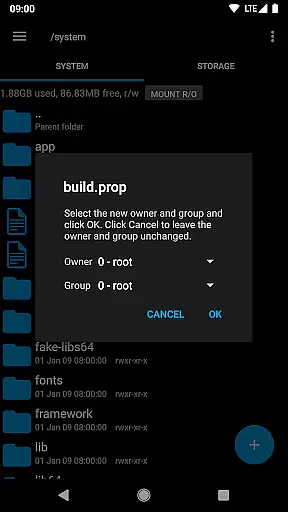
Furthermore, additional tools like image thumbnails, APK binary XML viewing, file owner/group changing, symbolic link creation, an 'Open With' facility, MD5 checksum generation, and shortcut creation collectively enhance the user experience by offering versatile solutions for diverse file management challenges.
Root Explorer offers a comprehensive suite of tools that redefine productivity for advanced users. At its core, the app provides robust file management capabilities that allow users to efficiently organize and manipulate their Android device's file system.
The application supports multiple tabs, enabling seamless navigation between different directories. With integrated cloud services like Google Drive, Box, and Dropbox, users can easily manage files across various storage locations without leaving the app. This ensures that all important data is accessible from one unified interface.
Advanced features such as SQLite database viewing and text editing make it possible to modify configuration files directly on the device. The ability to create and extract ZIP or TAR/GZIP archives, along with unpacking RAR files, streamlines common tasks that would otherwise require separate applications.
For power users who need to execute scripts or change file permissions, Root Explorer provides these options within a secure environment. These capabilities ensure that administrators can maintain their systems effectively while keeping security intact.
Cross-device synchronization is where Root Explorer truly shines in terms of productivity enhancement. By integrating with popular cloud storage solutions, the app ensures that your files are always up-to-date across all devices.
Google Drive integration allows for automatic syncing of documents and media files, making them available whether you're working on your phone or tablet. Similarly, support for other cloud services like Box and Dropbox means you have flexibility in choosing your preferred platform without sacrificing functionality.
Network (SMB) support extends this capability even further by enabling access to shared folders on local networks. This feature is particularly useful for professionals who need to collaborate with team members or transfer large datasets between workstations.
Reliability is guaranteed through careful implementation of background processes that monitor changes and propagate updates instantly. Users can trust that their modifications will be reflected everywhere they need to be, maintaining consistency throughout their digital workspace.
Unrestricted file access
Comprehensive feature set
Cloud storage integration
Advanced technical tools
User-friendly interface
Paid application
Complex for beginners
Requires root access
No iOS version available
Occasional stability issues

Secure, fast, open-source, VNC and SSH Remote Desktop for Windows, Linux and Mac
 4.70
4.70
Take control of your clipboard with Clipper!
3.90
Native client for Forgejo and Gitea
5.00
8 custom complications. Custom Time Fonts. Beautiful color schemes. A++ Design.
5.00
Pwnagotchi companion app
4.20
* block pre-roll ads, pop-up and forced redirect ads * Samsung certification app
4.00
Best Tool for the professionals Electrician, Electrical contractors, etc.
4.90
Quickly and easily keep track of your work shifts
4.70
QuickEdit is a fast, stable and full featured text and code editor.
4.20
Multilingual translator for text, voice, and image translation!
4.90
Protect and view your important info on your phone and tablet with eWallet®
4.80
QuickBooks Workforce lets teams view pay info and track time in one place.
4.70
Client for Nextcloud Deck
4.60
Functional QR scanner and barcode reader that requires little storage space.
4.60
Secure your apps with lock screens, use custom themes and different features.
4.40
Access, manage and transfer files on Android, PC, Mac, NAS and cloud storages.
4.30
Total remote control for your Android device, PC and cloud services (IFTTT)!
4.20
Secure, open-source, SPICE and SSH Remote Desktop for QEMU KVM virtual machines
4.00
ID.me Authenticator is a simple and free Two Factor Authentication solution
3.50


User Reviews