
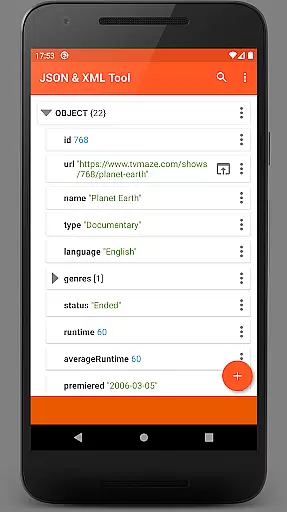
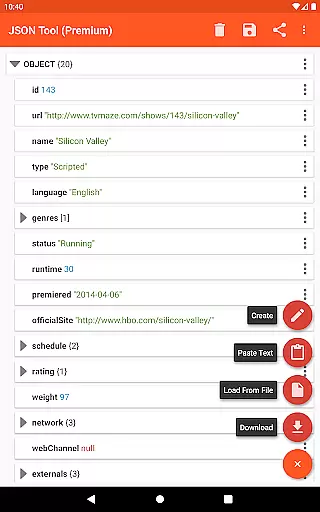
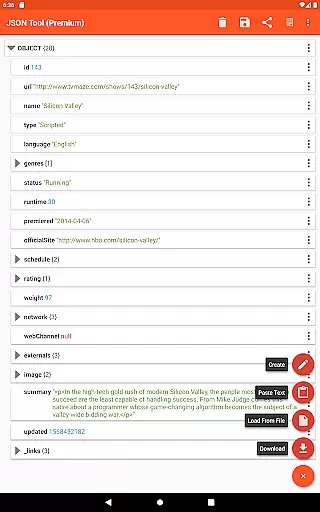
JSON & XML Tool Premium is a powerful productivity app designed for effortless creation, editing, and conversion of JSON and XML files. The app's standout feature is its simple hierarchical view that makes file navigation intuitive and efficient. Whether you're working on game addons or handling data transformation tasks, this tool provides the necessary functionality to streamline your workflow.
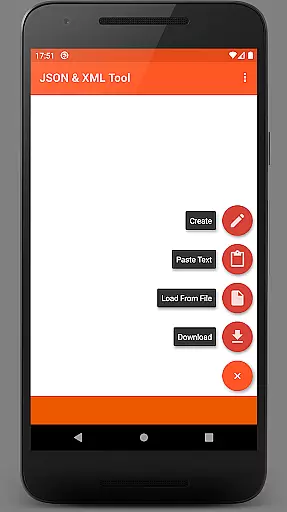
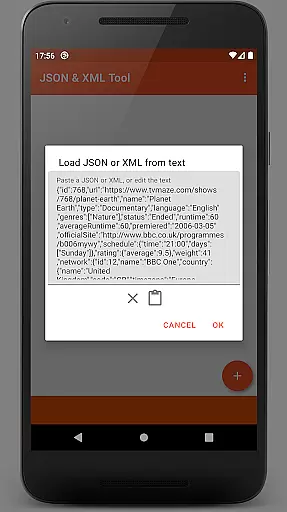
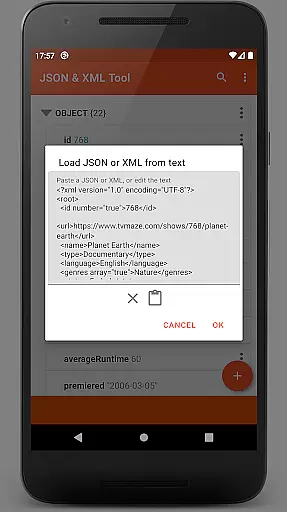
The app supports multiple ways to load files including internal SAF-based file picker, external file picker, URL download, and text pasting. It also offers comprehensive editing capabilities such as renaming nodes, modifying values, switching between data types, and managing array elements. With additional features like dark theme support, PDF export, and JMESPath query language integration, it becomes an indispensable tool for developers and power users.
This versatile application is particularly useful for software developers, data analysts, and tech enthusiasts who frequently work with structured data formats. By providing both basic and advanced functionalities in a user-friendly interface, JSON & XML Tool Premium significantly enhances productivity when handling complex data structures.
JSON & XML Tool Premium stands out with its comprehensive set of features tailored for efficient file manipulation. The app's core functionality revolves around its hierarchical viewer that presents JSON and XML structures in an easily navigable format. This visualization makes it simple to understand complex data relationships and quickly locate specific elements within large files.
The editing capabilities are robust and versatile. Users can perform various operations including renaming nodes, modifying values, duplicating elements, and reordering array items. The app supports seamless switching between different value types and provides options to save changes either as a new file or overwrite the existing one. Advanced features include JMESPath query support for element extraction and transformation, plus the ability to preview formatted output before finalizing changes.
Additional noteworthy features include integrated storage browser using SAF, multiple file loading methods, dark theme support, and PDF export functionality. The app also enables sharing parsed content with other applications and registers itself as a default handler for JSON/XML files upon installation. These features collectively make JSON & XML Tool Premium a complete solution for managing structured data files across various use cases.
At the heart of the JSON & XML Tool Premium app lies its robust core task management system, designed to streamline the handling of JSON and XML files. This productivity tool allows users to view, create, and edit these file types with remarkable ease through a simple hierarchical view.
The app's functionality extends beyond basic viewing and editing. It supports complex operations such as renaming node elements, modifying values, and switching between value types like Boolean, Number, and String. These features ensure that users can manage their data structures effectively, catering to both novice users and advanced developers.
Task management is further enhanced by additional capabilities including duplicating and removing node elements, moving elements within arrays, and saving work in progress. The ability to export files as PDF documents or transform elements using JMESPath query language adds layers of versatility not commonly found in similar tools.
By integrating these comprehensive task management features, the app empowers users to handle various scenarios efficiently. Whether it's for creating game addons or converting file types, this app provides a reliable solution that boosts productivity without compromising on functionality.
While the JSON & XML Tool Premium app does not explicitly market itself as a cross-device synchronization tool, it incorporates features that contribute to reliable data access and management across different devices. By utilizing the Storage Access Framework (SAF), the app ensures that files can be accessed and edited seamlessly, regardless of the device being used.
The app's support for multiple file loading methods enhances its synchronization capabilities. Users can load files via an internal file picker, download from the web using URLs, paste text directly, or receive files from other applications. This flexibility ensures that work started on one device can be continued on another without hassle.
Furthermore, the app's ability to register itself as a JSON/XML file handler upon installation means that files can be opened and managed consistently across devices. When combined with cloud storage solutions, this feature facilitates a reliable cross-device workflow.
Although direct real-time synchronization isn't emphasized, the app's comprehensive file handling capabilities and SAF integration provide users with the tools necessary to maintain consistent and up-to-date JSON/XML files across their various devices, ensuring reliable access to important data whenever needed.
User-friendly interface
Comprehensive editing tools
Multiple file loading options
Advanced data transformation
Dark mode support
Premium version only
No cloud sync
Occasional permissions
Learning curve
PDF export limited

The long-awaited modern gallery app for your Nextcloud server
 4.70
4.70
Send files, sync SMS, notifications & clipboard across devices via local network
4.40
Make your handwriting beautiful, even more than pen on paper.
3.60
Remotely view listen control and record cameras.
3.70
Secure, fast, open-source, Remote Desktop Client for Windows and Linux with SSH
4.60
A comprehensive suite of tools designed specifically for Lactation Consultants
4.2
A simple Whisper AI keyboard for reliable speech transcription and rewording
4.60
Secure your apps with lock screens, use custom themes and different features.
4.40
Simple notepad & memo. Take notes, to-do list, shopping list with reminders.
4.80
8 custom complications. Custom Time Fonts. Beautiful color schemes. A++ Design.
5.00
Scientific calculator for Android - looks and operates like the real thing!
4.90
Use powerful, industry-leading AI tools to generate visual charts from any data
4.80
Absolutely the best CNC machinist speed and feed calculator around. fswizard.com
4.60
App Lock with fingerprint, password: Lock apps & hide photos with lock screens
4.60
The AI assistant that thinks with you - write, code, and solve complex tasks
4.60
Access, manage and transfer files on Android, PC, Mac, NAS and cloud storages.
4.30
Todo reminder
4.10
Create and edit presentations with Google Slides, part of Google Workspace.
4.00
Create study competitions, track your hours, and stay consistent with friends
4.3


User Reviews