
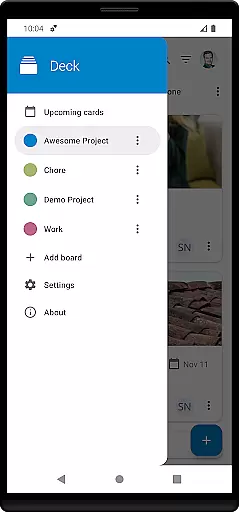
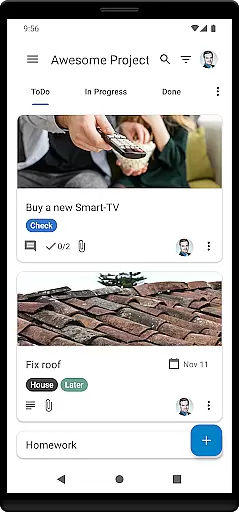
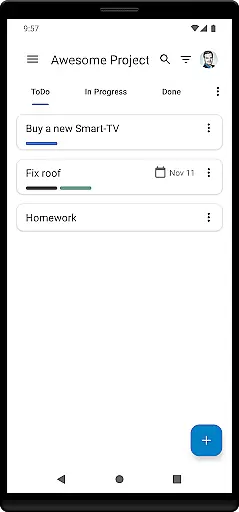
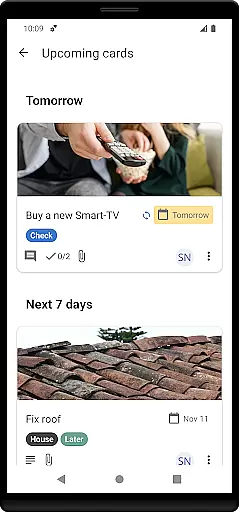
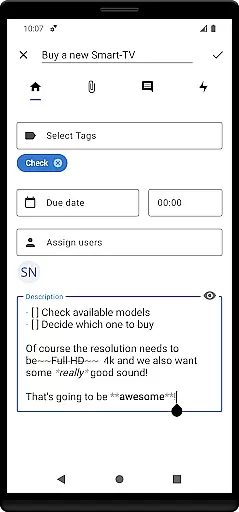
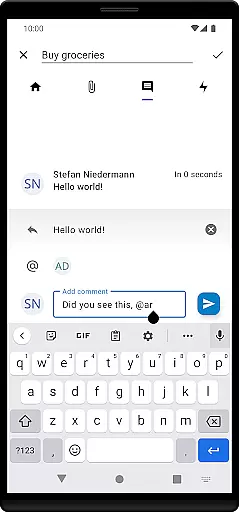
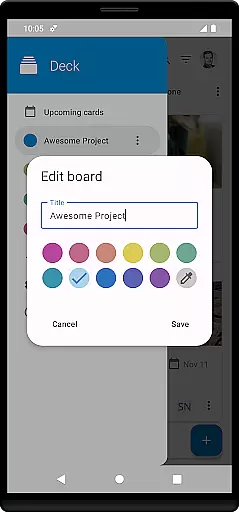

Nextcloud Deck is a productivity-focused application designed to streamline task management and team collaboration. This app allows users to create, organize, and manage cards, lists, and boards efficiently, making it an ideal tool for both personal task tracking and team-based projects.
One of the standout features of Nextcloud Deck is its support for multiple accounts, enabling users to handle various tasks across different profiles seamlessly. Additionally, the app works offline, ensuring that users can access their data even without an internet connection. With functionalities such as managing tags, attachments, activities, and comments, Deck provides a comprehensive platform for organizing work processes effectively.
The app also includes a dark mode and supports multiple languages, enhancing user experience by catering to individual preferences and global accessibility. Whether you're coordinating with a team or managing personal tasks, Nextcloud Deck offers a versatile solution that adapts to your needs while integrating smoothly with the broader Nextcloud ecosystem.
Nextcloud Deck stands out with its robust set of features tailored for efficient task management. The app supports multiple accounts, allowing users to switch between different profiles effortlessly, which is particularly useful for those managing several projects or roles.
Deck's offline functionality ensures that users can continue working without disruption, regardless of internet connectivity. The ability to manage cards, lists, and boards provides a flexible framework for organizing tasks and workflows. Users can also take advantage of advanced features like tagging, attaching files, tracking activities, and adding comments, all of which contribute to a more dynamic and interactive project management experience.
Additional highlights include a visually appealing dark mode and multilingual support, which together enhance usability and accessibility. These features collectively ensure that Nextcloud Deck not only meets the basic requirements of task management but also offers a sophisticated suite of tools that cater to diverse user needs within the productivity landscape.
Nextcloud Deck offers a robust solution for managing tasks and projects efficiently. The app allows users to create, organize, and prioritize cards, lists, and boards, which are essential components of task management systems. This functionality is crucial for individuals and teams who need to keep track of their work in a structured manner.
The app supports multiple accounts, enabling users to handle personal and professional tasks from a single platform. With the ability to manage tags, attachments, activities, and comments, Nextcloud Deck ensures that all relevant information is accessible and organized. These features collectively enhance productivity by streamlining workflows and reducing clutter.
One significant advantage of Nextcloud Deck is its offline capability. Users can continue managing their tasks without an internet connection, with changes syncing automatically once connectivity is restored. This feature is particularly beneficial for those who travel frequently or work in areas with limited internet access.
Overall, Nextcloud Deck's comprehensive task management tools provide users with the flexibility and control needed to stay productive. Whether handling simple to-do lists or complex project boards, the app delivers a seamless experience that adapts to various work styles and requirements.
Cross-device synchronization is a cornerstone of Nextcloud Deck's productivity-enhancing features. The app ensures that all data, including cards, lists, boards, tags, attachments, activities, and comments, are reliably synced across multiple devices. This seamless integration allows users to transition between their desktop, tablet, and smartphone without missing a beat.
Reliable synchronization is vital for maintaining consistency and accuracy in task management. Nextcloud Deck achieves this by leveraging the robust infrastructure of Nextcloud, a trusted name in cloud solutions. As a result, users can trust that their data will be up-to-date regardless of the device they use, promoting efficient and uninterrupted workflows.
In addition to real-time updates, Nextcloud Deck offers offline support, allowing users to make changes that will sync automatically when an internet connection is available. This dual capability ensures that productivity is never compromised, even in challenging connectivity environments.
By combining reliable cross-device synchronization with offline functionality, Nextcloud Deck provides a dependable solution for users seeking to maximize their productivity. The app's commitment to data integrity and accessibility makes it an invaluable tool for modern task management needs.
User-friendly interface
Offline functionality
Multiple account support
Comprehensive task management
Multilingual capabilities
Requires Nextcloud setup
Limited standalone use
Dependent on third-party apps
No built-in calendar
Complex for beginners

When you Focus, so will your Bean in this cozy focus timer
 4.30
4.30
Unlock AutoNotification
4.00
8 custom complications. Custom Time Fonts. Beautiful color schemes. A++ Design.
5.00
Secure, fast, open-source, Remote Desktop Client for Windows and Linux with SSH
4.60
A beautiful digital clock with autostart and many other functions
4.70
Experience and share your SolidWorks designs on your Android® phone and tablet.
2.50
Intelligent AI Assistant
4.10
Simple notepad & memo. Take notes, to-do list, shopping list with reminders.
4.80
Daily processing of PDF documents.
4.40
Best Tool for the professionals Electrician, Electrical contractors, etc.
4.90
Direct Chat without saving contacts & Dual WA Account on Single Device
4.70
A Pixel Art watchface inspired by other iconic 90s designs for Wear OS devices!
4.40 4.20
4.20
A customizable calendar for your Wear OS watch
4.20
Professional calendar app for Google Calendar, MS Outlook & Exchange
4.20
All in One PDF Reader: Manage, Read and Edit your Documents
4.20
Make apps & sites with natural language prompts
4.10
Create and edit presentations with Google Slides, part of Google Workspace.
4.00
AI Video AI Image Private LLM AI Browser Llama Gemma Ollama Connect LLM Studio
4.0


User Reviews