
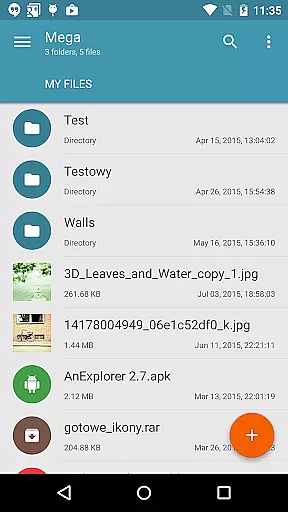
Mega Plugin for Solid Explorer is a productivity-focused extension that seamlessly integrates with your Solid Explorer file manager. This plugin enables users to directly connect their Mega cloud storage accounts, allowing for efficient file management without leaving the Solid Explorer interface. With this app, you can perform essential operations such as copying, moving, renaming, and viewing files, as well as downloading and uploading content.
One of the standout features is its ability to stream music and videos directly from your Mega cloud storage. Whether you're managing documents or media files, this plugin provides a smooth experience for both personal and professional use. The app is particularly useful for those who rely on cloud storage for organizing and accessing their digital assets across multiple devices.
The Mega Plugin offers a comprehensive set of features designed to enhance productivity. First and foremost, it allows users to manage their Mega cloud storage with ease. You can copy, move, rename, and view files directly within Solid Explorer, eliminating the need to switch between different applications. Additionally, the plugin supports downloading and uploading files, making it simple to transfer data between your device and cloud storage.
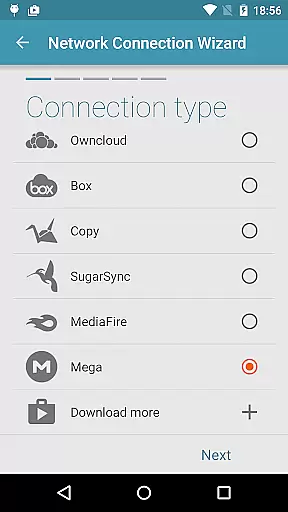
Another notable feature is the ability to stream music and videos. This functionality lets you enjoy your media files without needing to download them first. To connect to Mega, simply tap the + button in Solid Explorer, choose 'Cloud connection,' select the Mega option, and enter your login credentials. Once connected, you can access your cloud drive with just a tap, providing a seamless integration between your local and cloud-based file systems.
Task management is a critical aspect of productivity applications, and the Mega Plugin for Solid Explorer excels in this area. This plugin allows users to connect to their Mega accounts and perform a wide range of file operations with ease.
Users can copy, move, rename, and view files directly within the app interface. These capabilities ensure that managing your cloud storage doesn't detract from your productivity but rather enhances it by providing seamless access to essential tasks.
In addition to basic file operations, the plugin supports downloading and uploading files, which further streamlines workflow processes. By integrating these features, the app ensures that users can efficiently handle their data without needing to switch between multiple applications or platforms.
The ability to stream music and videos adds another layer of convenience, allowing users to preview media files without fully downloading them. This feature saves time and bandwidth, making the overall task management experience more efficient and user-friendly.
Cross-device synchronization is vital for maintaining consistency and accessibility across different devices, and the Mega Plugin for Solid Explorer offers reliable performance in this domain. By connecting to a Mega account, users can ensure their files are consistently updated and accessible wherever they go.
The process of setting up a cloud connection is straightforward. Users simply tap the + button, choose 'Cloud connection,' select the Mega option, and enter their login credentials. Once connected, the app takes care of synchronizing files automatically, ensuring that all devices have the latest versions of your data.
This synchronization reliability extends to various file operations such as copying, moving, renaming, and viewing files. Whether you're at home or on the go, you can trust that any changes made on one device will be reflected across all others linked to your Mega account.
Furthermore, the ability to download and upload files ensures that users can work offline when necessary while still maintaining synchronization once reconnected. This flexibility makes the Mega Plugin an invaluable tool for anyone seeking dependable cross-device file management.
Seamless integration
Comprehensive file management
Direct media streaming
User-friendly interface
Secure cloud connection
Limited to Mega users
Requires Solid Explorer
No standalone functionality
Potential sync delays
Subscription fees may apply

Secure, fast, open-source, VNC and SSH Remote Desktop for Windows, Linux and Mac
 4.70
4.70
QuickBooks Workforce lets teams view pay info and track time in one place.
4.70
8 custom complications. Custom Time Fonts. Beautiful color schemes. A++ Design.
5.00
The Pro Version of Android's tiniest Notepad app. Just 0.3MB but feature-packed!
4.60
We're working to become the best machining app on the market! www.cncdirt.com
4.80
All document reader, all in one file viewer read PDF, DOCX, XLS, PPT, TXT files.
4.60
Secure, open-source, SPICE and SSH Remote Desktop for QEMU KVM virtual machines
4.00
The ultimate file manager for rooted devices. The original and still the best.
4.00
AI Chatbot and AI writing assistant powered by ChatGPT.
4.60
Seamlessly integrate data and reports to build your presentation to impress
4.80
Client for Nextcloud Deck
4.60
Absolutely the best CNC machinist speed and feed calculator around. fswizard.com
4.60
Translate text/voice/photos in 150+ languages. Offline & fast translator app.
4.50
Send files, sync SMS, notifications & clipboard across devices via local network
4.40
Docker, Kubernetes management over Portainer Mobile
4.40
Automates browsing any website and notifies you of important changes or events
4.30 4.20
4.20
Take control of your clipboard with Clipper!
3.90
Code on-the-go with VScode for Android. Edit,debug and collaborate from mobile!!
3.10


User Reviews