



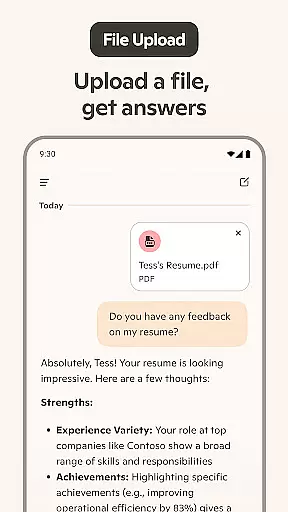
Microsoft Copilot is an advanced AI-powered productivity tool designed to be your daily companion in both personal and professional tasks. The app integrates the latest OpenAI and Microsoft AI models, offering users a seamless experience through its "Smart" mode powered by GPT-5. This cutting-edge model combines reasoning and conversational capabilities, making it intuitive and efficient for various use cases.
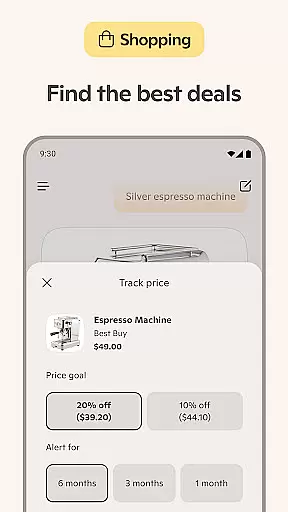
With Copilot, you can accomplish a wide range of tasks using its AI chat assistant, which supports text and voice interactions. Whether you need help drafting emails, creating shopping lists, or generating images from textual descriptions, Copilot provides versatile tools to enhance productivity. Its ability to summarize complex information, translate across multiple languages, and assist with creative projects makes it invaluable for users seeking smart solutions in their everyday workflows.
The app's standout feature is its adaptability, functioning as both a personal writing assistant and a creative partner. From developing brand logos to visualizing video storyboards, Copilot empowers users to explore endless possibilities while simplifying complicated processes. By leveraging AI technology, Microsoft Copilot ensures that individuals have access to innovative tools that save time and boost efficiency.
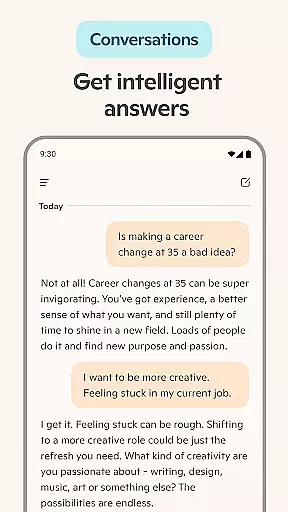
Microsoft Copilot stands out due to its comprehensive suite of features tailored to improve productivity and creativity. One of its core functionalities is the AI chat assistant, which allows users to engage in meaningful conversations via text or voice. This assistant not only answers complex questions but also generates instant summaries, rewrites content, and even creates artwork based on simple prompts.
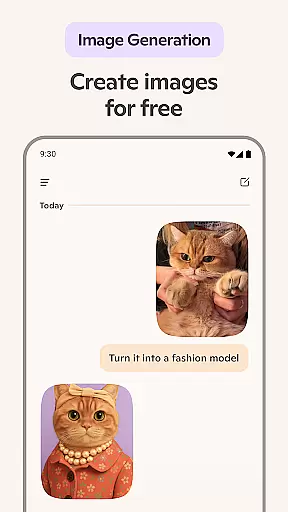
In addition to its conversational prowess, Copilot includes an AI photo generator capable of transforming ideas into high-quality visuals. Users can create anything from photorealistic images to abstract designs, making it ideal for professionals in branding, marketing, or creative fields. The app also excels at automating routine tasks such as drafting emails, proofreading documents, and organizing weekly meal prep lists with AI-generated shopping lists.
Another remarkable aspect of Copilot is its multilingual support, enabling translation and optimization of text across hundreds of languages, including regional dialects. Whether you're composing cover letters, updating resumes, or brainstorming new project ideas, Copilot adapts to your needs, ensuring accuracy and relevance. These robust features collectively position Microsoft Copilot as a versatile tool for modern work environments.
Microsoft Copilot excels in core task management by integrating advanced AI capabilities to streamline daily activities. The application leverages the latest OpenAI and Microsoft AI models to provide users with an intuitive platform for organizing tasks efficiently.
Through its AI chat assistant, Copilot simplifies complex task management processes into straightforward interactions. Users can effortlessly create to-do lists, manage schedules, and set reminders through simple conversations with the AI helper, ensuring no important task is overlooked.
The app's ability to generate instant sharp summaries and helpful rewrites enhances productivity by allowing users to quickly grasp essential information. Whether drafting emails, preparing weekly meal plans, or updating resumes, Copilot ensures that every task is accomplished with precision and ease.
By combining smart AI technology with a user-friendly interface, Microsoft Copilot empowers individuals to work smarter and achieve more. Its comprehensive task management features make it an indispensable tool for anyone looking to optimize their daily workflow.
Cross-device synchronization is a critical feature of Microsoft Copilot, ensuring seamless access to information across multiple devices. This reliability allows users to maintain continuity in their tasks, regardless of the device they are using at any given time.
The application employs robust cloud-based infrastructure to synchronize data instantly and securely between devices. Whether switching from a smartphone to a desktop or vice versa, users can expect consistent performance and up-to-date information at their fingertips.
Copilot's synchronization capabilities extend beyond mere data transfer; it maintains the context of user interactions. This means that whether you're composing an email, generating AI images, or managing your schedule, the transition between devices is smooth and context-aware.
With Microsoft Copilot, users can trust that their data will be reliably synchronized, providing peace of mind and enhancing overall productivity. This cross-device functionality underscores the app's commitment to delivering a cohesive and uninterrupted user experience.
Advanced AI integration
Versatile task management
Multilingual support
High-quality image generation
User-friendly interface
Limited offline functionality
Premium features require subscription
Occasional response delays
Steep learning curve for beginners
Dependent on internet connectivity

 4.20
4.20
Direct Chat without saving contacts & Dual WA Account on Single Device
4.70
Remotely view listen control and record cameras.
3.70
Customizable calendar widget for seamless event sync, planning & scheduling.
4.00
All in One PDF Reader: Manage, Read and Edit your Documents
4.20
The AI assistant that thinks with you - write, code, and solve complex tasks
4.60
Create and edit presentations with Google Slides, part of Google Workspace.
4.00
AI Chatbot and AI writing assistant powered by ChatGPT.
4.60
Put a lock on your cloud: Take the security of your data into your own hands
3.70
aCalendar+ makes your day, week and month
4.70
Calendar 2023 widget for Android. Appointment scheduler, planner, and reminder
4.60
A Pixel Art watchface inspired by other iconic 90s designs for Wear OS devices!
4.40
Automates browsing any website and notifies you of important changes or events
4.30
Total remote control for your Android device, PC and cloud services (IFTTT)!
4.20
Easily read and manage all your PDF files
4.10
Font maker keyboard with your own handwriting
4.10
Intelligent AI Assistant
4.10
Ads Free App! Editor, Hide File, Copy, Move, Delete and Rename.. all facility av
1.70
AI Video AI Image Private LLM AI Browser Llama Gemma Ollama Connect LLM Studio
4.3


User Reviews