
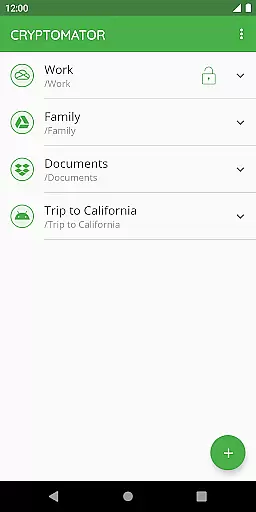
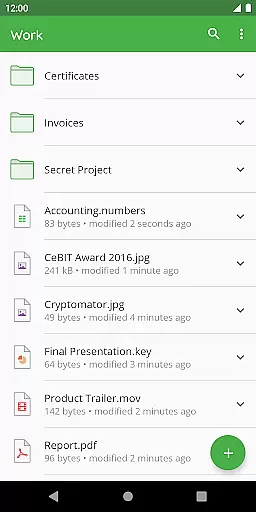
Cryptomator is a user-friendly encryption tool designed to secure your cloud-stored data. With its intuitive interface, users can easily create secure vaults and protect their files with AES encryption using a 256-bit key length. The app ensures that your data remains private while being uploaded to popular cloud services like Dropbox, Google Drive, and OneDrive.
Designed for productivity, Cryptomator offers seamless compatibility across various platforms and devices. Whether you're on Android or any major operating system, the app allows effortless access to encrypted files. Its open-source nature provides transparency, giving tech-savvy users peace of mind as they can review the code themselves.
The application's security features are robust, including automatic locking when idle and enhanced brute-force resistance through scrypt password protection. This makes Cryptomator an ideal choice for individuals seeking reliable privacy solutions without compromising usability.
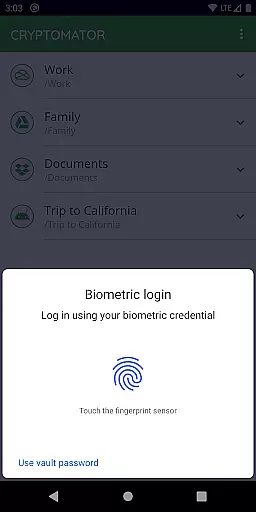
Cryptomator stands out with its easy-to-use functionality, allowing users to create secure vaults with just a password—no additional accounts needed. It supports biometric authentication such as fingerprint unlocking, making it both convenient and secure. These features ensure that managing encrypted data is straightforward even for non-technical users.
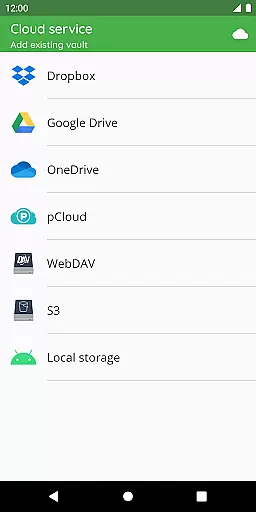
Compatibility is another strong suit of Cryptomator; it works seamlessly with numerous cloud storage services including Dropbox, Google Drive, OneDrive, S3-based systems, and WebDAV protocols. Additionally, it enables local storage vault creation in Android devices which can be synchronized via third-party apps, enhancing flexibility in how users manage their encrypted content.
Security-wise, Cryptomator employs advanced cryptographic techniques like AES file encryption and scrypt for password hashing. The implementation details are publicly documented, fostering trust among its community of users who value transparency alongside top-notch security measures.
In the realm of productivity, managing tasks efficiently is paramount. Cryptomator excels by not merely offering a tool for encryption but also ensuring that your core task of securing data does not become a cumbersome process. With its intuitive design, users can create secure vaults effortlessly, which act as encrypted rooms for your sensitive data, streamlining the task management involved in personal data security.
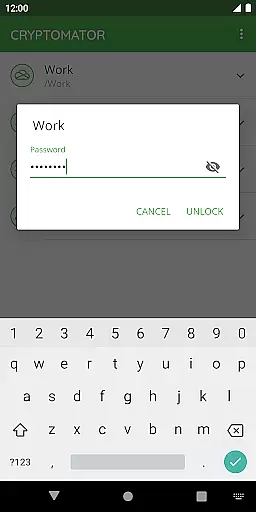
The application simplifies complex security protocols into user-friendly steps. You are required to set a password for your vault and then trust Cryptomator with safeguarding your files. This straightforward approach to task management ensures that even individuals without technical expertise can protect their digital assets with ease, making Cryptomator an essential productivity tool.
Furthermore, Cryptomator's seamless integration with cloud services amplifies its task management capabilities. Users can upload their encrypted vaults to their preferred cloud storage service without hassle. This means you can manage where your data resides and ensure it remains protected across all devices, enhancing both accessibility and security without compromising on either front.
Cross-device synchronization is a pivotal feature for any productivity tool in today's mobile-centric world, and Cryptomator shines brightly in this aspect. By enabling reliable synchronization across multiple devices, Cryptomator ensures that your encrypted data is accessible wherever you go. This flexibility allows users to access their secured files from smartphones, tablets, or computers without any loss in security or convenience.
The reliability of Cryptomatoru2019s synchronization is rooted in its compatibility with major cloud storage services such as Dropbox, Google Drive, OneDrive, and WebDAV-based services. Once your vault is synchronized via one of these services, any changes made within the vault are updated across all linked devices. This creates a cohesive ecosystem for managing digital information securely and efficiently.
Moreover, Cryptomator enhances synchronization reliability through automatic locking mechanisms when the app goes into the background. This feature prevents unauthorized access during moments of potential vulnerability, ensuring that your data remains protected at all times. Such attention to detail in maintaining high-security standards while providing dependable cross-device functionality makes Cryptomator an exemplary choice for those prioritizing both productivity and privacy.
User-friendly interface
Strong AES encryption
Multi-platform support
Automatic vault locking
Open-source transparency
No built-in cloud sync
Limited free features
Fingerprint setup complexity
Occasional performance lag
Requires technical knowledge

 4.20
4.20
AI Video AI Image Private LLM AI Browser Llama Gemma Ollama Connect LLM Studio
4.5
A customizable calendar for your Wear OS watch
4.20
QuickBooks Workforce lets teams view pay info and track time in one place.
4.70
Smart PDF reader & editor to view, organize and manage PDF documents easily.
3.70
⏰ Finally a timer app which can run multiple timers simultaneously on your watch
3.90
App lock - lock apps with fingerprint, password, pin or pattern, protect privacy
4.70
The ultimate file manager for rooted devices. The original and still the best.
4.00
Seamlessly read, manage, and organize all your PDF files solution in one place
4.40
Seamlessly integrate data and reports to build your presentation to impress
4.80
Understand anything with a personalized AI research assistant
4.80
Quickly and easily keep track of your work shifts
4.70
Functional QR scanner and barcode reader that requires little storage space.
4.60
To do list widget with a notebook organizer, checklist, simple shopping list
4.60
CalenGoo is a very flexible and feature-rich calendar app
4.40
This small app MUST BE INSTALLED after purchase, else license won't work
4.40
All in One PDF Reader: Manage, Read and Edit your Documents
4.20
Wake up & get tasks done! Add alarms & reminders on the Clock Launcher.
4.00
Secure, open-source, SPICE and SSH Remote Desktop for QEMU KVM virtual machines
4.00


User Reviews